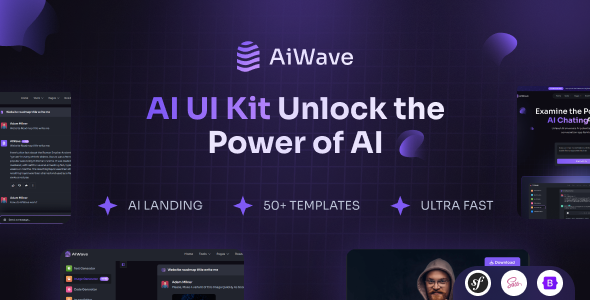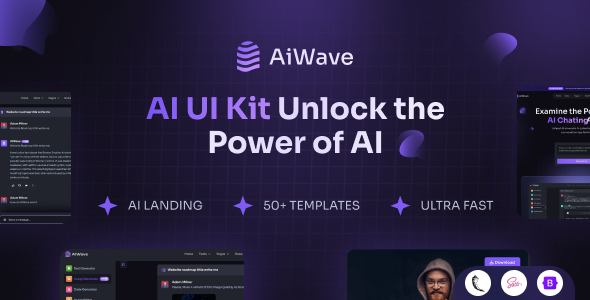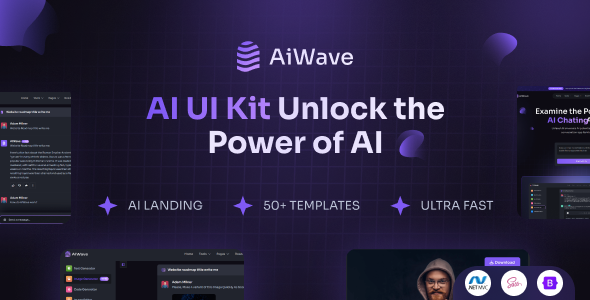
Aiwave is an ASP .NET MVC 5 UI kit designed for building AI SaaS website dashboards. It offers UI components for AI chat, code, and image generation, perfect for .NET developers needing a quick start on a new project.
Aiwave: A UI Kit for AI SaaS Dashboards
This product is essentially a frontend starter kit built on ASP .NET MVC 5, Bootstrap, SASS, and jQuery. It gives you a pre-designed set of pages and components tailored for an AI-centric Software as a Service dashboard. The core problem it solves is the initial setup and styling of a user interface for AI-powered applications, saving developers from building common dashboard elements from scratch.
Instead of wrestling with layout and basic component design, you get a solid foundation. This is particularly useful for those working within the Microsoft ecosystem who need to ship a proof-of-concept or a Minimum Viable Product quickly, without getting bogged down in repetitive frontend work.
Who Should Consider This AI SaaS UI Kit (and Who Shouldn't)
This kit is primarily for .NET developers and agencies that build custom AI tools or SaaS platforms using ASP .NET MVC. If your team is already invested in the Microsoft stack and needs a ready-made frontend for an AI dashboard, this can accelerate your development significantly. It's also suitable for freelancers looking to quickly prototype or deliver an AI SaaS website dashboard for clients.
However, this is not for non-developers or those expecting a complete, functional AI application out of the box. It’s a UI kit, meaning you still need to connect it to your own backend logic, AI models, and database. It’s also not a WordPress theme, so if your workflow relies on WordPress, this isn't for you. If you're building a Single Page Application with React, Vue, or Angular, the jQuery and MVC 5 architecture might feel a bit out of place for a greenfield project.
Design Language and Responsiveness for AI Applications
The design follows contemporary flat aesthetics, focusing on clear typography and functional layouts rather than flashy animations. It includes a dark mode, which is a standard expectation for dashboard interfaces and a nice touch for user preference. The kit is responsive across desktop, tablet, and mobile devices, which is handled largely by the underlying Bootstrap framework. This means the layout adjusts reasonably well to different screen sizes, ensuring a consistent experience for users accessing your AI platform from various devices.
From a practical standpoint, the responsiveness appears to be standard Bootstrap behavior. While testing it on a demo site, text and components reflow as expected on smaller screens. This adherence to standard practices contributes to a predictable user experience and reduces the need for extensive custom mobile styling.
Core Components and AI Features Included
The kit provides UI components for several AI-related features. These include interfaces for an AI chatbot, an AI code generator, and an AI image generator. It also hints at components for photo retouching, video creation, social media scheduling, and text-to-speech. It's important to understand these are the user interfaces for these features; you'll need to integrate your own AI APIs or services behind them.
The included components are built to be somewhat modular, making them reusable across different sections of your dashboard. This helps maintain consistency and can speed up development when you're assembling new views that leverage these specific AI functionalities.
Developer Experience and Code Structure
Built with ASP .NET MVC 5, Bootstrap, SASS, and jQuery, the kit uses a familiar stack for many .NET developers. The inclusion of SASS means the CSS is organized in a maintainable way, allowing for easier theme customization and consistent styling across the application. When we tested the kit, the SASS architecture felt logical, following common patterns for variables and partials, which is a good sign for long-term maintenance.
The documentation is clear enough to get started, and the code itself is commented, which is always appreciated. The `.cs.html` files indicate Razor views, which is standard for MVC. While the use of jQuery for interactivity is common in older MVC projects, for a new build, some developers might prefer a modern JavaScript framework. However, for quick prototyping or integrating into an existing jQuery-heavy application, it's perfectly functional. The HTML5/CSS3 W3C validity and cross-browser compatibility are standard expectations for any template today, ensuring a solid base for semantic accessibility and broader reach.
Cross-Device Behavior and Browser Compatibility
The UI kit's responsiveness means it adapts to various screen sizes, from large desktop monitors down to mobile phones. This is a baseline requirement for any web project today, and Aiwave delivers it through its Bootstrap foundation. During our testing, the layouts behaved as expected across common browsers like Chrome, Firefox, and Edge, which is a standard outcome for Bootstrap-based templates. This consistent cross-browser compatibility ensures your AI SaaS website dashboard will look and function correctly for most users without significant additional development effort.
Technical SEO Foundations for AI SaaS Platforms
From an SEO perspective, the kit provides a clean, semantic HTML structure, which is a fundamental requirement for search engine crawlers to understand your content. The use of valid HTML5 and CSS3 helps ensure that search engines can parse the page effectively. While a UI kit doesn't guarantee rankings, it sets a good technical foundation for your AI SaaS platform to be indexed and understood. The organized SASS structure also means faster loading CSS, contributing positively to page load times, which is a Core Web Vitals factor and beneficial for user experience and search engine visibility.
The Verdict: Is Aiwave a Smart Investment for Your AI Project?
If you're an ASP .NET MVC developer or agency looking to rapidly prototype or build an AI SaaS dashboard, Aiwave offers a significant head start. It provides a well-structured frontend with UI components specifically designed for AI features, saving you valuable design and development time on common elements. While the MVC 5 and jQuery stack might not be the absolute latest for greenfield projects, it's a stable and widely understood foundation that works well for its intended purpose.
The real value here is in accelerating the initial build, allowing your team to focus on the unique AI logic and backend services rather than reinventing the wheel on the frontend. It's a solid, practical choice for specific workflows, making it a smart investment for those operating within the .NET ecosystem who need to deliver an AI-focused interface efficiently.
FAQ
Is this a complete, functional AI application?No, Aiwave is a UI kit. It provides the visual frontend components for an AI SaaS dashboard, but you need to integrate your own backend logic and AI services to make it fully functional.
Can I use this UI kit with other backend frameworks like Node.js or Python?While the HTML, CSS, and JavaScript are framework-agnostic, the core structure is built around ASP .NET MVC 5 Razor views. Adapting it to a different backend framework would require significant refactoring of the view layer.
How easy is it to update the styling or branding?The kit uses SASS, which makes it relatively easy to customize colors, fonts, and other styles by modifying SASS variables and partials. This allows for consistent branding updates across the entire UI.
Are the AI features (like chat or code generation) ready to use out-of-the-box?The kit provides the user interface for these AI features. You will need to connect these UI elements to your actual AI models, APIs, or services to enable their functionality.