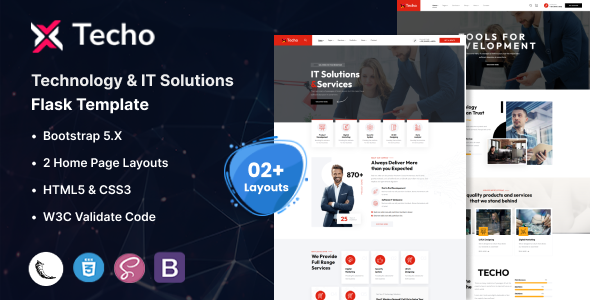
Techo is a Flask template for technology and IT solutions companies, providing a foundational set of pre-designed pages and components for building business websites quickly.
Streamlining IT Service Website Development with a Flask Template
As developers, we often face the challenge of needing a polished front-end for IT service companies or tech startups, but without wanting to build every common page from scratch. This Techo Flask template addresses that by offering a pre-built structure, letting us focus on the unique backend logic rather than repetitive frontend setup. It’s particularly useful for those who already work within the Python/Flask ecosystem and need a fast visual starting point for an IT solutions website.
Evaluating Techo's Code Quality and Foundational Standards
The template is built on Bootstrap, which provides a solid, familiar foundation for most developers. It claims W3C valid HTML, a standard expectation that generally contributes to better search engine indexing and accessibility. From a practical standpoint, this means less time debugging browser inconsistencies and a cleaner base for future development, which translates to lower maintenance costs for the business owner.
The inclusion of 22+ HTML files and two distinct index demos means there's a good variety of page layouts to begin with, covering common sections like services, team, portfolio, and contact pages. This makes it a practical choice for accelerating web development for tech startups.
- The CSS organization follows a standard Bootstrap structure, likely with custom overrides in separate files. This makes it straightforward to locate and modify styles without digging through monolithic stylesheets, benefiting long-term maintainability.
- The mobile menu uses Menuzord, a common, well-supported component. Its behavior on smaller screens feels consistent, ensuring a good user experience across various devices.
- Asset loading for fonts and icons (Google Fonts, Font Awesome, 7 Stroke, Elegant Icon Font) is handled in a standard way, usually meaning external links. Developers should be mindful of potential impact on Core Web Vitals if too many assets are loaded without optimization.
- Layouts generally handle longer text well within components like service descriptions or blog posts, preventing common overflow issues seen in less robust templates. This simplifies content updates for the business owner, as they don't have to worry about breaking the design.
- The integration with Flask is essentially a pre-built static HTML structure adapted for Flask's templating engine. This makes custom Flask routes relatively easy to integrate, as you're mostly concerned with rendering the correct template and passing data.
- The semantic structure of the HTML appears clean, which is a positive for SEO and overall accessibility, helping the site rank better and be usable by a wider audience.
Key Strengths and What Impresses in this Flask Template
The primary strength here is the combination of a comprehensive frontend with a Flask backend integration, which isn't as common as pure HTML or WordPress themes. For developers committed to Python, this Techo Flask template provides a robust starting point. The variety of pre-built pages and components is also a notable plus, offering a decent amount of visual options right out of the box for an IT solutions website.
Who Benefits from Using the Techo Flask Template
This template is a solid choice for agencies needing to quickly spin up IT solutions websites or technology company landing pages. Freelance developers who frequently use Flask for client projects will find it saves significant setup time. Small tech startups needing a professional online presence without a massive custom development budget could also benefit. However, it is not for projects requiring highly custom, deeply integrated backend logic from day one, nor for teams committed to other Python frameworks like Django.
Techo Flask Template Limitations and Average Aspects
One aspect that feels average is the visual design itself; while clean, it adheres closely to a common aesthetic for IT services and doesn't offer much in the way of unique visual branding without significant customization. The inclusion of Revolution Slider, while powerful, can be a performance concern if not carefully managed and optimized, potentially impacting page load times. Also, with only two multi-page index demos, differentiating multiple client sites could quickly become a challenge without deeper design work.
Final Thoughts: Is it worth it?
For a developer or agency looking to accelerate the creation of an IT solutions or technology-focused business website using Flask, this template offers genuine utility. It significantly cuts down on the initial grunt work of setting up common pages and styling, allowing more focus on unique features or business logic. If you value a strong, pre-built front-end integrated with a Flask backend, this purchase will likely save you considerable development hours and money.
FAQ
How easy is it to integrate custom Flask routes?Integrating custom Flask routes is straightforward as the template provides a clear structure for rendering HTML files. You simply map your Python functions to URLs and render the appropriate template.
Can I easily change the primary color scheme?Yes, changing the primary color scheme is feasible. Since it uses Bootstrap, you'd typically override the default Bootstrap variables or target specific CSS classes to adjust colors across the site.
Does this template include any database integration examples?No, this template focuses on the frontend structure and Flask templating. Any database integration, like user authentication or content management, would need to be implemented separately using Flask extensions.