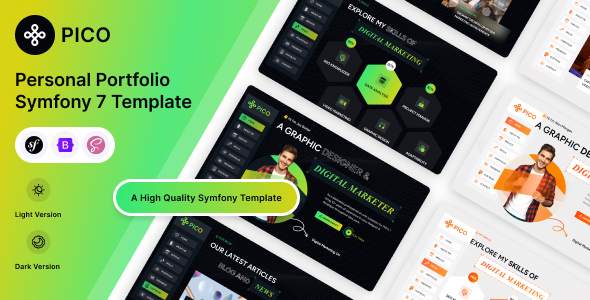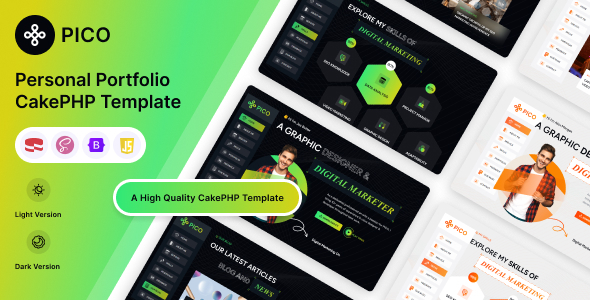
PICO is a minimalist personal portfolio template built with CakePHP and Bootstrap, offering a fast way for developers, designers, and freelancers to launch a clean online presence.
PICO: A Clean CakePHP Portfolio Template for Quick Launches
PICO is a personal portfolio template built on CakePHP and Bootstrap. It provides a solid base for individuals or small agencies who need to get a simple portfolio website online without starting from scratch, saving significant initial setup and styling time.
Who This Personal Portfolio Template Is For (And Who It Isn't)
This template is genuinely useful for freelance developers or designers comfortable with PHP and CakePHP, or agencies seeking rapid deployment for a client's basic portfolio. It’s a good fit if your main goal is to showcase work quickly and cleanly, especially if you already use CakePHP. If you're building a personal portfolio website, this gives you a head start.
However, it’s not for those needing a full content management system, extensive backend features, or if you're unfamiliar with CakePHP. It's also not for purely static HTML/CSS preferences without a PHP framework overhead.
Design Philosophy and Visual Execution for Freelance Portfolios
The design is genuinely minimal, focusing on clean typography with Google Font – Figtree. Light and dark demo options are included, allowing for quick aesthetic shifts. This straightforward approach means less CSS to override and a predictable layout, helping your freelance portfolio stand out for its clarity over heavy graphics.
Core Layout Structure for Showcasing Work
While the description doesn't detail numerous distinct page layouts, the template is structured around the typical sections you'd expect in a personal portfolio: an about section, services, portfolio grid, and a contact area. This usually means a single-page scroll experience, which is common for a quick online presence. The benefit is simplicity; you drop in your content, and the structure is already there.
Under the Hood: Code Structure and Developer Usability
Built with CakePHP and Bootstrap, this combination is generally reliable. The well-commented code and well-documented file structure are crucial, meaning less time understanding existing logic and more efficient customization. This directly translates to lower ongoing maintenance costs for any business owner. Modifying Bootstrap variables for colors or adjusting components felt standard. The logical file organization is a step above many market-average templates.
- CakePHP and Bootstrap foundation: Provides a robust and familiar environment for developers.
- Clear code comments: Reduces the learning curve and speeds up customization tasks.
- Logical file structure: Makes maintenance and updates more efficient for long-term use.
Device and Browser Performance for All Users
Being 100% responsive and mobile-friendly is an absolute baseline expectation for any template today, so this isn't a standout feature but a necessary one. The template handles various screen sizes well, thanks to its Bootstrap foundation. This ensures your portfolio looks good and functions correctly whether a client is viewing it on a phone, tablet, or desktop, which is vital for reaching a broad audience.
Cross-browser optimization is also standard practice. The inclusion of RTL (Right-to-Left) support is a nice touch, expanding its usability for specific language markets, which isn't always a given in simpler templates.
Foundational SEO for Portfolio Visibility
A clean, semantically structured HTML is the first step towards good SEO, and a template like PICO, built on Bootstrap, generally provides that. Since it's a relatively simple site, the page load times should be quick, contributing positively to Core Web Vitals, provided images are optimized. This means search engines like Google can crawl and index your content efficiently, making your CakePHP portfolio website more discoverable.
However, remember that a template provides the technical foundation; your content quality, proper meta descriptions, and external links will ultimately drive your search engine performance. The template itself doesn't make promises about rankings, but it doesn't hinder them either.
The Final Word: Is PICO Worth It for Your Portfolio?
After building multiple agency sites with tools like this, PICO offers a solid, no-frills option for anyone needing a quick, presentable personal portfolio. Its strength lies in its simplicity and the familiar CakePHP/Bootstrap stack. If you’re comfortable with CakePHP, or an agency looking to deploy a minimalist freelance portfolio theme without days of setup, this template genuinely saves time. It’s a smart investment for a clean codebase and a straightforward path to getting your work online.
FAQ
Does this template require knowledge of CakePHP to use?Yes, to fully customize and maintain PICO beyond basic content changes, you will need a working understanding of the CakePHP framework.
How easy is it to change the colors and fonts?Changing colors and fonts is relatively straightforward as it leverages Bootstrap, allowing for global style adjustments through its variable system or custom CSS overrides.
Is this template good for SEO and page speed?Its minimal design and Bootstrap foundation suggest good potential for fast page loads and a clean HTML structure, which are beneficial for SEO and Core Web Vitals.
Can I easily add new sections or pages to the portfolio?Adding new sections or pages will require some familiarity with CakePHP's view and controller structure, but the documented codebase should make this manageable for a developer.