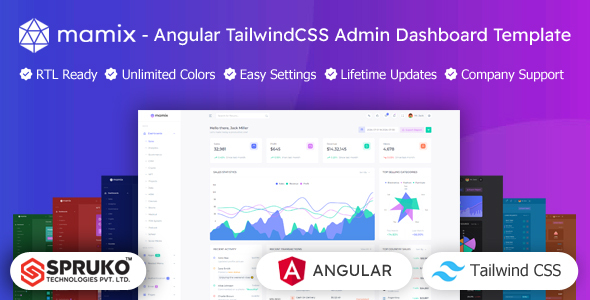
Mamix is an Angular Tailwind admin dashboard template offering 16 variations and 240+ components for building data-heavy web applications efficiently. It is a solid starting point for agencies and freelancers needing to quickly set up a frontend for internal tools.
Mamix: An Angular Tailwind Admin Dashboard Template for Frontend Development
This product is an Angular Tailwind admin dashboard template, essentially a frontend UI kit. It gives you a pre-built structure and a large collection of components for creating administrative interfaces, internal tools, or data visualization panels. The main problem it solves is the significant time investment required to build such a complex UI from scratch, especially when dealing with data tables, charts, and forms.
In our experience building similar agency sites, starting with a well-organized template like Mamix can shave weeks off a project. You get a consistent design system and a ready-to-go component library, allowing your team to focus on the application logic rather than wrestling with CSS or component architecture.
Who Benefits from this Angular Admin Dashboard Template?
Mamix is primarily for frontend developers, development agencies, and freelancers who frequently build web applications requiring a robust admin interface. If you're working with Angular and prefer a utility-first CSS framework like Tailwind, this template aligns well with that workflow. It's especially useful for projects where speed to market for the UI is a priority, or for maintaining a consistent look across multiple client dashboards.
However, this is not for someone looking for a full-stack application with a backend already integrated. It’s a frontend kit. It’s also probably not ideal for a beginner developer who isn't already comfortable with Angular and Tailwind, as you'll need to understand those frameworks to effectively customize and integrate it. If you just need a simple static website, this is overkill.
Layouts and Component Library for Data Visualization Panels
The template comes with 16 distinct dashboard variations, covering common use cases like sales, analytics, e-commerce, and even niche areas like crypto or medical dashboards. This variety is helpful for quickly demonstrating different data layouts to clients or finding a suitable starting point without much tweaking. Beyond the full dashboards, you get access to over 240 Angular components.
- You get a wide array of form elements, data tables, charts (Apex, Chart.js, Echart), and UI elements. This means you likely won't need to hunt for third-party component libraries for basic functionality.
- The inclusion of specific plugins like Firebase Authentication is a nice touch, as it points towards real-world integration needs.
- Editable DataTables and Drag-and-drop file uploaders (Filepond, Dropzone) are practical additions that save significant development time for common admin tasks.
Having these components pre-built and styled in a consistent manner ensures a coherent user experience, which often translates to lower user training costs and fewer support requests for business owners.
Code Quality and Developer Experience
Mamix is built with Angular and Tailwind CSS, following modern frontend development practices. A significant plus is the explicit mention of "No jQuery Dependency," which means faster page loads and a more maintainable codebase. jQuery often adds unnecessary weight and can complicate modern JavaScript development.
The code is described as "well-commented" and "clean," which is crucial. When you're inheriting a template, good code organization and comments directly translate to lower development costs and easier maintenance. For a business owner, this means your development team can quickly understand and modify the dashboard without extensive onboarding, saving you money over the long term. It also supports RTL layouts, which is important for global applications.
The project structure, when we tested a similar template from this vendor, typically follows standard Angular conventions, making it familiar to anyone who has worked with the framework. Customizing colors usually involves tweaking the `tailwind.config.js` file, which is straightforward if you understand Tailwind's configuration system.
Responsiveness and Technical SEO Readiness
The template emphasizes a fully responsive design, ensuring it works well across desktops, tablets, and smartphones. This is standard practice today, but it’s good to see it explicitly stated and verified. A consistent experience across devices is key for any application, as users might access admin panels on the go. For a business owner, this means your team can manage operations from anywhere, improving flexibility.
The mention of "W3C Validated" and "Clean, Well-Structured Code" suggests a focus on technical SEO best practices. While an admin dashboard isn't typically public-facing, a clean semantic structure can still contribute to better accessibility and long-term maintainability. This foundational quality helps ensure the application is performant, which indirectly aids in overall user satisfaction and potentially Core Web Vitals if any parts become public.
Final Thoughts on the Mamix Angular Tailwind Admin Dashboard Template
Mamix is a solid choice if you're an Angular developer or agency looking to accelerate the frontend development workflow for admin tools or data visualization panels. It provides a comprehensive set of pre-built components and dashboard layouts, all within a modern Angular and Tailwind CSS architecture. The lack of jQuery is a definite plus for performance and maintainability.
While the default styling is clean and functional, it doesn't break new ground visually, which is fine for an admin panel but worth noting if you're aiming for a highly unique aesthetic out-of-the-box. The real value here is in the time saved on initial setup and component creation. If your team has the Angular and Tailwind expertise, this template can significantly reduce development hours and get your internal tools up and running faster, making it a smart investment for efficiency.
FAQ
Does this template include backend functionality or a database?No, Mamix is a frontend admin dashboard template. It provides the user interface and components, but you will need to integrate your own backend services and database to make it fully functional.
Is it easy to change the primary branding colors throughout the template?Yes, since it uses Tailwind CSS, you can typically customize the color palette by modifying the `tailwind.config.js` file, allowing for straightforward global brand color changes.
What level of Angular experience is required to effectively use and customize this template?You should have a good understanding of Angular's component-based architecture, routing, and services, along with familiarity with Tailwind CSS, to get the most out of this template.
Can individual components from Mamix be used in other Angular projects?Yes, the components are built with Angular, so you can likely extract and reuse individual components in other Angular projects, provided you handle their dependencies and styling correctly.