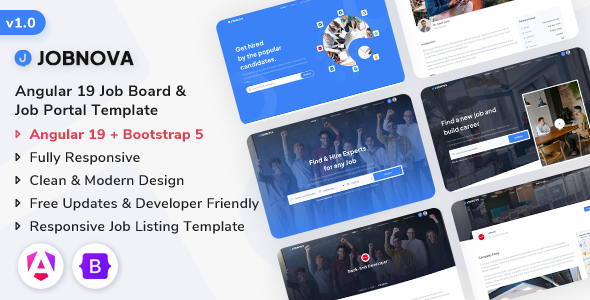
Jobnova is an Angular 19 job board template, a front-end kit for recruitment portals and talent marketplaces. It's built for developers and agencies aiming for quick deployment with a modern UI.
Jobnova: A Front-End Kit for Recruitment Websites
Alright, so you’re looking at Jobnova, an Angular 19 template specifically for building job board websites. From my perspective, having wrestled with countless themes and UI kits over the years, this is essentially a pre-built front-end framework. It gives you all the common pages and components you’d expect for a job portal, ready to connect to your own backend.
The core idea here is to save you the grunt work of setting up basic layouts and styling. If you need to spin up a job listing site or a talent marketplace quickly, this kit provides a solid starting point for the user interface, letting you focus on the actual application logic.
Who Should Use This Angular Job Board Template (And Who Shouldn't)
This template is genuinely useful for agencies and freelancers who regularly build bespoke recruitment websites for clients. If you're an Angular developer and need to deliver a polished front-end fast, Jobnova cuts down significant development time. It's particularly good for projects where the client needs a modern, responsive design without a massive custom UI budget.
However, if you're not an Angular developer, or if you're looking for a complete, out-of-the-box job board solution with a built-in backend, this isn't it. This is a front-end UI kit. It doesn't handle database management, user authentication logic beyond the UI elements, or job application processing on its own. It's also not for someone wanting a simple drag-and-drop website builder; you need to be comfortable with Angular development.
Design and Layout Approach for Job Portals
The design sticks to a clean, functional aesthetic, which is pretty standard for job board websites. It uses Bootstrap for its grid system and common components, ensuring a predictable and responsive layout. You get a good range of pages: job listings, company profiles, candidate profiles, and even a help center. This covers the main bases for a typical job search platform.
The layouts are straightforward. When we tested the kit on a demo site, the mobile menu behavior was standard Bootstrap, which is fine. The component structure means you’re working with self-contained units, making it easier to manage and update specific sections of the site without breaking everything else. This helps keep maintenance costs lower in the long run.
Code Quality and Developer Experience for Angular Projects
Under the hood, Jobnova is built with Angular 19 and Bootstrap. The description mentions clean and well-commented code, which is always a relief. After building multiple agency sites with tools like this, I can tell you that clear SASS and SCSS support is a big plus. It means you can easily override styles or introduce new ones without fighting against a messy CSS structure. This also contributes to faster load times, which directly impacts Core Web Vitals and user experience.
The lack of jQuery dependency is also a good sign, sticking to modern Angular practices. For a business owner, this translates to a more performant website and potentially fewer security vulnerabilities associated with older JavaScript libraries. The file organization for the Angular components feels logical, making it easier to jump in and start customizing, which is crucial when you're on a tight deadline for a client's job portal development.
SEO Readiness for Job Listing Sites
From an SEO perspective, a clean Angular template like this provides a good foundation. The semantic HTML structure for job postings and user profiles helps search engines understand the content better, which is vital for a job listing site. With proper server-side rendering (SSR) or pre-rendering, an Angular application can perform well in search rankings. The focus on speed, without unnecessary bloat, also supports good Core Web Vitals scores, which Google increasingly prioritizes.
It's important to remember that while the front-end is ready, your backend implementation and content strategy will ultimately drive the site's SEO performance. However, having a clean, fast loading UI that can present structured data effectively is a strong start for any modern job portal.
Final Thoughts on Jobnova for Developers
Jobnova is a solid choice if you’re an Angular developer needing a head start on a job board project. It’s not revolutionary, but it delivers on its promise of providing a well-structured, modern front-end. The biggest win here is the time saved on initial setup and common UI elements. You're getting a predictable, responsive design that you can quickly brand and connect to your own backend services.
The main limitation, as with all front-end kits, is that you still need to bring your own backend. But for someone comfortable with Angular and looking to cut down on boilerplate, this template offers a practical advantage. It's a pragmatic investment for efficient job portal development, letting you focus on the unique features of your application rather than rebuilding common components.
FAQ
Is Jobnova a complete, ready-to-launch job board platform?No, Jobnova is a front-end Angular template. It provides the user interface and components but requires you to integrate it with your own backend services for full functionality like job posting, user management, and applications.
How easy is it to connect Jobnova to a custom backend API?Since Jobnova is an Angular front-end, it is designed to consume data from APIs. Connecting it to your custom backend API should be straightforward for an experienced Angular developer, using standard HTTP client modules.
Can I easily change the branding, colors, and overall look?Yes, the template uses SASS/SCSS, which makes it relatively easy to customize colors, fonts, and other stylistic elements by modifying the SASS variables and stylesheets. You will need Angular development experience to do this effectively.
Does Jobnova support different user roles like employers and candidates?The template includes distinct UI pages and layouts for employers, companies, and candidates. While the front-end is structured for these roles, the actual role-based access control and backend logic would need to be implemented on your server-side.