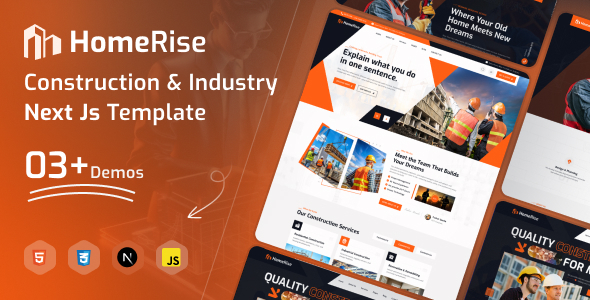
HomeRise is a Next.js template for construction and industrial businesses, offering pre-built pages and components for quick website launches. It's suitable for agencies and freelancers needing a solid foundation for client projects in this sector.
Streamlining Construction Website Development with HomeRise
When we're building websites for construction or industrial clients, getting a professional look and feel up fast is key. HomeRise steps in as an HTML template built with Next.js, which means it's not just static HTML but has some modern framework benefits baked in. We found that for businesses in this niche – think contractors, manufacturers, or engineering firms – having a template that already understands their needs, like showcasing projects or detailing services, cuts down on initial development time significantly. It’s designed to handle the specific content requirements of these industries without us having to reinvent the wheel for basic layouts.
Who Benefits Most from This Construction Template
This template is a good fit for agencies and freelancers who regularly build sites for construction, engineering, or manufacturing companies. If you need to launch a client website quickly and want a solid, well-organized starting point that adheres to common industry presentation standards, HomeRise is worth a look. It’s also useful if you're looking to build a portfolio site for your own construction business. However, if your project requires deep custom backend logic, complex database integrations beyond what a standard business site needs, or a highly unique, out-of-the-box design that deviates from typical corporate structures, this template might be too restrictive.
Solving the "Time to Launch" Challenge for Industrial Clients
The biggest workflow problem HomeRise solves is the time sink involved in setting up the foundational pages and sections for a business-to-business industrial site. Instead of spending hours on responsive layouts, basic navigation, and styling common elements like service cards or project galleries, we can start with these pre-built components. This means we can focus more on client-specific content and unique features rather than basic structural work. For example, the included project detail pages and service layout options are already structured to present information clearly, which is crucial for converting potential clients in these fields. We also found its approach to asset loading to be quite efficient, which translates to better performance for the end-user and potentially lower maintenance costs down the line due to faster load times.
Navigating the Template's Structure and Components
When we looked under the hood, the template uses Bootstrap, which is a familiar and widely supported framework. This makes it easier for developers to customize and extend. The SCSS files are also included, which is standard practice and helps in managing styles more effectively, especially on larger projects. We appreciated that the code felt organized, making it easier to locate and modify specific elements. The mobile menu behavior was also predictable and handled well across different devices. While it provides a good set of reusable components, for extremely complex, bespoke UI elements, we’d likely need to build those from scratch or integrate other libraries.
Key Features for Business Websites
The HomeRise template comes with a decent set of pre-designed pages and variations that are relevant to the construction and industrial sectors.
- Multiple Homepage Options: This gives us flexibility to choose the best initial impression for a client, whether they are a large industrial supplier or a smaller renovation contractor.
- Service and Project Detail Layouts: These are critical for showcasing capabilities and past work, and the template provides structured ways to present this information effectively.
- Responsive Design: Standard for any modern template, ensuring the site looks good and functions well on all devices, which is non-negotiable for client sites.
- SEO Optimized Code: While subjective, the clean HTML structure and semantic markup are good starting points for search engine visibility.
This template adheres to standard accessibility practices, which is important for any professional website aiming for broad reach.
Considering the Trade-offs and Limitations
While HomeRise offers a good starting point, it’s important to understand its limitations. It’s an HTML template, meaning it doesn’t come with a content management system like WordPress. This means all content updates and site management will need to be handled by someone comfortable with code or by integrating a separate headless CMS. For clients who expect to update their own content easily through a visual interface, this template alone won't suffice. Also, the "clean UI/UX" is good, but it's a fairly standard corporate look. If a client wants something truly unique or visually avant-garde, this template might require significant customization beyond its intended scope.
Final Thoughts on HomeRise for Business Projects
For agencies and freelancers focused on the construction and industrial sectors, HomeRise offers a practical shortcut to launching professional websites. It saves considerable time on initial setup by providing pre-built, niche-specific pages and components. While it requires a developer's touch for full implementation and customization, it provides a solid, well-structured foundation that can be adapted to various client needs within its target industries, making it a smart investment for streamlining project delivery.
FAQ
What kind of businesses is HomeRise best suited for?HomeRise is primarily designed for businesses in the construction, engineering, industrial, and architectural sectors, including contractors, manufacturers, and agencies.
Is HomeRise suitable for beginners without coding experience?No, as an HTML template, HomeRise requires developer knowledge to implement, customize, and maintain. It is not a drag-and-drop website builder.
Can HomeRise be used for e-commerce websites?While the template includes basic page structures, it is not specifically built for e-commerce functionality and would require significant custom development to add shopping cart and checkout features.
How does the template handle content updates?Content updates would need to be made directly by editing the HTML files or by integrating a headless CMS, as it does not come with a built-in content management system.