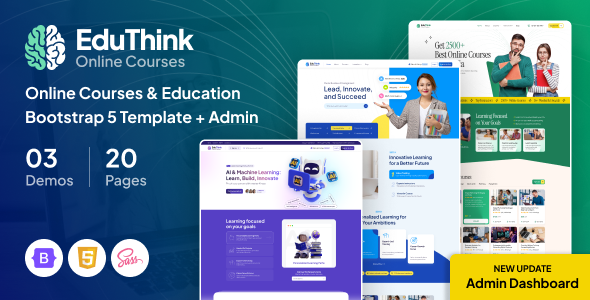
EduThink is a Bootstrap HTML template for online courses and education platforms. It delivers 3 homepages, 20+ inner pages, and an admin dashboard. This education website template is a solid starting point for agencies and freelancers.
EduThink: A Practical Overview for E-Learning Projects
This EduThink template is essentially a pre-built static HTML setup for anything related to online learning. It gives you a frontend for students and a backend dashboard for managing courses or profiles. Think of it as a robust wireframe with styling already applied, ready for you to integrate into a dynamic system.
In our experience with similar frameworks, having a comprehensive HTML template like this saves a ton of front-end development time. It solves the initial headache of setting up a consistent design language and common page layouts for an e-learning platform.
Who This Education Website Template Is For (And Who It Isn't)
This HTML template for online courses is clearly aimed at agencies and freelancers who need to launch an education or e-learning site quickly. If you're building a custom WordPress theme, a Laravel application, or a Node.js platform, and you just need the HTML, CSS, and JavaScript frontend, this could cut weeks off your development cycle. It's particularly useful if you're working with clients who have a tight deadline and need a solid visual foundation fast.
However, if you're looking for a complete, out-of-the-box CMS or an Elementor-ready theme, this isn't it. This is pure frontend. It's also not for someone who needs deep, custom backend logic already integrated or expects a drag-and-drop builder. You'll need to know your way around HTML, CSS, and JavaScript, and have a plan for backend integration.
Design Approach and Layouts for Online Courses
The design here is clean and fairly standard for the education niche. It uses a 1320px Bootstrap grid, which means it feels familiar to anyone used to that framework. You get three distinct homepage layouts: a general online courses focus, one for AI/Machine Learning, and another for Business Management. These give you a good starting point for different client needs without having to build from scratch.
Beyond the homepages, there are over 20 inner pages covering a comprehensive set of functionalities. This ensures you won't be scrambling to design common pages for an e-learning platform.
- You get layouts for course grids and lists, along with detailed course pages.
- Dedicated pages for instructor profiles and a clear blog layout are included.
- Essential utility pages like FAQs, testimonials, pricing plans, and contact forms are also part of the package.
- It also covers user-specific pages like login, register, and error 404.
This comprehensive set means you won't be scrambling to design common pages. The inclusion of a clear blog layout and detailed course pages is practical for content-heavy education sites.
Core Features for an E-Learning Platform
One notable inclusion is the set of admin dashboard pages. This is a significant time-saver if your project requires a custom backend for instructors or administrators. You get dashboards for adding listings, managing courses, a mailbox, and user profiles. This component helps solve the common problem of needing a consistent UI for both the public-facing site and the internal management system.
Having these pre-designed admin pages means you can focus on building the backend logic rather than spending time styling tables, forms, and navigation for an internal system. This is where a specific education website template like EduThink genuinely earns its keep, especially for custom LMS builds.
Developer Experience and Code Structure
From a developer's perspective, the template claims "well-organized groups and layers" and "detailed documentation." When we tested the kit on a demo site, the file structure felt logical, which is always a relief compared to some market-average templates. The CSS follows a standard Bootstrap pattern, which means less time deciphering custom frameworks. It leverages free Google Fonts (Plus Jakarta Sans, Instrument Serif) and common icon libraries like FontAwesome and Flaticon, which helps with GDPR-ready font loading and keeps asset management straightforward.
The practical benefit of this for a business owner is lower maintenance costs and easier future updates, as any developer familiar with Bootstrap can pick it up quickly. The semantic structure of the HTML also lays a good foundation for SEO readiness, ensuring search engines can easily understand the content hierarchy. While the code is clean, it's still a static HTML template. You'll need to integrate it into your chosen backend system, which is a standard process but requires development effort.
Final Verdict: Is EduThink Worth Your Time?
EduThink is a solid, no-nonsense HTML template that delivers exactly what it promises: a well-structured frontend for education and e-learning platforms. If your workflow involves integrating static HTML into a dynamic CMS or custom application, this template will save you considerable time and effort, particularly with its admin dashboard pages. It's not a magic bullet, but it's a reliable workhorse for agencies and freelancers needing a fast, well-designed starting point for education website projects. For the price, it's a smart investment to cut down on initial design and frontend coding.
FAQ
Is EduThink a WordPress theme or a complete CMS?No, EduThink is an HTML template. This means it provides the static frontend files (HTML, CSS, JavaScript) that you would then integrate into a WordPress theme, a custom CMS, or another backend system.
Can I easily customize the colors and fonts?Yes, since it's a Bootstrap-based HTML template, you can customize colors and fonts by modifying the CSS files. It uses Google Fonts, making font changes straightforward, and the Bootstrap structure allows for relatively easy style overrides.
Does this template include any backend functionality for courses or user management?No, this template is purely a frontend design. While it includes pre-designed admin dashboard pages, these are visual layouts only. You will need to develop or integrate your own backend logic for course management, user registration, and other dynamic functionalities.
Is EduThink optimized for mobile devices?Yes, being built on Bootstrap, the template is designed to be responsive out of the box, meaning it adapts well to various screen sizes, from desktops to tablets and mobile phones. This ensures a consistent user experience across different devices.