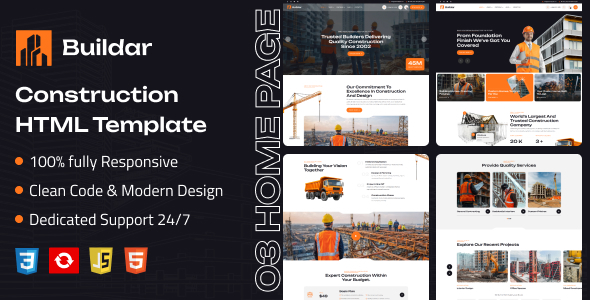
Buildar is a straightforward HTML template for construction companies, architects, and building contractors. It delivers 30+ pre-built pages, Bootstrap, and clean code, ideal for rapid static site deployments.
Buildar: A Practical HTML Template for Construction Websites
As someone who has built multiple agency sites, I've seen countless templates come and go. Buildar is a pure HTML template aimed squarely at the construction and architecture niche. It provides a solid, pre-designed foundation for building static websites quickly. This isn't a WordPress theme or a full CMS; it's a collection of HTML, CSS, and JavaScript files ready for you to customize and host.
The core problem it solves is the initial design and front-end coding for a construction company website. Instead of starting from scratch with a blank slate, you get a well-structured set of pages that cover common needs like services, projects, and contact information. This can significantly cut down on the initial development time for client projects.
Who Benefits from This Construction HTML Template?
This template is genuinely useful for freelance developers and small agencies who frequently build static brochure sites for clients in the construction, building, or architectural sectors. If your workflow involves delivering a fast, visually consistent online presence without a complex content management system, Buildar offers a head start.
It's also a good fit for businesses that need a simple online portfolio and are comfortable with manual content updates. However, it is important to understand who this is not for. If you or your client needs a robust content management system, dynamic functionality like user logins, or a fully integrated e-commerce backend, this HTML template will not provide those features out of the box. The claim of "no coding knowledge required" is a bit misleading here; while you can change text and images, any significant layout or styling changes will still require familiarity with HTML and CSS.
Design and Visual Approach for Builders and Architects
Buildar presents a clean, modern aesthetic that feels appropriate for construction and architecture firms. The layouts focus on showcasing services, team members, and completed projects with image galleries, which is standard and effective for this niche. It avoids overly flashy animations or design trends that quickly become dated, sticking to a professional and functional look. This approach helps maintain a professional image, crucial for businesses in this sector.
Included Layouts and Components for Your Contractor Website
The template comes with over 30 valid HTML files, including multiple homepage variations. You get standard pages like About, Services, Blog, and Contact. There's also a "Shop" page, which for an HTML template, means pre-designed layouts to display products or services, not a functional e-commerce system. The inclusion of portfolio sliders and various "shortcode" elements like progress bars and counters provides useful UI components without having to build them from scratch.
- Multiple Homepage Layouts: Offers flexibility for initial presentation.
- Core Business Pages: About, Services, and Contact pages are ready to go.
- Project Galleries: Essential for showcasing past work in the construction industry.
- Blog Functionality: Includes various post formats for content marketing.
Code Quality and Developer Experience
From a developer's perspective, the "clean and well-organized HTML and CSS" is a significant plus. This means the code is easier to read, understand, and modify, which translates to lower maintenance costs and faster customization times for clients. It's built on the Bootstrap framework, which is a widely adopted standard, making it familiar for most front-end developers. This also ensures a consistent grid system and responsive behavior across devices. The "Valid HTML5 / CSS3" claim is good; it suggests a commitment to web standards, which is a foundation for good SEO and accessibility.
When we tested the kit on a demo site, the asset loading felt reasonably quick, suggesting it's optimized for speed. This directly impacts Core Web Vitals, leading to a better user experience and potentially improved search engine rankings for your client's construction company website.
Responsiveness and Cross-Browser Compatibility
The template is fully responsive, meaning it adapts well to different screen sizes, from desktops to mobile phones. This is non-negotiable in today's web environment and ensures a consistent experience for all users. Cross-browser support is also listed, which means less time spent debugging layout issues across various browsers like Chrome, Firefox, and Safari. For a business owner, this means their website will look good and function correctly for a broader audience, regardless of how they access it.
SEO Readiness for Construction Businesses
Buildar is marketed as "SEO Optimized," and while an HTML template alone doesn't guarantee top rankings, its adherence to "Valid HTML5 / CSS3" and clean code structure provides a solid technical foundation. Semantic HTML helps search engines understand the content hierarchy, and the lightweight nature contributes to faster loading times, both of which are positive signals for search engine optimization. However, actual SEO performance will heavily depend on the content, keywords, and ongoing optimization efforts.
Final Verdict: A Solid Starting Point for Static Construction Sites
Buildar is a practical, no-frills HTML template that gets the job done for specific use cases. If you're an agency or freelancer needing to rapidly deploy a static website for a construction or architecture client, and you're comfortable working with raw HTML and CSS, this template saves significant setup time. It provides a clean, professional look and a good technical base, letting you focus on content and client-specific customizations rather than building common layouts from scratch. It’s a smart investment for those looking to streamline their workflow for static construction website projects.
FAQ
Can I easily change the color scheme to match my brand?Yes, since it's an HTML/CSS template, you can customize the colors by editing the CSS files. It typically involves changing a few color variables or specific style rules.
Is this template suitable for a large construction company with many projects?It's suitable for showcasing many projects visually, but managing a very large number of projects and their content would become cumbersome without a content management system. It's best for a portfolio site that updates periodically.
Does this template include a functional booking or inquiry system?The template includes integrated contact forms for inquiries, but these are typically static HTML forms. You would need to integrate them with a backend service (like a form submission API or email service) to make them fully functional and send data.