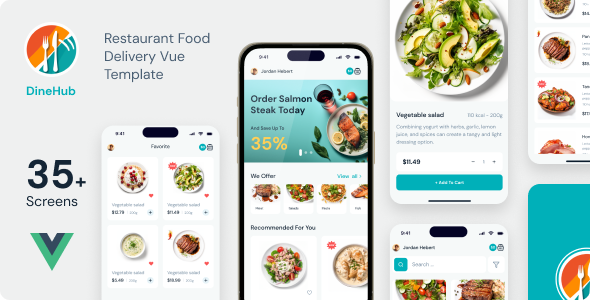
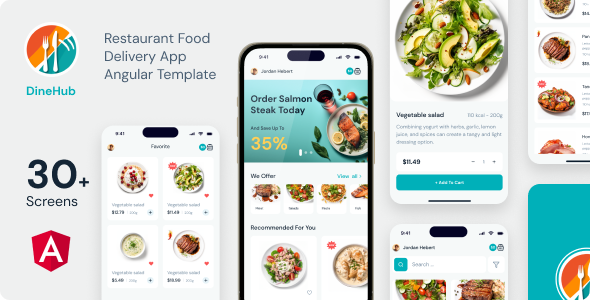
DineHub is a Next.js PWA template for building food delivery and restaurant apps, offering a complete, optimized frontend. It's for agencies and developers needing rapid deployment in the food service niche.
DineHub Next.js Food Delivery PWA Template Explained
This isn't a full-stack solution, so let's be clear: DineHub is a frontend Progressive Web Application (PWA) built with Next.js. It aims to give you a solid head start on a food ordering platform or a dedicated restaurant food delivery app without having to build the entire user interface from scratch.
The core problem it solves is the initial setup and design for a mobile-first food delivery experience. Instead of spending weeks on responsive layouts, onboarding screens, and PWA manifest configurations, you get a pre-packaged solution ready for your API integration.
Intended Users: Who Benefits from this Next.js Restaurant App Template
DineHub is genuinely useful for web agencies and freelance developers who regularly take on restaurant clients or projects in the food service industry. If you need to launch a custom food ordering platform quickly, especially one with PWA capabilities, this template provides a strong foundation.
It's particularly good for those already comfortable with Next.js, React, and SCSS. You'll get the most out of it if you have an existing backend API ready to plug in, or if you're building a new one in parallel.
Who shouldn't use it? If you're looking for a drag-and-drop solution without any code, this isn't it. It's also not for teams who need a fully integrated backend system out of the box; you'll need to handle data fetching and order processing logic separately.
Design and Visual Approach: Onboarding and User Flow
The design focuses on a clean, mobile-first experience, which is critical for a food delivery app. It includes dedicated onboarding screens, which is a smart inclusion because it helps guide new users through the app's features and encourages engagement right from the start.
The use of free fonts like Source Sans 3 and DM Sans ensures good readability across devices, and they are standard choices that won't cause GDPR headaches with self-hosting. All icons are provided in SVG format, which means they scale perfectly on any screen without pixelation, contributing to a polished look and feel.
Layouts, Pages, and Components for Food Ordering Platforms
While the description doesn't list specific page names beyond "onboarding screens," the focus on a food delivery PWA implies a standard set of pages: menu browsing, item customization, cart, checkout, and possibly order tracking. The mention of "well structured components" suggests a modular approach.
This component-based architecture, common in React and Next.js projects, means you can easily reuse UI elements across different parts of your application. This saves time during customization and ensures consistency in the user experience.
Code Quality and Developer Experience: Next.js PWA Best Practices
Having worked on numerous client projects requiring quick deployment, I appreciate the stated focus on clean code and SCSS support. This means the styling is organized and maintainable, not a jumbled mess of inline styles or deeply nested CSS.
The project uses .tsx files, indicating TypeScript, which is a huge plus for larger projects and team environments. TypeScript adds type safety, reducing bugs and making the codebase easier to understand and refactor over time. Zustand for state management is a good, lightweight choice, often preferred over Redux for simpler setups.
Documentation is included, which is standard but always welcome. It should cover the basic setup commands, helping you get the project running without too much guesswork.
- SCSS support for organized and maintainable styling.
- TypeScript (.tsx files) improves code quality and reduces bugs.
- Zustand for lightweight and efficient state management.
Responsiveness and Compatibility: PWA for All Devices
As a Progressive Web Application, responsiveness is a core promise. This means the application should adapt gracefully to different screen sizes, from mobile phones to tablets and desktops. The "cross-platform compatibility" claim is inherent to PWAs; one codebase serves all devices through the browser.
The PWA benefits listed, like "native-like experience," "offline access," and "lightning-fast performance," are significant for any modern web application. For a business owner, this translates to better user retention, reliability even with poor internet, and no need to deal with app store approvals, which reduces friction for users and costs for the business.
SEO Readiness: Optimizing a Food Ordering Platform
The description explicitly mentions "SEO optimization" and "SEO Optimized." With Next.js, this typically means server-side rendering or static site generation capabilities, which are excellent for search engine visibility. Unlike traditional client-side React apps, Next.js ensures that content is available to search engine crawlers from the start.
Good semantic HTML structure, implied by "clean code," also contributes to better SEO. This helps search engines understand the content hierarchy and relevance, which is crucial for a competitive niche like food delivery where local search visibility is key.
Final Thoughts: Is DineHub a Smart Investment for Your Restaurant PWA?
If you're an agency or developer needing to quickly deploy a robust frontend for a food delivery or restaurant ordering platform, DineHub is a solid starting point. It takes care of the core PWA architecture, mobile-first design, and a clean Next.js setup, saving you significant development hours on foundational work.
The inclusion of Figma design files is a nice touch, bridging the gap between design and development. While it's a frontend-only solution, understanding this limitation upfront means you can plan your backend integration accordingly. In our experience with similar Next.js PWA templates, getting a well-structured frontend like this can easily shave weeks off a project timeline, making it a worthwhile investment for accelerating your food ordering platform development.
One thing I'd typically want to see more of in these types of templates is a clear, documented example of how to integrate with a common API endpoint. While it's a frontend kit, a basic example or suggested architecture for connecting to a backend would be immensely helpful for speeding up the next phase of development.
FAQ
Does DineHub include a backend for managing orders and menus?No, DineHub is a frontend-only Progressive Web Application template. You will need to integrate your own backend API for order processing, menu management, and user authentication.
Is this template suitable for a single restaurant or a multi-vendor food delivery service?Out of the box, it provides the frontend structure for a single restaurant's ordering system. Adapting it for a multi-vendor platform would require significant customization of the UI and integration with a more complex backend API.
How does DineHub impact Core Web Vitals and overall site performance?Built with Next.js and designed as a PWA, DineHub inherently supports strong Core Web Vitals. Server-side rendering and efficient asset loading contribute to faster initial page loads and better user interaction metrics, leading to an improved user experience and potentially better search rankings.
What level of technical expertise is required to customize and deploy DineHub?You'll need a good understanding of Next.js, React, TypeScript, and SCSS to effectively customize and deploy this template. Basic command-line knowledge for running development servers and build processes is also necessary.