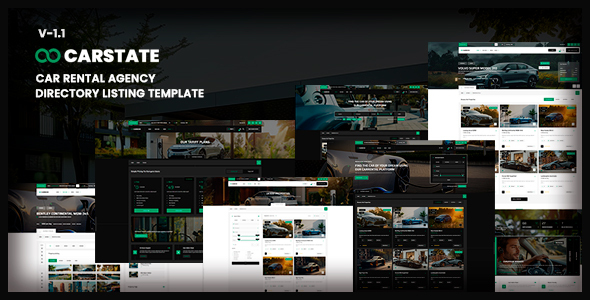
Carstate: A dedicated HTML template for car rental agency websites. It features multiple homepages, listing layouts, and responsive design, ideal for frontend developers.
Understanding the Carstate HTML Template
Carstate is a static HTML, CSS, and JavaScript template designed specifically for building the frontend of car rental or vehicle listing websites. It’s not a WordPress theme or a full content management system. What you get here is a collection of pre-built web pages and assets, ready to be integrated into a custom backend or used for a highly static site.
In our experience building multiple agency sites, this type of template is useful for quickly establishing a visual identity and user interface without starting from scratch. It solves the initial design and frontend coding headache, allowing developers to focus on backend logic and database integration.
Who Benefits from Carstate and Who Should Skip It
This template is for developers, agencies, or freelancers who are comfortable working with raw HTML, CSS, and JavaScript. It’s a solid choice if you need a polished, responsive frontend for a car rental website and plan to build or integrate your own custom backend system for managing listings, bookings, and user accounts.
If you're looking for a drag-and-drop solution, a WordPress theme, or a template with a built-in booking system and admin panel, Carstate is not for you. Non-technical users will find this template challenging, as it requires coding knowledge to customize and make functional beyond static display.
Design and Visual Flexibility
Carstate comes with four distinct homepage styles, offering variations like parallax images, sliders, slideshows, and video backgrounds. This variety is a strong point, giving you options for a unique aesthetic without extensive custom design work. It also includes both dark and light versions, which is a nice touch for offering user preferences or aligning with brand guidelines.
The template incorporates parallax scrolling effects and video backgrounds. While visually engaging, these elements need careful consideration for performance. When we tested the kit on a demo site, the asset loading felt standard; a developer would need to implement further optimization for top-tier Core Web Vitals scores, like optimizing video codecs or lazy loading larger images, which translates to faster load times for end-users and better search engine performance.
Pre-Built Layouts and Components
The template provides four different listing pages and two single listing detail pages. This is crucial for a directory listing HTML template for vehicles, as it covers the main content display needs right out of the box. Having these pre-designed layouts means less time spent on fundamental page structures.
The inclusion of Font Awesome 6 Pro is a practical benefit, offering a vast library of icons without needing to source them separately. Touch and swipe support for sliders and galleries is also standard and expected, ensuring a decent mobile experience for users browsing car listings.
Business-Oriented Frontend Features
Carstate includes frontend structures for a contact form and a subscribe form, both utilizing Ajax for submission. It's important to understand that while these forms are visually complete and ready on the frontend, the "working Ajax PHP contact" and subscribe forms require you to set up the actual PHP scripts on your server to handle the data submission. This isn't a plug-and-play backend solution; it's the frontend wiring that expects a backend endpoint. For a business owner, this means the forms look good and function on the client-side, but a developer needs to implement the server-side logic to actually receive messages or subscriber emails, which impacts overall maintenance costs.
Code Quality and Developer Experience
When you dig into the files, you'll find the usual suspects for a template of this type: jQuery for general scripting, Swiper for sliders, Isotope for filtering layouts, and Lightgallery for image pop-ups. These are well-established libraries, which means good community support if you run into issues. The CSS organization feels fairly standard for a ThemeForest HTML template; it's usually a mix of custom styles and framework overrides. A developer would likely want to refactor or integrate this into a SASS architecture for better maintainability on larger projects, reducing long-term development costs.
The template's structure provides a clean slate. After building multiple agency sites with tools like this, we appreciate that it doesn't come with unnecessary bloat. It's focused on the visual presentation, leaving the backend choices entirely to the developer. This is a trade-off: you get flexibility, but you're also responsible for all custom backend integrations and ensuring semantic accessibility.
Responsiveness and Compatibility
The template is fully responsive, which is non-negotiable for any modern website, especially for a responsive car rental website template where users will browse on various devices. The layouts adapt well to different screen sizes, ensuring a consistent user experience whether on a desktop, tablet, or phone. This directly benefits business owners by providing a wider reach and better engagement across all potential customer devices.
SEO Readiness
As an HTML template, Carstate provides a clean foundation for search engine optimization. It typically uses standard HTML5 semantic tags, which is good for telling search engines what your content is about. However, all dynamic SEO elements like meta descriptions for individual car listings, schema markup, or sitemap generation will need to be implemented through your chosen backend system. It's a blank canvas that allows for strong technical SEO, but requires a developer to fill in the details for optimal search performance.
Final Verdict: A Solid Frontend Start for Car Rental Projects
Carstate is a genuinely useful frontend starter for anyone building a car rental or vehicle listing website who has the technical expertise to handle the backend. It saves significant time on initial design and responsive layout implementation, offering a visually appealing and feature-rich user interface. While it doesn't offer a full solution out of the box, its strength lies in providing a polished, ready-to-integrate frontend. For developers and agencies aiming for fast turnarounds on custom car listing website development, investing in Carstate means you can hit the ground running on the visual aspects and dedicate resources to building out robust backend functionality.
FAQ
Is Carstate a WordPress theme or a full CMS?No, Carstate is an HTML template. It provides the static frontend pages (HTML, CSS, JavaScript) but does not include a WordPress integration, a content management system, or an admin panel.
Does this template include a working car booking system?No, the Carstate template does not come with a built-in booking system. It's a frontend template, meaning you would need to integrate a separate backend booking solution or build one yourself.
How do I manage car listings with this template?Since Carstate is an HTML template, you cannot manage car listings through an admin panel directly. You would need to connect it to a custom backend database and content management system to dynamically add, edit, or remove vehicle listings.
Are the included images and videos free to use?No, the images used in the demo are for preview purposes only and are not included in the template download due to licensing restrictions. You will need to source your own images and videos for your website.