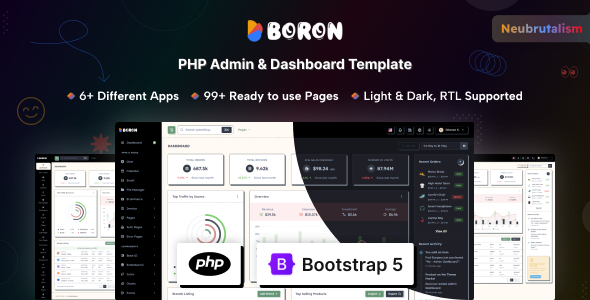
Boron is a PHP admin dashboard template built with Bootstrap for web developers needing a modern, functional backend with a Neubrutalism design twist.
Product Overview: Boron PHP Admin Dashboard for Developers
This Boron template isn't a full backend system; it's the front-end UI kit for one. Think of it as a well-stocked toolbox for building custom admin interfaces, SaaS dashboards, or internal tools. It provides the visual structure, components, and pages you'd typically need, all pre-designed with a specific aesthetic.
In our experience building multiple agency sites, starting with a solid UI template like this saves a significant amount of time, especially on the initial setup and styling. It tackles the common headache of designing and implementing consistent UI elements from scratch for a complex backend application.
Who Needs a Neubrutalism Admin Panel (and Who Doesn't)
Boron is for web developers, agencies, and internal development teams who regularly build custom administrative panels or SaaS applications. If you need to quickly launch a functional backend UI without getting bogged down in every CSS detail, and you appreciate a distinct visual style, this template is a strong contender.
It's particularly useful for those looking for a PHP admin dashboard template that comes with a comprehensive set of pre-built pages and components. However, this isn't for absolute beginners expecting a no-code solution. You'll need a grasp of PHP, Bootstrap, SCSS, and jQuery to truly leverage and customize it. It's also not for teams whose brand guidelines strictly prohibit the Neubrutalism aesthetic, as changing the core design would be a significant undertaking.
Design and Visual Approach: Boron's Distinctive Style
The standout feature here is the Neubrutalism design concept. This isn't your average flat or material design; it uses strong borders, contrasting colors, and a slightly retro, almost "punk" feel. It includes both light and dark modes, which is standard but well-implemented here, using attribute-based switching for flexibility.
When we tested the kit on a demo site, the design felt fresh and certainly not generic. This specific design choice can be a major time-saver if it aligns with your project's brand, as you won't need to spend hours creating a unique visual language for your admin panel.
Core Layouts and Components for Backend Workflows
Boron comes packed with over 80 pages and more than 200 UI components. This is where the real value for a developer building an internal tool lies. You get:
- All standard Bootstrap components, ensuring familiarity for most developers.
- Rich form elements, validation, and wizards, which are crucial for data entry and user management in any admin system.
- Advanced data tables, a common pain point for custom styling, are included and functional.
- Multiple charting libraries (Chart.js and ApexCharts) providing 30+ chart types for data visualization.
- Drag and drop functionality (Dragula) and multiple file upload components, streamlining common user interactions.
- WYSIWYG editors (Summernote and SimpleMDE), essential for content management features.
Having these components pre-styled and integrated saves significant development time. It means less time fiddling with CSS for complex elements and more time on core application logic.
Business-Focused Applications and Utility Pages
Beyond the core components, Boron includes several built-in application layouts and utility pages that address common business needs within an admin environment. These include:
- Calendar and Chat applications, useful for team collaboration or scheduling features.
- A File Manager, which can be adapted for document storage or media libraries.
- Ecommerce layouts, if you're building an admin for an online store.
- Invoice and Email pages (inbox, details, compose), providing a foundation for client communication or billing systems.
- A full suite of authentication pages, including Login, Register, 2FA, and Account Deactivation, which covers most user management scenarios out of the box.
- Various error pages (401, 404, 500, etc.) and utility pages like FAQ, Maintenance, and Pricing.
These pre-built sections reduce the development overhead for common admin features, letting you focus on integrating your specific backend logic rather than building the UI from scratch.
Code Quality and Developer Experience with Boron
Boron is built using modern web technologies like PHP and Bootstrap, leveraging SCSS for styling. The use of SCSS variables means branding changes, like updating primary colors or typography, are straightforward. This translates to lower maintenance costs and quicker design iterations for a business owner.
The template is fully documented, which is always a good sign for developer usability. The inclusion of Vite for asset bundling points to a more modern development workflow, which generally results in optimized asset loading and better performance. In our experience, templates with clear SCSS architecture are much easier to adapt and maintain over time compared to those with monolithic CSS files.
Responsiveness and Cross-Browser Compatibility
The template is fully responsive, meaning it adapts well to different screen sizes, from desktops to mobile phones. This is a basic expectation for any modern web template, but it's executed cleanly here. It works across all modern browsers, which is crucial for internal tools where team members might be using various devices and browsers.
A well-implemented responsive design ensures a consistent user experience, regardless of how your team or clients access the admin panel, leading to greater efficiency and less frustration.
SEO Readiness for Internal Tools
For an admin dashboard, "SEO readiness" isn't about ranking on Google. Instead, it refers to the underlying HTML structure and its impact on maintainability and accessibility. Boron's use of Bootstrap typically implies a clean, semantic HTML structure, which is beneficial for screen readers and overall code clarity.
A well-structured template like this helps ensure that your internal tools are not only functional but also adhere to standard accessibility practices, making them usable for a wider audience within your organization. This contributes to a lower long-term maintenance burden.
Final Verdict: Is Boron a Smart Investment for Your Backend?
Boron delivers a solid foundation for anyone needing to build a custom admin panel quickly. Its Neubrutalism design is a strong differentiator, offering a distinct look that can save significant design time if it fits your project. The sheer volume of pre-built pages, components, and application layouts means you're not starting from scratch.
While its reliance on jQuery might feel a bit older for some developers accustomed to modern JavaScript frameworks, it's a stable and widely understood library. For developers and agencies focused on efficient delivery of custom backend solutions, investing in Boron can genuinely accelerate your workflow and provide a professional, feature-rich interface right out of the box.
FAQ
Does Boron include backend functionality or a database?No, Boron is strictly a front-end UI template. It provides the visual components and page layouts, but you will need to integrate your own backend logic, database, and server-side code.
Is the Neubrutalism design easy to change to a different style?While you can easily customize colors and fonts using the SCSS variables, fundamentally changing the Neubrutalism aesthetic to something like a flat or material design would require significant CSS work and is not a simple toggle.
What level of developer skill is recommended for using Boron effectively?You should be comfortable with HTML, CSS (especially SCSS), JavaScript (jQuery), and have a basic understanding of how to integrate front-end templates with a PHP backend to get the most out of Boron.