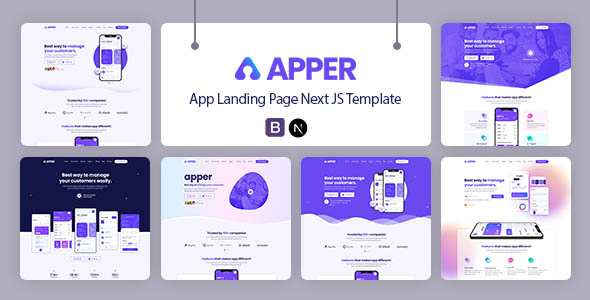
APPER: A Next.js app landing page template for showcasing mobile and web applications. It's built on Bootstrap for agencies needing a fast, modern app showcase.
APPER: A Next.js Template for App Landing Pages
This APPER template is a frontend package built on Next.js, designed specifically for creating single-page app landing websites. It offers a solid foundation for anyone looking to launch a product or service with a dedicated online presence, particularly in the mobile or web application space.
What you get here is a collection of pre-styled components and page layouts that integrate with the Next.js framework. It's essentially a pre-built marketing page designed to highlight an application's features, benefits, and call to action. From our perspective, it aims to streamline the initial setup for app landing page development without requiring a full custom build.
Who Benefits from This Next.js App Showcase Template?
This template is a good fit for agencies or freelance developers who need to deliver a modern, performant app landing page quickly. If your client has a new mobile app or SaaS product and needs a dedicated website to drive sign-ups or downloads without a complex backend, APPER provides a strong starting point.
Individuals or small teams looking for a robust frontend base for their own application's marketing site will also find value. It saves significant time on initial setup and styling, letting you focus on content and specific conversion elements. However, if you require deep custom backend logic integrated directly into the site, or a highly unique, bespoke UI/UX that deviates significantly from Bootstrap's conventions, this template might be too restrictive without extensive modification.
Layouts and Components for App Marketing
The template focuses on essential sections for an app landing page. You'll find typical blocks like hero sections, feature showcases, testimonials, pricing tables, and call-to-action areas.
- Pre-designed sections for app feature presentation.
- Standard layouts for showing user testimonials.
- Clear call-to-action components designed for conversion.
While the product description doesn't detail the exact number of unique pages, the focus is clearly on a single, compelling landing page structure. This means you're getting variations on sections rather than a multi-page site with diverse internal layouts. It’s built for a focused message.
Code Quality and Developer Experience
Working with APPER feels familiar if you have experience with Next.js and Bootstrap. The project structure is component-based, which is standard for modern React applications. This means developers can easily locate and modify individual sections without digging through monolithic code files.
The "W3C Valid Markup" claim is a good sign for long-term maintainability and search engine optimization, indicating a clean semantic structure. The use of Google Fonts and Font Awesome icons is standard practice, offering a good balance of aesthetics and easy implementation. For a business owner, this translates to lower maintenance costs and better compatibility across different browsers and devices.
Responsiveness and Compatibility for Modern Devices
Built on the Bootstrap grid system, this template is inherently responsive. This means the layout adjusts well across various screen sizes, from large desktop monitors down to mobile phones. In our experience, Bootstrap-based templates generally handle mobile views predictably, which is crucial for an app showcase website where mobile users are a primary target.
The "Cross Browser Compatibility" ensures your app landing page will display correctly across different web browsers. This is a basic expectation today, but it's good to know it's been considered, preventing potential display issues for your visitors.
SEO Readiness for App Launch Websites
Leveraging Next.js for a static site like an app landing page offers inherent advantages for SEO. Next.js typically provides excellent performance out of the box, which positively impacts Core Web Vitals, a key ranking factor for Google. The W3C Valid Markup also contributes to a cleaner code structure that search engine crawlers can interpret more effectively.
While the template provides a strong technical foundation, remember that content quality, keyword integration, and link building will still be critical for achieving top search rankings. This template gives you a fast, crawlable site, which is half the battle for fast app launch website visibility.
Final Thoughts on APPER for App Landing Pages
APPER is a practical choice for quickly deploying a performant app landing page. It solves the common problem of needing a modern, responsive frontend without starting from scratch. For agencies or developers on a tight deadline, it's a smart investment that can save dozens of hours on initial setup and styling.
The main trade-off is that while it's efficient, the Bootstrap foundation means the design might lean towards a familiar, rather than truly unique, aesthetic without significant custom CSS work. If you're looking for an extremely distinct visual identity out-of-the-box, you might need to look elsewhere or budget for design customization. However, for a solid, reliable, and fast foundation for your next app marketing push, APPER gets the job done.
FAQ
Does APPER support multiple languages for international app launches?The template itself provides a static content structure. While it doesn't include built-in internationalization (i18n) features, Next.js fully supports it, allowing you to implement multi-language capabilities with additional development.
How difficult is it to change the primary colors and fonts to match my brand?Since it's built with Bootstrap, changing primary colors and fonts is generally straightforward by modifying the main CSS variables or a configuration file. This is a standard process for customizing Bootstrap-based themes.
Can I easily integrate third-party analytics or marketing scripts with this template?Yes, integrating analytics like Google Analytics or marketing scripts is simple with Next.js. You can add these scripts directly into the document head or specific components, following standard Next.js practices.