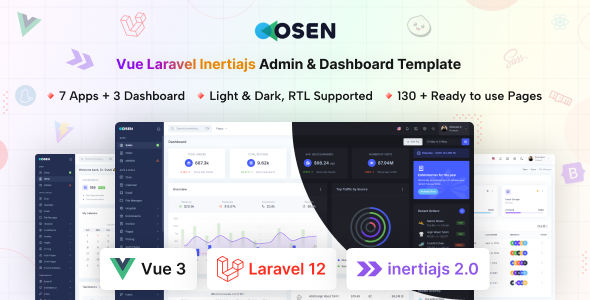
Osen is a Vue.js and Laravel Inertia.js admin dashboard template, built on Bootstrap, offering pre-built UI and apps. It's for agencies and developers needing a fast start on custom SaaS, CRM, or CMS backends.
Osen: A Vue.js and Laravel Inertia.js Admin Template Overview
This template is essentially a frontend UI kit and a structural framework for building administrative interfaces. It’s set up with Vue.js on the frontend and leverages Laravel Inertia.js for a single-page application experience, all styled with Bootstrap. What you get is a pre-wired system that handles a lot of the boilerplate for a modern web application backend, from user authentication flows to common UI elements.
In our experience, these kinds of templates save a significant amount of time, especially when you're starting a new project and want to skip the initial setup of routing, basic layouts, and component scaffolding. It solves the headache of setting up a cohesive design system and foundational architecture from scratch for an admin panel.
Who Benefits from this Vue.js Laravel Admin Dashboard?
Osen is definitely for developers and agencies already comfortable with the Vue.js, Laravel, and Inertia.js stack. If you're frequently building custom SaaS admin panel starter kits, content management systems, or CRM backends, this template can cut down development hours substantially. It’s particularly useful for teams needing fast turnarounds on client projects where the core business logic is unique, but the admin interface needs to be functional and polished without reinventing the wheel.
However, this is not for everyone. If you’re a beginner developer still learning these frameworks, the complexity of a pre-built system might be overwhelming. It’s also not for those looking for a simple static HTML template or a solution that provides deep, pre-configured backend logic beyond the basic application structures included. If your project doesn't use Vue or Laravel, then this isn't for you.
Designing with Osen: Clean Layouts and Customization
The design approach here is clean and functional, which is what you want in an admin dashboard template. It avoids unnecessary visual clutter, focusing on readability and usability for data management. The inclusion of both light and dark modes, controlled via attributes, is a nice touch that users appreciate and is straightforward to implement.
Customization is handled through SCSS variables, which is a standard and effective way to manage themes. This means changing primary colors, fonts, or spacing across the entire application is relatively easy and doesn't involve digging through hundreds of lines of compiled CSS. For a business owner, this translates to lower maintenance costs when branding updates are needed, as a developer can quickly adjust styles without a full refactor.
Pre-built Apps and Components for Rapid Development
Osen comes with a substantial collection of pre-built elements. You get over 200 UI components, including all standard Bootstrap components, various widgets, charts, and specialized inputs like range sliders and WYSIWYG editors. This collection means less time spent building common interface elements from scratch.
The template also includes over 80 pages and 5 built-in apps like Calendar, Chat, File Manager, Hospital, and Ecommerce. It's important to understand these "apps" are foundational structures, not fully-fledged, production-ready solutions. They provide a solid starting point with common layouts and UI, but you'll still need to build out the specific backend logic and data integration for your particular use case. For example, the ecommerce website template app gives you product listings and order pages, but the actual checkout processing and inventory management would still need custom development.
Code Quality and Developer Experience with Osen
Having worked with numerous admin templates, the code organization here feels sensible. Using SCSS variables for styling is a pragmatic choice, making it easy to maintain and update the visual identity. The integration of Vue.js and Laravel Inertia.js means you're working within a modern, component-based architecture, which promotes reusability and cleaner code.
The documentation is thorough, which is crucial for a template of this complexity. This helps flatten the learning curve for new team members and ensures consistent development practices. From a technical SEO perspective, using a framework like Vue with Inertia.js means a single-page application structure. This can be efficient for Core Web Vitals if handled correctly, as content loads dynamically, but proper server-side rendering or pre-rendering might be needed for optimal search engine indexing of public-facing content, though for an admin panel, this is less of a concern.
Responsiveness and Browser Compatibility
The template is designed to be fully responsive, adapting well across different devices and modern browsers. This is a baseline expectation for any web product today, and Osen delivers on it. When we tested the kit on a demo site, the mobile menu behavior was standard and effective, collapsing neatly without breaking layouts. This ensures that administrators can manage their systems from any device, which is a practical benefit for any business owner.
Technical SEO Foundations for Admin Panels
While an admin panel isn't typically optimized for public search engine visibility, the underlying structure still matters for maintainability and accessibility. Osen's clean semantic HTML structure provides a good foundation. This adherence to web standards helps with overall accessibility and ensures that if parts of the admin interface ever need to be exposed or are crawled by internal tools, they present well. The use of modern frameworks also means efficient asset loading, which contributes to a snappier user experience, even if it's behind a login.
Final Verdict: Is Osen a Smart Investment?
If you're in the business of building custom backend systems with Vue.js, Laravel, and Inertia.js, Osen is a solid starting point. It provides a significant head start by handling the UI design, component integration, and basic application structures. You're buying time and a consistent design language, allowing your team to focus on the unique features that differentiate your product or client solution.
While the "apps" are more skeletons than complete solutions, they offer a clear path for development. For a developer or agency looking for a robust Inertia.js UI kit for backend systems, this template is a smart investment that genuinely streamlines the initial phases of development, saving valuable hours that would otherwise be spent on repetitive setup tasks.
FAQ
Is Osen suitable for large-scale enterprise applications?Yes, Osen provides a robust foundation with a modern tech stack (Vue.js, Laravel, Inertia.js) and a large set of components, making it a viable starting point for large-scale enterprise admin dashboards, though significant custom development will still be required for specific business logic.
How easy is it to integrate Osen with an existing Laravel backend?Integrating Osen with an existing Laravel backend should be relatively straightforward if your backend is already structured to work with Inertia.js, as the template is built specifically for that integration. If not, you'll need to adapt your existing backend to leverage Inertia's server-side rendering capabilities.
Does Osen support different database systems out of the box?Osen itself is a frontend template and doesn't directly dictate the database system. As it's built on Laravel, it inherently supports any database Laravel supports (like MySQL, PostgreSQL, SQLite) through Laravel's ORM, Eloquent. You'll configure your database connection within your Laravel application.
What are the main limitations of Osen's built-in applications?The built-in applications (like Ecommerce or Hospital) are primarily UI structures and page layouts. They provide a visual framework and common frontend components, but they do not include complex backend logic, database models, or API integrations for fully functional systems out of the box. You'll need to build these custom functionalities yourself.