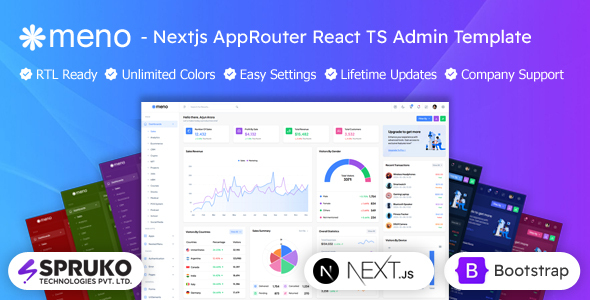
Meno is a Next.js admin dashboard template built with TypeScript and React Bootstrap. It offers 16 dashboard variations and 180+ pages for building data-heavy web applications fast.
Evaluating the Meno Next.js Admin Dashboard Template
Alright, let's talk about Meno. This is a Next.js admin dashboard template that uses TypeScript and React Bootstrap. It's designed for building internal tools, management systems, and web application interfaces where you need to display and manage a lot of data. Think of it as a starter kit to get a functional admin UI up quickly without starting from zero.
From what I've seen, it leans heavily into client-side rendering using Next.js's "use client" directive. This means the interactive parts of your dashboard load and run in the user's browser, which can make for a snappy user experience once everything is loaded. It’s a common approach for highly interactive applications where SEO isn't the primary concern for every single page.
Who Meno is Built For and Who Should Skip It
This Next.js admin panel template is clearly aimed at a few specific groups. If you're an agency needing to quickly prototype or launch client dashboards, or a freelancer building custom admin interfaces, this could save you a lot of grunt work. It's also a solid choice for product teams that need a robust, component-rich foundation for their web application's backend or internal tools. The Firebase integration is a nice touch for rapid full-stack development.
However, Meno is not for everyone. If you're new to Next.js, React, or TypeScript, the learning curve here will be steep. This isn't a drag-and-drop website builder. Also, if your project demands heavy server-side rendering for every single page for extreme SEO performance, or if you need very deep, custom backend logic beyond what Firebase offers out-of-the-box, you might find yourself fighting the template more than using it. It's a static template, so you're responsible for the actual data fetching and API integration.
Layouts and Core Components for Next.js Projects
Meno comes with a lot of pre-built content. You get 16 dashboard variations, which is quite a few, covering common use cases like sales, analytics, e-commerce, and CRM. There are over 180 pages included, which usually means variations of forms, tables, error pages, and utility screens. This volume of content means you'll likely find something close to what you need for most standard admin functions.
The included components leverage React Bootstrap, which is a familiar framework for many developers. This means the grid system and many UI elements will behave as expected if you've worked with Bootstrap before. The template also bundles a good number of plugins for charts (Apex, Chart.js, EChart), data tables (Grid JS), and file uploads (Filepond, Dropzone), which are often time-consuming to integrate from scratch.
- 16 Dashboard Variations for common business needs.
- 180+ Next.js Pages covering various admin screens.
- 60+ Integrated Plugins for charts, tables, and forms.
- React Bootstrap Framework for consistent UI elements.
Code Quality and Developer Experience with Meno
From a developer's perspective, the "no jQuery dependency" is a good sign. It means the codebase is built with modern JavaScript practices, which generally leads to better performance and easier maintenance. The mention of well-commented code is always a plus, as it helps new team members get up to speed faster and reduces long-term maintenance costs. The SASS architecture should be reasonably organized, making global style changes or custom branding less of a headache compared to themes that dump all CSS into one file.
The template also includes a built-in switcher panel for real-time customization of themes, layouts, and color modes. This is useful for quickly demonstrating options to clients or for developers to rapidly test different looks without recompiling. It helps ensure a consistent user experience across different devices, which is vital for any modern web application.
SEO Readiness for Admin Applications
While admin dashboards aren't typically SEO-heavy, a clean, semantic structure is still beneficial. Meno claims an "SEO-Optimized Structure" with clean, semantic code. This means the HTML elements are used correctly (e.g., `
` for main titles, `` for navigation), which helps with overall web accessibility and maintainability. For an admin application, this primarily benefits long-term site health and potentially the discoverability of public-facing login pages or documentation, rather than ranking for complex search terms.
The focus on optimized performance, being free of jQuery and built with modern JavaScript, also contributes to better Core Web Vitals. Fast loading times and smooth interactions are not just good for user experience; Google also factors these into its ranking algorithms, even if the direct impact on an internal admin panel is less critical than a public marketing site.
Final Verdict on This Next.js Admin Dashboard Template
Look, if you're building a Next.js application that needs a solid admin interface, Meno is a practical choice. It solves the problem of starting from a blank canvas for your data management UI, saving significant development hours on boilerplate setup and component integration. The sheer volume of pre-built pages and dashboard variations means you'll likely find a starting point for almost any common admin feature, which translates directly into faster project delivery for agencies and freelancers.
The trade-off is that while it’s highly customizable within its switcher options, deep, bespoke styling or unique UI patterns will still require a good understanding of Next.js, React, Bootstrap, and SASS. It’s a solid, functional base, not a magic bullet for complex custom design. After building multiple agency sites with tools like this, I can tell you that having a well-structured, component-rich template like Meno is a smart investment to accelerate development and maintain consistency across your projects.
FAQ
Does Meno support different layout orientations like RTL?Yes, the template includes support for both Left-to-Right (LTR) and Right-to-Left (RTL) layouts, along with vertical and horizontal navigation styles, which is helpful for internationalization.
Is it easy to change the overall color scheme or branding?The template features a built-in switcher panel that allows real-time customization of themes, layout styles, and color modes, making it straightforward to apply your brand's primary colors.
What level of Next.js knowledge is required to use this template effectively?You'll need a foundational understanding of Next.js, React, and TypeScript to customize and integrate this template effectively into a working application, as it's not a low-code solution.