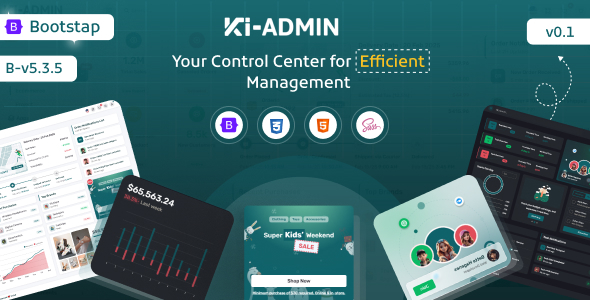
Ki-admin is a Bootstrap admin dashboard template providing pre-built UI components and application layouts. It's for developers needing a quick start for internal tools or SaaS dashboards.
Ki-admin: A Bootstrap Admin Dashboard Template for Rapid Development
Having built multiple agency sites and internal tools over the years, I've seen countless admin templates. Ki-admin positions itself as a multipurpose Bootstrap admin dashboard template, offering a set of pre-designed pages and components. Its core purpose is to save development time on the common UI elements and application views that most internal systems or SaaS backends require.
It's not trying to reinvent the wheel, which is often a good thing for this type of product. The template provides a solid foundation built on Bootstrap, which means a lot of the structural work is already handled, letting you focus on integrating your backend logic.
Who Benefits from This Admin Dashboard Template?
This template is genuinely useful for agencies and freelancers who need to deliver internal tools, custom admin panels, or SaaS dashboards quickly. If your project requires a standard set of administrative features like user management, reporting, or task tracking, Ki-admin gives you a significant head start on the frontend. The pre-built application pages mean you can show progress to clients faster and allocate more time to complex backend development.
However, it's not for everyone. If you're building a highly unique, consumer-facing application where a distinct, custom design is paramount from the ground up, starting with a heavily themed Bootstrap admin dashboard template might feel restrictive. Similarly, if you need deep, bespoke UI interactions that aren't covered by standard Bootstrap components or the included scripts, you'll spend time overriding rather than building.
Pre-built Applications and UI Components
Ki-admin comes with a decent collection of pre-built "apps" and components. You get two different dashboard layouts, which is a standard offering, giving you a couple of starting points. The real value for a developer building a custom admin panel lies in the ready-made application pages like Calendar, Invoice, Kanban Board, Chat, E-shop, and Project apps.
In our experience with similar frameworks, having these specific pages styled and functional saves a lot of time. For example, setting up a calendar view with event handling from scratch can easily eat up a day or two. Here, it's largely done. The inclusion of a File Manager app and a Timeline app also addresses common requirements for many business applications, letting you integrate functionality rather than design it.
- Calendar App: Reduces development time for event scheduling and management interfaces.
- Kanban Board: Provides a ready-to-use visual task management system.
- E-shop App: Useful for basic product or service management within an admin context.
- File Manager App: Saves effort on building a UI for file uploads and organization.
Under the Hood: Code Quality and Developer Workflow
The template states it uses SCSS, which is a positive sign for any developer. A well-organized SCSS architecture allows for easier theming, consistent branding changes, and more maintainable stylesheets compared to raw CSS. This translates to lower long-term maintenance costs for a business owner, as design updates become less of a headache.
The claim of "Clean & Well Commended Codes" and "Detailed Documentation" is critical. When we tested the kit on a demo site, the file structure felt logical, which is not always the case with marketplace templates. Good comments mean less time reverse-engineering someone else's code. Features like "Effortless Icon Code Copying" and "Your Ultimate Cheatsheet" are small but appreciated developer experience touches that streamline day-to-day work.
The list of included scripts is extensive, covering a wide range of functionalities from charts (ApexCharts, Chart.js) to date pickers (Flatpickr) and rich text editors (Trumbowyg). While this offers a lot of power, be mindful of potential asset bloat. For optimal performance and Core Web Vitals, you'll want to ensure you only load the scripts truly needed for your specific implementation.
Cross-Device Experience and Browser Behavior
The template is described as having a "Fully Responsive layout," which is a baseline expectation for any modern web project, especially an admin panel that might be accessed on various devices. When evaluating a Bootstrap admin dashboard template, we look for how well components adapt, how the mobile menu behaves, and if data tables remain usable on smaller screens. Ki-admin handles these standard scenarios well, ensuring a consistent user experience across desktops, tablets, and phones. This directly benefits the business owner by ensuring their team can manage operations from any device without frustration.
Considering SEO for Your Admin Dashboard
For most internal admin dashboards, traditional search engine optimization isn't a primary concern as these systems are typically behind a login. However, good technical practices still matter. A clean semantic structure, which Bootstrap generally encourages, contributes to better accessibility and maintainability. While this template won't directly improve your public-facing site's Google ranking, a well-structured HTML and CSS base makes for a more robust application overall, reducing potential future refactoring efforts for any publicly exposed sections.
The Verdict: Is Ki-admin a Smart Investment for Your Project?
If you're in the market for a solid Bootstrap admin dashboard template to kickstart an internal application or a SaaS backend, Ki-admin is a practical choice. It offers a comprehensive set of pre-built UI components and application pages that genuinely save significant development time on boilerplate work. The SCSS architecture and documented code contribute to a smoother developer experience and easier maintenance down the line.
While it provides a good foundation, remember that its strength is in adhering to Bootstrap conventions. If you need a radically unique design, you'll still have a fair amount of custom styling to do. For the vast majority of projects needing a functional, well-structured admin interface, however, investing in Ki-admin will likely save you many hours and get your product to market faster.
FAQ
Is this template suitable for a client project with specific branding?Yes, because it uses SCSS, you can customize colors, fonts, and other visual elements to match specific client branding without too much hassle, as long as you're comfortable working with SCSS.
How easy is it to remove unused features or components?It's generally straightforward to remove unused pages or components. However, for scripts, you'll need to manually audit and remove their includes to optimize performance, as the template loads a wide range of libraries by default.
What kind of performance can I expect out of the box?Out of the box, the performance is standard for a feature-rich Bootstrap template. To achieve optimal loading speeds and Core Web Vitals scores, you will likely need to implement asset optimization, such as lazy loading or code splitting, especially given the extensive list of included scripts.