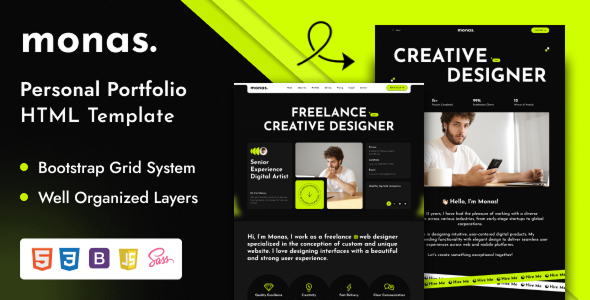
Monas is a personal portfolio HTML template built on Bootstrap, offering four home page layouts for designers, agencies, and freelancers to quickly launch their online presence.
Monas Personal Portfolio Template: A Quick Look for Freelancers
This Monas template is a straight-up HTML, CSS, and JavaScript package designed to get a portfolio online fast. It's not a WordPress theme or a full CMS; it's a collection of pre-built web pages. The main problem it solves is the initial setup and styling for a modern personal portfolio website, saving you from coding common sections from scratch.
In our experience building multiple agency sites with tools like this, the value here is in the foundational work. You get a visually cohesive starting point, which can shave a good chunk of front-end development time off a project, especially when you need to deliver a client portfolio website quickly.
Who Monas is For (and Who It Isn't)
Monas is best for individual freelancers, graphic designers, photographers, or small creative agencies who need a solid, visually appealing online portfolio. If you're comfortable with HTML, CSS, and basic JavaScript, or have a developer on hand who is, this template gives you a head start.
It's also a good fit for agencies needing fast turnarounds on simple portfolio sites for their clients. This template is not for someone looking for a content management system or deep custom backend logic. If your project requires complex interactive features beyond standard sliders and lightboxes, or if you're not keen on editing raw code, this might be more work than you're expecting.
Design Aesthetics and Layout Flexibility
The template's design was apparently put together in Figma first, which usually means the visual hierarchy and component spacing are well-considered. It uses a modern UI aesthetic, which feels current without being overly trendy. The 1800px grid system provides ample space for visual elements on larger screens, though the responsiveness needs to handle that width gracefully.
For fonts, it uses Bricolage Grotesque and DM Sans, both from Google Fonts. This is a practical choice, ensuring good loading performance and accessibility, which is a standard accessibility practice we look for. The "distinctive aesthetic" means it has a particular style; if that aligns with your brand, you're golden. If not, be prepared to tweak the CSS to match your vision.
Exploring Monas's Pre-built Pages and Components
You get four different home page layouts, two header variations, and four footer variations. This gives you some immediate choices to differentiate your personal portfolio. While it's not an endless array, these options are enough to provide distinct first impressions without overwhelming you.
The template incorporates several common JavaScript libraries like Swiper for sliders, Magnific Popup for lightboxes, and GSAP/Animate.css for animations. These are standard tools that save time implementing common interactive elements on a portfolio site.
- Four home pages: Offers different initial layout structures to quickly match various portfolio presentation styles.
- Multiple header and footer variations: Provides flexibility for branding and navigation without custom coding.
- Pre-integrated JS libraries: Saves development time for common features like sliders, popups, and scroll animations.
Code Structure and Developer Usability
Monas is built on a Bootstrap foundation, which is a big plus for most front-end developers. It means a familiar grid system, component styling, and a generally predictable structure. The description mentions cleanly structured HTML and layered groups, which suggests it won't be a nightmare to navigate the code when you need to make changes.
The template comes with "detailed documentation" and video guides. This is critical for any template, as it drastically reduces the time spent figuring out how things work or where to change specific elements. For a non-technical business owner, good documentation means lower maintenance costs because developers can get up to speed faster.
- Bootstrap foundation: Offers a familiar, well-documented base for developers, reducing the learning curve and making future updates easier.
- Valid HTML5 / CSS3: Ensures the code adheres to web standards, leading to better browser compatibility and long-term maintainability for your personal portfolio website.
- Detailed documentation: Speeds up customization and troubleshooting, saving developer time and effort, which translates to lower project costs.
Device Responsiveness and Browser Support
The template is responsive and retina-ready, which is an absolute must these days. It also claims to be touch-friendly and cross-browser compatible. In our experience, these claims usually hold up for modern browsers. The important thing here is that your portfolio will look good and function correctly across various devices, from desktops to phones, and in different web browsers. This ensures everyone visiting your site gets a consistent and positive experience, which is crucial for potential clients.
Technical SEO Considerations for Your Portfolio
With valid HTML5 and CSS3, Monas provides a clean semantic structure, which is a good baseline for search engine optimization. It means the content is organized in a way that search engines can easily understand and index. There aren't any advanced SEO features built-in, like specific schema markup for portfolios, but the clean code means you have a solid foundation to add those as needed. This helps your personal portfolio website be discoverable by search engines, attracting more potential clients.
The Verdict: Is Monas Worth Your Time and Money?
If you're a freelancer or a small agency looking for a quick, presentable personal portfolio HTML template, Monas is a solid option. It delivers a clean design, a familiar Bootstrap base, and enough pre-built variations to get you started without reinventing the wheel. The detailed documentation is a significant plus, especially for those who want to minimize setup headaches.
While the reliance on multiple animation libraries (GSAP, Animate.css) can sometimes lead to slightly heavier page loads if not optimized, it's a common trade-off for visual flair in templates like this. For agencies needing fast turnarounds on portfolio sites, or individuals wanting a polished online presence without a full custom build, investing in Monas makes sense. It saves you considerable front-end development and design time, letting you focus on showcasing your actual work.
FAQ
Is Monas a WordPress theme?No, Monas is an HTML template. This means it's a collection of static HTML, CSS, and JavaScript files, not a dynamic WordPress theme.
Can I easily change the color scheme or fonts?Yes, you can change colors and fonts by editing the CSS files. Since it uses Google Fonts, swapping them out is straightforward.
Does this template include a content management system?No, Monas does not include a content management system. You will need to manually edit the HTML files to update your content.
How difficult is it to add new pages or sections?Adding new pages or sections requires you to duplicate existing HTML files and modify them, or to create new HTML and CSS from scratch, depending on your needs.