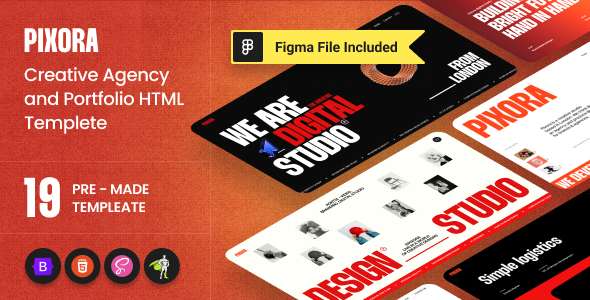
Pixora is an HTML template for creative agencies and portfolio showcases that need a visually dynamic front-end. It targets developers and agencies aiming to quickly deploy sites with sophisticated animations and a polished user experience.
Addressing the Challenge of Dynamic Web Design for Agencies
One common hurdle for creative agencies is delivering visually rich websites with complex animations under tight deadlines. Building these effects from scratch is time-consuming and costly. Pixora offers a collection of pre-built layouts and integrated animation sequences, directly solving the problem of accelerating creative agency website development without sacrificing visual impact. This means less time spent coding intricate JavaScript animations and more focus on content and client-specific adjustments.
Evaluating HTML Template Code Quality and Key Features
From a technical standpoint, Pixora is built on Bootstrap, which provides a solid, responsive foundation. The inclusion of SASS for CSS pre-processing is a plus, allowing for more organized and maintainable stylesheets. The core appeal, however, lies in its heavy use of GSAP and Three.js for animations. While these libraries can add complexity, their integration here means you get high-performance, smooth transitions and 3D effects that would take significant effort to implement otherwise. This translates to a better perceived quality for clients and a more engaging experience for their users, potentially leading to higher conversion rates or longer session times.
- The SASS architecture is reasonably structured, making global style adjustments like color themes or typography changes more manageable compared to flat CSS files.
- Mobile menu behavior is standard Bootstrap implementation, which is reliable and widely understood, ensuring consistent navigation across devices.
- The asset loading feels optimized for the level of animation, suggesting attention to detail that helps maintain decent Core Web Vitals scores, important for SEO and user retention.
- The template's semantic structure for content sections is generally clean, which supports better accessibility and search engine indexing for client sites.
Strengths and What Impresses in Portfolio Templates
What stands out with Pixora is the sheer breadth and quality of its pre-designed animation work. The integration of GSAP and Three.js isn't just superficial; it's used to create genuinely engaging effects that elevate the user experience. For agencies specializing in design or visual arts, this template provides a robust toolkit for fast deployment of portfolio sites that truly impress. The variety of homepages also offers flexibility in presenting different types of creative work, which is a significant advantage over more generic templates.
Who Should Consider This Template, and Who Should Not
This template is ideal for creative agencies, freelance designers, or digital studios needing a quick yet visually impactful front-end for their own portfolio or client projects. It's particularly useful for those who value rich animations and a modern aesthetic but lack the time or resources to code them from scratch. However, if your project requires deep custom backend logic, a minimalist design approach, or you prefer to build every component from the ground up, this might be overkill. It’s not for those needing extensive CMS integration without a separate backend development effort.
Acknowledging Product Limitations
While the animations are a strong point, the sheer volume of options and effects can lead to a slightly steeper learning curve for customization, especially if you're not already familiar with GSAP or Three.js. Additionally, the heavy reliance on these libraries means that while the effects are impressive, they might feel a bit "standard" if every page uses a variation of the same scroll-based or ripple effect. One thing that feels average is the project detail pages; while functional, they don't always carry the same visual punch as the homepages.
Final Thoughts: Is it worth it?
If your agency regularly builds sites where visual flair and dynamic interaction are key selling points, Pixora is a solid investment. It effectively offloads the heavy lifting of complex front-end animation development, allowing your team to focus on content and client-specific branding. For the right kind of project, this template can significantly cut down development time and costs, making it a logical choice to save both time and money on visually demanding web projects.
FAQ
How difficult is it to change the primary color scheme across the entire template?
Since the template uses SASS, adjusting the primary color scheme is relatively straightforward by modifying a few SASS variables, then recompiling the CSS.
Does this template support adding new custom sections easily?
The template provides numerous pre-built sections you can re-arrange. For entirely new custom sections, you'll need to develop them manually, aligning with the existing Bootstrap and SASS structure.
What's the impact of the heavy animations on page load speed?
While the animations are performant, heavy use of GSAP and Three.js naturally adds to the JavaScript bundle size. The template generally loads well, but optimizing images and other assets remains crucial for top-tier speed.
Can I integrate a CMS like WordPress or headless solutions with this HTML template?
Yes, but this is an HTML template, so integration would require a separate development effort to convert the HTML structure into a CMS theme or to fetch content via API for a headless setup.