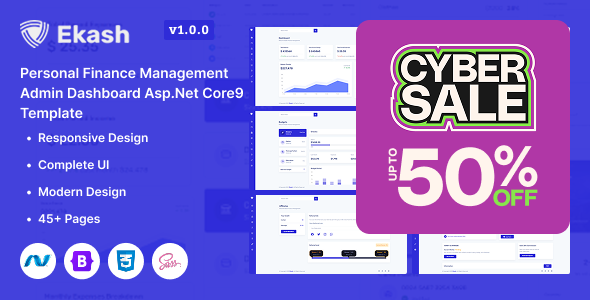
Ekash offers a solid ASP.NET Core 9 admin dashboard template, perfect for developers building personal finance management applications and financial web apps. It provides pre-built pages, 150+ UI components, and light/dark modes, ideal for developers building financial web applications.
A Practical Look at the Ekash ASP.NET Core Dashboard
This template is an ASP.NET Core 9 frontend admin dashboard. It gives you a ready-made user interface for web applications, especially those in the finance sector. What it does well is provide a comprehensive starting point, meaning you do not have to build common UI elements from scratch. This approach is standard for admin templates and helps keep the project focused purely on the visual presentation and user interaction.
The core problem Ekash solves is accelerating UI development for data-heavy applications. Instead of spending weeks on styling tables, charts, and common financial layouts, you get a polished foundation. This saves significant development time, allowing teams to focus on the backend logic and specific business requirements.
Who Should Use This Finance Admin Template (and Who Shouldn't)
Ekash is a good fit for agencies and freelance developers who need to quickly prototype or deploy a personal finance management dashboard. If you are comfortable with ASP.NET Core and primarily focused on the frontend presentation layer, this template offers a robust starting point. It is particularly useful for those building financial web apps where a consistent, data-rich interface is critical.
However, Ekash is not for everyone. Beginners expecting a full-stack solution with integrated backend logic will be disappointed; you need to connect your own database and server-side code. It is also not ideal for teams needing a deeply custom UI framework outside of Bootstrap's conventions. If your project requires a completely unique design system from the ground up, a pre-built Bootstrap template might feel restrictive. Lastly, users unfamiliar with ASP.NET Core's Razor Pages or MVC structure will face a steeper learning curve.
Design and Visuals for Financial Dashboards
The template delivers a clean, functional design, which is essential for data-intensive financial applications. It includes both light and dark modes, a practical feature that allows users to choose their preferred viewing experience, especially important for prolonged use or varying lighting conditions. While the design is not groundbreaking, it is professional and provides a familiar, usable aesthetic that users will find easy to navigate.
It is built to be fully responsive, adapting well to desktops, tablets, and mobile phones. This means a consistent user experience across different devices, which is a basic expectation today. The visuals are crisp on high-resolution screens, ensuring clarity for detailed financial charts and tables.
Components and Layouts for Finance Management
Ekash comes with pre-designed pages for common personal finance management dashboard features like Wallets, Budgets, Goals, and Transaction History. This is where the template truly shines for its niche. Having these specific financial layouts ready to go means less time spent on initial setup and more time on data integration.
The template includes over 150 UI components, which is a comprehensive set of common elements. You get various data tables with sorting and pagination, interactive charts (integrating popular libraries like ApexCharts), forms, buttons, and icons. For a developer, this means less time wiring up basic UI elements and more time on the unique aspects of their financial application. The inclusion of multiple dashboard variations, covering CRM, eCommerce, Cryptocurrency, and Investment, also shows its flexibility beyond just personal Finance.
Code Quality and Developer Experience
Built with ASP.NET Core 9 and Bootstrap, Ekash uses widely adopted and well-understood technologies. This is a big plus because it means most developers familiar with modern web stacks can jump in quickly. The code is well-organized and commented, which is crucial for maintainability and onboarding new team members, ultimately reducing long-term maintenance costs.
From our experience with similar frameworks, working with Ekash feels straightforward. Customizing primary colors and layouts is manageable for anyone familiar with Bootstrap's SASS architecture and utility classes. Asset loading for CSS and JavaScript is handled efficiently, contributing to good performance metrics like Core Web Vitals, which translates to a faster, smoother experience for end-users. The W3C validated code provides a clean semantic structure for SEO and accessibility, ensuring a solid foundation even for internal admin tools.
Responsiveness and Browser Support
The template is designed to be fully responsive, ensuring it looks and functions correctly across various screen sizes, from large desktops to small mobile phones. This is a standard expectation for any modern web application. It also supports all modern browsers, which means you do not have to worry about compatibility issues for your users, providing a consistent experience regardless of their browsing choice.
SEO Readiness for Admin Interfaces
While an admin dashboard is typically an internal tool not directly exposed to public search engines, its underlying code quality still matters. Ekash's clean HTML structure and W3C validation provide a good semantic foundation. This benefits accessibility, makes the code easier for future developers to understand, and ensures efficient parsing by browsers, which can indirectly contribute to a more performant application. It sets a good base if any part of the application were ever to become public-facing.
Final Verdict on Ekash for Financial Web Apps
After building multiple agency sites with tools like this, Ekash stands out as a solid frontend template for anyone tackling an ASP.NET Core personal finance management dashboard. It delivers a comprehensive set of pre-built pages and components specifically tailored for financial data visualization, which is a huge time-saver. The familiar Bootstrap foundation means you are not locked into an obscure framework, making it easy for any developer to pick up and customize.
The main trade-off, as with any frontend-only template, is that you are responsible for all backend integration and database logic. While the design is clean and functional, it is also quite standard, so if you are aiming for a truly unique visual identity, you will need to invest significant effort in custom styling on top of the Bootstrap base. Overall, Ekash is a smart investment for developers looking to rapidly deploy a robust, professional-looking admin interface for financial web apps, significantly cutting down on initial UI development time and costs.
FAQ
Does Ekash include a database or backend logic for transactions?No, Ekash is a frontend-only template. You will need to integrate your own backend logic, database, and API for handling transactions and other data.
Is this template compatible with older ASP.NET Core versions?Ekash is built specifically with ASP.NET Core 9. While some components might be compatible, using it with older versions would likely require significant modifications and testing.
How difficult is it to customize the overall look and feel?Customization is straightforward if you are familiar with Bootstrap and CSS. The template is modular, allowing you to change colors, fonts, and layouts using standard Bootstrap methods.
What kind of developer support is available for Ekash?The product description mentions dedicated support and regular updates, which is standard for Themeforest items. This typically means assistance with template-related issues and bug fixes.