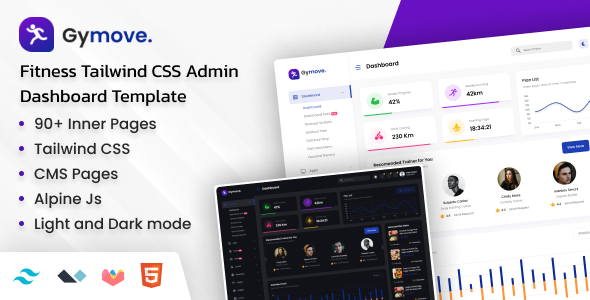
Gymove: A Tailwind CSS admin dashboard template for fitness apps. It offers multiple demos, color schemes, and layout options for developers needing a pre-built admin interface.
Gymove: A Tailwind CSS Admin Dashboard Template for Fitness Applications
Gymove is a pre-built admin dashboard template built with Tailwind CSS and Alpine.js. If you're building a fitness application or any backend interface that needs a clean, functional admin panel, this template provides a solid starting point. It's designed to save you time on the foundational styling and layout of your dashboard.
Who Needs Gymove and Who Should Look Elsewhere
This template is a good fit for developers and agencies who need to spin up a functional admin area quickly. If you're working on a fitness app, a gym management system, or any project requiring a data-heavy backend with user management and reporting, Gymove can shave off a significant chunk of development time. It’s particularly useful if you're already comfortable with Tailwind CSS and want to avoid building common dashboard components from scratch. This is not for those looking to build a highly custom backend from the ground up with a unique architectural approach. If your project requires deep integration with complex, custom backend logic or a very specific, non-standard UI, you might find this template too opinionated.
Solving the "Boilerplate Blues" for Admin Interfaces
The core problem Gymove solves is the repetitive nature of building standard dashboard layouts. Think about setting up navigation, cards for displaying metrics, forms, tables, and user profile sections. These are common elements in almost any admin panel. Gymove provides these out of the box, using Tailwind CSS for styling, which means the CSS is generally well-organized and utility-first. This allows for quicker customization of colors, spacing, and typography without digging through deeply nested CSS files. For someone needing to build a fitness app dashboard, it means you can focus on the unique features of your application rather than reinventing the wheel for basic UI elements. The inclusion of multiple demos and layout options means you have flexibility to choose a structure that best suits your specific project's data flow and user interaction needs.
Code Quality and Developer Experience
From a developer's perspective, the use of Tailwind CSS is a major plus. The CSS is typically clean and organized around utility classes, making it easier to understand and modify without fear of breaking other parts of the UI. The template appears to follow standard HTML5 and semantic accessibility practices, which is crucial for any application aiming for good SEO and usability. The code organization is generally well-commented, which is standard for well-maintained templates and helps in understanding how different components are structured. The practical benefit here is reduced maintenance overhead and easier onboarding for new developers joining a project using this template.
Layouts, Pages, and Components
Gymove comes with a substantial number of HTML pages, reportedly over 100, spread across several pre-defined demos. This includes various page templates for dashboards, user profiles, forms, tables, and error pages. The flexibility in header and sidebar layouts, including collapsible and compact options, is a practical feature. This allows you to adapt the navigation structure to fit the complexity of the data you're presenting. The responsive nature of these layouts ensures a consistent experience across different devices, which is essential for any modern web application.
eCommerce and Business-Related Features
While the primary focus is on a fitness admin dashboard, the template includes features that are relevant for managing a business. The inclusion of table components, form elements, and data visualization charts (using libraries like Apexcharts, Chart.js, etc.) are key for reporting and analytics. If your fitness application involves membership management, booking systems, or tracking user progress, these components provide the building blocks for such functionalities. The template doesn't appear to be a full-fledged eCommerce solution, but the underlying structure can certainly support business-oriented dashboards.
Responsiveness and Compatibility
The template emphasizes being super responsive for all latest browsers and mobile devices. This is a critical aspect for any admin panel, as users might access it from various devices. The use of Tailwind CSS inherently promotes a mobile-first approach, meaning layouts are designed to adapt well to smaller screens. This focus on responsiveness ensures that your dashboard remains functional and usable whether viewed on a desktop, tablet, or smartphone, contributing to a better overall user experience.
SEO Readiness
The template is described as SEO optimized. In the context of an admin dashboard, this likely refers to the clean HTML structure and semantic markup, which are good for search engine crawlers if any part of the admin interface were to be indexed. The use of standard HTML elements and proper heading structures contributes to this. While the direct impact on public-facing SEO might be minimal for a backend interface, it’s a good practice that ensures the underlying code is clean and accessible.
Final Thoughts: A Practical Tool for Dashboard Development
Gymove is a solid choice if you need a pre-built admin dashboard template for a fitness-related project or any application that benefits from a structured backend interface. It leverages Tailwind CSS effectively, providing a good foundation for customization. While it offers many features and pages, remember that it’s a template, and significant customization might still be required to perfectly match a unique brand or complex functionality. However, for speeding up the initial development of a dashboard, it’s a worthwhile investment that can save considerable time and effort.
FAQ
What is the primary use case for the Gymove template?
The Gymove template is primarily designed for building admin dashboards for fitness applications, gyms, or any project requiring a functional backend interface with data visualization and user management features.
Is Gymove suitable for beginners with Tailwind CSS?
Yes, if you have some basic understanding of Tailwind CSS, Gymove can be a great starting point. Its utility-first approach makes it relatively easy to customize, but a complete beginner might find the sheer number of options overwhelming initially.
Can I use Gymove for non-fitness related admin panels?
Absolutely. While branded for fitness, the core components and layout options are versatile enough to be adapted for various types of admin dashboards, such as project management, internal tools, or data analytics platforms.
What is the benefit of the light and dark mode feature?
The light and dark mode feature enhances user comfort and readability by allowing users to switch between interfaces based on their preference or ambient lighting conditions, which is a standard accessibility and user experience consideration.