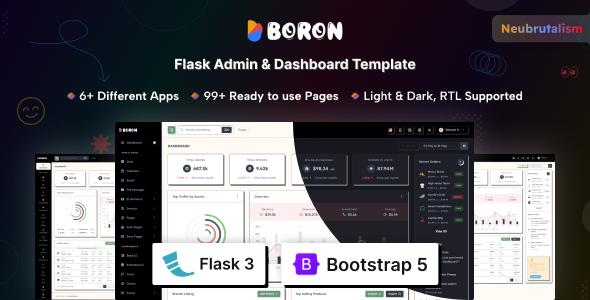
Boron Flask Admin Dashboard Template is a pre-built UI kit for Flask applications, designed for developers who need a quick, opinionated start to their Python backend interfaces.
Streamlining Flask Admin Panel Development for Python Projects
This template addresses the common developer problem of spending too much time building out standard admin UI elements for Flask applications. Instead of coding authentication flows, data tables, forms, and basic dashboards from scratch, Boron provides a ready-to-use foundation. For agencies or solo developers working on Python backend projects, this translates directly into saved hours, allowing focus on core application logic rather than repetitive frontend setup.
Evaluating Boron's Technical Standards and UI Kit Features
Boron is built on Bootstrap, which provides a solid, familiar framework for most web developers. The integration with Vite for asset compilation is a smart move, indicating a modern development workflow that helps with faster page loads and improved Core Web Vitals. The SCSS architecture is well-structured, making global style changes straightforward, which is crucial for maintaining a consistent brand identity without deep diving into countless CSS files.
In our experience with similar frameworks, the inclusion of comprehensive UI components, various chart libraries, and pre-built application layouts like an ecommerce dashboard or file manager saves significant development time. The template's semantic structure for forms and data displays also sets a good baseline for accessibility, an often-overlooked aspect in rapid development. It's a robust starting point for anyone looking for a reliable Flask admin dashboard template for Python projects.
- The SCSS variable setup allows for quick, centralized branding adjustments, meaning lower maintenance costs for clients.
- Vite integration contributes to efficient asset loading, which improves user experience and can positively impact SEO through faster page speeds.
- Responsive design ensures the admin panel functions well on any device, providing a consistent experience for users managing content on the go.
- Pre-built auth pages cover common scenarios like 2FA and password recovery, reducing the boilerplate code needed for user management.
- The Neubrutalism design is a distinct aesthetic choice, offering a fresh look compared to many generic admin templates.
Key Strengths of this Bootstrap Admin UI Kit
What impresses most is the sheer breadth of pre-built pages and components. From various error pages to detailed forms and multiple chart types, it covers nearly every common admin panel requirement. The consistent application of the Neubrutalism design across all these elements gives the template a cohesive, if specific, identity. For developers needing a Bootstrap admin UI kit that handles most of the frontend heavy lifting, Boron provides a strong, opinionated starting point.
Who Benefits from a Rapid Prototyping Admin Panel for Flask?
This template is ideal for individual developers or small teams building internal tools, SaaS dashboards, or any Flask-based application requiring a backend interface. It's particularly useful for those who prioritize rapid prototyping admin panel for Flask projects and appreciate having a distinct design language already in place. However, it is not for projects that require a completely unique design from the ground up, or those needing deep, custom backend logic tightly coupled with the UI out-of-the-box.
Understanding the Limitations of the Boron Admin Template
While the Neubrutalism design is a strength for some, it's also the template's most significant limitation. If your project's brand guidelines don't align with this aesthetic, you'll spend considerable time overriding styles, potentially negating some of the time-saving benefits. The Flask integration is a starting point; the built-in apps like "Ecommerce" or "Chat" provide UI, but the underlying Flask logic and database models still need to be implemented, which is standard for templates but worth noting.
Final Thoughts: Is it worth it?
If you're building a Flask application and need a functional, visually distinct admin interface quickly, Boron is a solid investment. It handles a lot of the tedious UI work, allowing you to focus on your application's unique features. The modern tech stack and thoughtful SCSS organization mean it's not just a quick start, but also a maintainable foundation, ultimately saving significant development time and cost.
FAQ
How easy is it to integrate Boron with an existing Flask application?Integrating Boron requires adapting your existing Flask routes and views to use its Jinja templates and static assets. It's manageable if your Flask application follows a standard structure, but some refactoring might be needed for complex setups.
Can I change the design style beyond the Neubrutalism concept?Yes, you can change the design, but it will require significant SCSS overrides and potentially modifying the core component styles. While possible, it might be time-consuming if you aim for a completely different aesthetic.
What's the typical workflow for adding new data models to the dashboard?The workflow usually involves creating your Flask models, setting up new routes and views, then building out the corresponding HTML tables and forms using Boron's existing UI components and styling conventions.
Is this template suitable for a multi-user admin system with different access levels?Boron provides the frontend for authentication and user pages, but the actual backend logic for managing multiple users, roles, and permissions needs to be implemented within your Flask application.