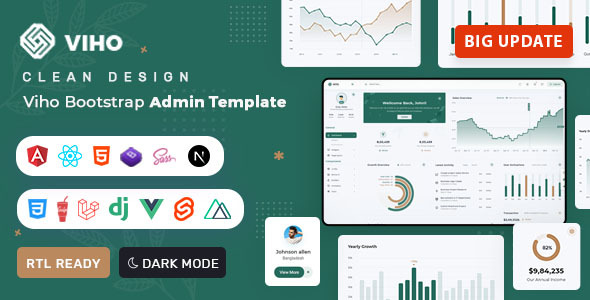
Viho is a Bootstrap 5 admin and dashboard template built with HTML, CSS, and SASS, offering a wide array of reusable UI components for custom admin panels, app backends, and CMS/CRM systems. This template is suitable for developers needing a solid foundation for web applications that require a functional administrative interface.
Viho Bootstrap Admin Template: A Foundation for Web Application Backends
Viho is essentially a pre-built set of HTML, CSS, and JavaScript components designed to serve as the administrative backend for web applications. Think of it as a starter kit for building dashboards, control panels, or internal tools. It’s built on Bootstrap 5, which means it adheres to standard web development practices and offers a predictable structure for styling and layout.
The primary problem this template solves is the time sink involved in building common administrative UI elements from scratch. Instead of spending hours creating data tables, forms, charts, and navigation menus, you get a ready-made system. This is particularly useful for projects where the admin interface isn't the main focus but still needs to be functional and presentable.
Who Benefits from the Viho Admin Template and Who Should Look Elsewhere
This template is a good fit for agencies and freelance developers who need to quickly spin up functional admin areas for client projects. If you're building a custom application and need a robust backend interface without reinventing the wheel, Viho can significantly speed up your development cycle. It's also suitable for internal tools or MVPs where a polished admin interface is required early on.
However, if you're looking for a template to build a public-facing website with dynamic content, or if your project requires a highly unique and custom front-end design, this is probably not the right tool. It’s also not for those who need deep, custom backend logic beyond what standard admin panels typically offer. Developers who prefer to build their entire UI from the ground up, or who have very specific framework requirements not covered by the included versions, might find it restrictive.
Layouts, Pages, and Components for Functional Dashboards
Viho comes with a variety of pre-built layouts and components. This includes different dashboard variations, light and dark themes, and box layouts, giving you some initial choices for the overall look and feel. The collection of reusable UI components is extensive, covering everything from basic form elements and buttons to more complex data tables with export options and various chart types.
- Multiple Dashboard Options: Provides different starting points for your admin interface.
- Reusable UI Components: Saves time by offering ready-to-use elements for forms, tables, charts, and more.
- Data Table Functionality: Includes features for displaying and exporting data in formats like CSV, Excel, and PDF, which is standard for many backend applications.
eCommerce or Business-Related Features
While Viho is primarily an admin template, its component-rich nature means it can be adapted for certain business-related functionalities. The inclusion of data tables with export options and various chart types supports data analysis and reporting, which are crucial for many business applications. Features like multi-file uploads and range sliders are also common requirements in backend systems for managing data or settings.
Code Quality and Developer Experience
In our experience with similar frameworks, Viho appears to be built with SASS, which is a standard and efficient way to manage CSS. The description mentions clean and well-commented code, which is a good sign for maintainability. The inclusion of Gulp suggests a build process that can help automate tasks like compilation and minification, leading to cleaner, more optimized front-end assets.
- SASS Architecture: Allows for more organized and maintainable CSS.
- Gulp Integration: Aids in automating development workflows, potentially leading to faster build times and cleaner output.
- W3C Validated Code: Indicates adherence to web standards, which is good for long-term compatibility and accessibility.
The practical benefit of clean code and a good build process is that future updates or modifications to the admin interface are less likely to break existing functionality, reducing maintenance costs.
Responsiveness and Compatibility
The template is described as fully responsive, meaning it should adapt to different screen sizes, from desktops to mobile devices. This is a standard requirement for modern web applications, ensuring a consistent user experience across all platforms. Building with Bootstrap 5 also implies good cross-browser compatibility, as Bootstrap itself is well-tested across major browsers.
SEO Readiness
As an admin template, the primary focus isn't on the SEO of public-facing pages, but rather on the structure of the administrative interface itself. The mention of W3C validated code suggests a clean semantic structure, which is beneficial for internal tooling and accessibility. This means the HTML is likely well-organized, making it easier for developers to understand and for assistive technologies to interpret.
Viho: A Solid Starting Point for Your Next Admin Project
Viho provides a comprehensive set of pre-built components and layouts that can save considerable development time when building administrative interfaces. It’s a practical choice for developers who need a functional and organized backend foundation quickly. While it's not a magic bullet for every web development need, its focus on core admin functionalities makes it a smart investment for specific project types, particularly for those needing to create an effective internal tool or app backend.
FAQ
Is Viho suitable for a beginner developer?Yes, if the beginner is comfortable with Bootstrap and basic HTML/CSS. The pre-built components simplify the process, but understanding the underlying framework is still beneficial.
Does Viho include any backend code or is it purely front-end?Viho is a front-end template. It provides the HTML, CSS, and JavaScript for the user interface but does not include server-side logic or database integration. You will need to connect it to your own backend.
What is the advantage of the SASS architecture in Viho?SASS allows for more organized and maintainable CSS code through features like variables, nesting, and mixins, which can speed up development and make future style adjustments easier.
How does Viho handle data visualization for reports?The template includes various chart options that can be used to visualize data, which is a common requirement for administrative dashboards and reporting tools.

.__large_preview.png)