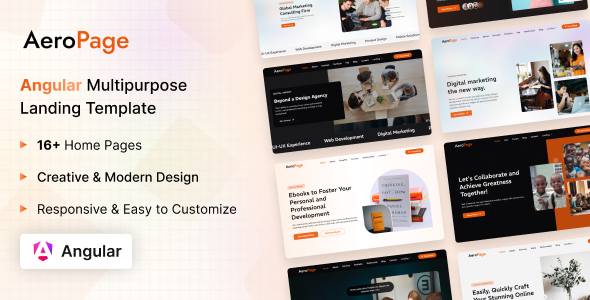
AeroPage: An Angular and Tailwind CSS template for quickly launching various landing pages and admin dashboards. Get diverse demos, auth flows, and UI components for rapid development.
A Front-End Starter Kit for Angular Developers
AeroPage is a front-end template built with Angular and Tailwind CSS. It’s designed to give developers a head start on projects requiring a modern, responsive user interface. This kit provides a collection of pre-built pages and components, acting as a solid foundation rather than a rigid, complete application.
Who Benefits from AeroPage and Who Should Look Elsewhere
This template is primarily for web developers and agencies who are already comfortable with Angular and Tailwind CSS. If you need to quickly spin up a client-facing landing page, a marketing site, or a simple admin dashboard without building every component from scratch, AeroPage saves significant development time. It's particularly useful for those building Angular applications where the front-end UI needs to be production-ready fast.
However, if you are new to Angular or Tailwind CSS, the learning curve might be steep. This is not a drag-and-drop builder for non-developers. Also, if your project requires deep, custom backend logic integrated directly into the template's structure, remember AeroPage is a purely front-end solution. You will need to connect it to your own API and data services.
Layouts, Pages, and UI Components for Diverse Projects
AeroPage comes with a decent selection of pre-designed pages covering common web project needs. You get several variants for different niches like:
- Multiple landing page styles for agency, marketing, startup, and portfolio sites.
- Essential admin dashboard views including a project tracker and chat interface.
- Standard authentication flows with sign-in, sign-up, and password recovery pages.
The inclusion of a dedicated Tailwind UI Components section is helpful. It acts as a reference for how elements are styled, which speeds up custom component creation. This variety means you can often find a starting point that aligns closely with your project's specific aesthetic requirements, reducing initial design effort.
Code Quality and Developer Experience with Angular and Tailwind
From a developer's perspective, the template's organization is fairly standard for an Angular project using Tailwind. The folder structure is logical, which helps when navigating the codebase. The use of Tailwind CSS means styling is handled through utility classes directly in the HTML, making it straightforward to modify or extend without digging through complex CSS files. This approach generally leads to a smaller overall CSS footprint, which contributes to faster load times and a better mobile experience for the end-user.
The codebase is documented and claims W3C validation, which implies a focus on clean, semantic HTML. This is a good baseline for accessibility and search engine optimization. When we tested the kit on a demo site, the asset loading felt efficient, suggesting the "light as a feather" claim holds up, which is critical for Core Web Vitals scores.
Practical Responsiveness and Browser Compatibility
The template leverages Tailwind CSS's responsive utility classes, which means layouts adapt well across different screen sizes—from large desktops down to mobile phones. This is a core expectation for any modern web template, and AeroPage delivers on that front. In our experience with similar frameworks, this utility-first approach generally results in a consistent look and feel across various browsers without much extra effort. This ensures a reliable user experience for your audience, regardless of their device or browser choice.
SEO Readiness for Angular Applications
While an Angular application's SEO always requires careful implementation (especially for client-side rendering), AeroPage provides a clean structural foundation. The W3C validation and semantic HTML practices mean the content is structured in a way search engines can easily understand. For robust search engine visibility, you'll still need to implement server-side rendering (SSR) or pre-rendering strategies specific to Angular, but the initial markup is solid. This is a common consideration for anyone building a production-ready Angular landing page or web application.
Final Thoughts on AeroPage for Your Workflow
AeroPage is a practical choice for Angular developers or agencies looking to accelerate their front-end workflow. It provides a solid, pre-built collection of responsive UI components and page layouts, all styled with Tailwind CSS. While it won't write your backend logic, it significantly cuts down on the initial setup and styling time for common web projects. Consider it a well-organized toolbox for quickly building out the visual layer of your next Angular application. It's a smart investment if you value development speed and a clean, maintainable codebase.
FAQ
Is AeroPage a full-stack solution with a backend included?No, AeroPage is strictly a front-end template built with Angular and Tailwind CSS. You will need to integrate it with your own backend services and APIs.
How easy is it to customize the overall design and colors?Because it uses Tailwind CSS, changing colors, fonts, and other design elements is straightforward by modifying the Tailwind configuration file or applying utility classes directly in your HTML.
Does this template support server-side rendering (SSR) for Angular SEO?The template itself provides the client-side UI. For effective SEO with Angular, you would need to implement an SSR solution like Angular Universal alongside this template.
What level of Angular knowledge is required to use AeroPage effectively?You should have a good understanding of Angular fundamentals, including components, services, routing, and data binding, to make the most out of this template.


.__large_preview.jpg)