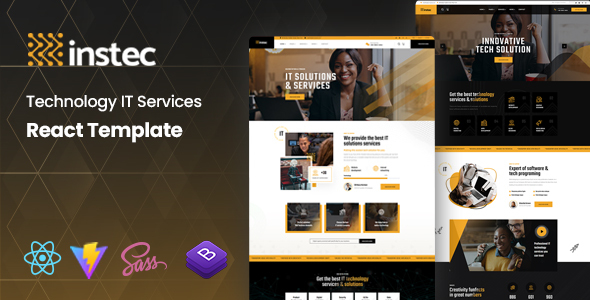
Zotech is a clean HTML template for IT services and tech startups, offering 4 homepages, SASS, and Bootstrap. Build fast, responsive sites for your clients without CMS bloat.
Zotech: A Practical HTML Template for IT Services
This Zotech template is a static HTML, CSS, and JavaScript kit aimed squarely at IT service websites and tech startups. It’s built on Bootstrap and uses SASS, which means you get a structured starting point for a range of technology-focused businesses like cybersecurity firms, SaaS providers, or data centers. The core idea here is to give you a solid front-end without the overhead of a content management system, letting you deploy quickly if a static site fits the client's needs.
Who This IT Solutions Template Is For (And Who It Isn't)
This kit is a good fit for agencies and freelancers who need to spin up a professional-looking site quickly for clients in the IT and technology sector. If your client requires a straightforward online presence, a brochure site, or a simple lead generation page, this template provides the necessary layouts and components to get there fast. It's particularly useful for those who want to avoid WordPress or other CMS platforms for performance or security reasons, preferring a lean HTML template for IT service websites.
However, Zotech is not for everyone. If your project demands a full-fledged content management system for daily updates by non-technical staff, complex e-commerce functionality, or intricate backend logic, this isn't your solution. It’s an HTML template, meaning dynamic features will require custom development and integration, which adds to the project scope.
Visuals and Structure: A Look at Zotech's Design
Zotech offers four distinct homepages, which is a decent starting point for variety. The designs lean into current trends for technology startup templates: clean lines, ample white space, and a focus on clear typography. In our experience, these layouts provide a professional, trustworthy feel that clients in the IT sector generally appreciate. The inclusion of SASS means you can adjust colors, fonts, and spacing globally from a few variables, making brand customization straightforward without digging through endless CSS files.
The template handles images and media well, with retina optimization ensuring sharp visuals on high-density screens. This attention to detail is crucial for making a site feel polished and modern, which directly impacts a business owner's perception of quality and professionalism.
Included Pages and Components for Technology Websites
You get a good selection of pre-built pages: Services, About Us, Why Choose Us, Contact, Testimonials, and various blog layouts. This covers most of what an IT or technology company needs for a marketing site. The structured approach to these common pages saves significant development time compared to building them from scratch, allowing you to focus on content and specific client requirements rather than basic layout construction.
- Services pages: Well-designed to list and describe various IT offerings.
- Testimonial sections: Essential for building trust and credibility in the service industry.
- Blog layouts: Provides a standard framework for content marketing, which is important for organic search visibility.
Business Features: Beyond the Standard Marketing Pages
While this isn't an e-commerce platform, the business-focused pages are well-considered for an IT service provider. The service listing pages are structured to highlight offerings clearly, and the testimonial sections are effective for social proof. There’s also a functional PHP-based contact form script included, which is a standard convenience for lead capture, though its implementation is basic.
For a business owner, these components translate into a website that can effectively present their services, collect inquiries, and build client confidence, all without the complexity of a database-driven system for a basic online presence.
Under the Hood: Zotech's Code Quality and Developer Workflow
The template is built on Bootstrap, which provides a solid, well-understood grid system and component library. The use of SASS for styling is a big plus for developers, allowing for organized, maintainable CSS. When we tested the kit on a demo site, the SASS architecture made global style changes efficient, a far cry from the spaghetti CSS often found in cheaper templates.
The HTML files are W3C valid, which is a good sign for clean code and semantic structure, aiding in search engine understanding. The documentation is clear and includes screenshots, making it easier for a developer to navigate the files and customize the template. This attention to code organization and documentation directly reduces future maintenance costs for clients.
- SASS structure: Facilitates theme customization and long-term style management.
- Bootstrap foundation: Ensures responsiveness and access to a vast ecosystem of components.
- Commented code: Makes onboarding new developers or revisiting old projects less painful.
Device Compatibility and Responsive Behavior
Zotech is fully responsive and looks good across different devices. The Bootstrap framework handles most of the heavy lifting here, ensuring layouts adapt correctly from desktops to mobile phones. This is a baseline expectation for any modern web project, and Zotech meets it without issues. In our experience, the mobile menu behaves predictably, and content reflows logically, which is critical for user experience and search engine ranking.
Retina optimization is also a standard inclusion that ensures images appear sharp on high-resolution screens, contributing to a premium feel for the user. A responsive technology startup template like this needs to perform well on all screens, and Zotech delivers on that front.
Technical SEO Considerations for Zotech
Because it's a static HTML template, Zotech can be incredibly fast if deployed correctly. This is a significant advantage for Core Web Vitals, which Google prioritizes for search ranking. The W3C valid HTML suggests a clean, semantic structure, which helps search engines understand the content and hierarchy of your pages. While it doesn't offer built-in SEO tools like a CMS plugin, the underlying structure provides a solid foundation for manual optimization.
Proper heading structure, clean markup, and efficient asset loading (thanks to its static nature) mean you're starting with a good technical base for search engine visibility. This translates to better potential for organic traffic for the business owner.
The Verdict: Is Zotech a Smart Buy for Your Next IT Project?
If you're an agency or freelancer needing a quick, reliable front-end for an IT or technology client, Zotech is a solid option. It provides a clean, modern aesthetic with a well-organized code base using Bootstrap and SASS. The variety of pre-built pages for IT service websites saves considerable development time, letting you focus on content and client-specific integrations.
It's not groundbreaking, and the "pixel-perfect design" is a fairly standard claim these days, but it gets the job done efficiently for its intended purpose. For projects where a static site is appropriate, and speed of deployment is a priority, this template offers good value. It’s a practical investment that genuinely solves the problem of needing a professional-looking IT site without the bloat of a full CMS, saving you hours on initial setup and styling.
FAQ
Can I use this Zotech template with WordPress or other CMS platforms?No, this is a static HTML template, not a WordPress theme or a CMS-specific template. Integrating it with a CMS would require significant custom development to convert the HTML into a dynamic template.
How easy is it to change the overall colors and fonts in the Zotech template?Since it uses SASS, changing colors and fonts is relatively straightforward. You can typically adjust these global styles by modifying a few variables in the SASS files, which then compile into your main CSS.
Does this template support complex service listings or project case studies?Yes, the template includes dedicated service pages and layouts that can be adapted for detailed service descriptions or project case studies. You would populate these with your client's specific content and images.
What about ongoing maintenance or updates for this HTML template?As a static HTML template, maintenance involves updating content directly in the HTML files or through the SASS for styling changes. There are no automatic software updates like with a CMS, so you control all aspects of the site's evolution.