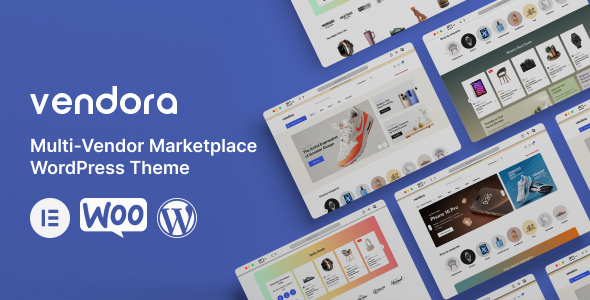
Vendora is a multi-vendor marketplace WordPress theme built around Elementor and WooCommerce, designed for agencies or freelancers who need to quickly deploy a marketplace site without extensive custom coding.
Streamlining WordPress Multi-Vendor Marketplace Setup
This theme primarily solves the problem of integrating a multi-vendor plugin like Dokan or WCFM with a visually editable WordPress front end. For someone building an online marketplace with WooCommerce, Vendora aims to cut down the initial development and styling time significantly. It’s useful for projects where the client needs a functional marketplace fast, and the budget doesn't allow for a fully custom design and build from scratch.
Assessing Vendora's Technical Standards and Feature Set
From a technical standpoint, Vendora adheres to standard WordPress and WooCommerce practices for theme development, leveraging Elementor for most of its visual components. The inclusion of multi-vendor plugin compatibility out of the box means less time spent on custom integrations. The theme's structure is generally semantic, which helps with search engine optimization, making it easier for potential customers to find vendor products. Asset loading feels typical for an Elementor-based theme; it’s not exceptionally lean but manages to keep things moving. The underlying CSS organization, while abstracted by Elementor, appears reasonably structured for those who need to dive in for deeper customizations.
- The reliance on Elementor means you get a powerful visual builder, but it also ties you into that ecosystem for future updates and modifications.
- Integration with popular multi-vendor plugins like Dokan is a core strength, handling vendor registration, product submission, and dashboard layouts.
- The theme provides Ajax Cart functionality, which is a standard expectation for modern ecommerce websites, improving the user experience by allowing customers to add items without full page reloads.
- The inclusion of Revolution Slider adds a lot of visual flair, but it's a known resource-intensive plugin that can impact Core Web Vitals if not optimized carefully.
- Header and Footer Builder functionality within Elementor is a practical addition, offering flexibility for branding and navigation without needing custom code for common layout changes.
- Child Theme Included is a crucial detail for developers, ensuring that custom modifications are not overwritten during theme updates, which helps lower long-term maintenance costs.
Key Strengths for Building an Online Marketplace with WooCommerce
What impresses most is how it brings together the multi-vendor functionality with Elementor's visual editing capabilities. For quick turnarounds on a WordPress multi-vendor marketplace setup, this combination is powerful. The pre-built layouts for vendor stores and product pages save a lot of initial design work, allowing you to focus on content and marketplace operations rather than pixel-pushing. The product comparison and wishlist features are also well-integrated, which are often overlooked in simpler themes but are important for conversion-ready funnels.
Who Benefits from a Vendora Elementor Multi-Vendor Theme
This theme is clearly for agencies, freelancers, or small businesses looking to launch a multi-vendor marketplace quickly, especially if they are already comfortable with Elementor. It's a solid choice for projects where a visually rich but not overly bespoke design is acceptable. However, it’s not for those who need deep custom backend logic, highly unique UI/UX that breaks from Elementor’s structure, or projects where extreme performance optimization is the absolute top priority without compromise.
Understanding Vendora's Practical Limitations
While the Elementor integration offers immense flexibility, it also means a certain level of boilerplate code, which can sometimes impact performance. The "Amazing Speed" claim feels standard for an optimized Elementor theme, not groundbreaking. The sheer number of included features, while beneficial, also means a larger footprint. For a very lean project, some of these might feel like unnecessary bloat. The overall design, while clean, is fairly conventional; it gets the job done but doesn't necessarily push any creative boundaries.
Final Thoughts: Is it worth it?
If your goal is to rapidly deploy a functional, good-looking multi-vendor marketplace on WordPress using Elementor, Vendora offers a robust starting point. It handles the core integrations well and provides enough visual flexibility to create a professional site without extensive custom development. For the time saved on setup and integration alone, it's a smart investment for specific project types.
FAQ
Does Vendora impact site performance significantly?Like many feature-rich Elementor themes, Vendora can have a larger footprint than a minimalist theme, potentially impacting performance if not properly optimized with caching and image compression.
Can I use other page builders instead of Elementor?While WordPress themes technically allow other page builders, Vendora is deeply integrated with Elementor, meaning most of its pre-built layouts and custom elements will only function as intended within Elementor.
How does Vendora handle vendor-specific customization?Vendora integrates with multi-vendor plugins like Dokan, which provide vendor dashboards for product management and store settings, allowing vendors a degree of control over their individual storefronts within the theme's framework.
Is this theme suitable for a very high-traffic marketplace?For high-traffic marketplaces, the theme's performance will heavily depend on your hosting environment, server optimizations, and how many additional plugins you run. It provides a solid foundation, but scaling requires robust infrastructure.