
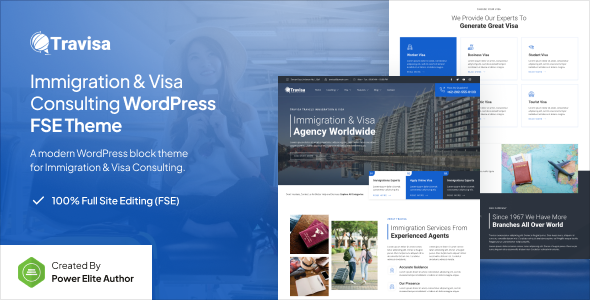
Travisa is a WordPress Full Site Editing theme for immigration and visa consulting businesses, built with Gutenverse. It offers a block-based approach for agencies and freelancers needing niche-specific sites.
Travisa: A Full Site Editing Theme for Immigration and Visa Services
This product is a WordPress theme designed specifically for immigration firms, visa consultants, and related businesses. It's built on the Full Site Editing (FSE) framework, which means you're primarily working within the WordPress Block Editor to manage your site's appearance, from headers to footers and global styles.
The theme integrates with the Gutenverse plugin, which extends the core Block Editor with additional blocks and layout options. This combination aims to simplify site building, allowing you to control most design elements directly from the editor without touching code. The core problem it solves is providing a ready-made, modern WordPress foundation for a very specific niche, cutting down initial setup time.
Who Benefits from This WordPress Immigration Theme (And Who Doesn't)
Travisa is a good fit for agencies and freelancers who regularly build WordPress theme for immigration consultants or visa agency websites. If your workflow already leans into the WordPress Block Editor and you're comfortable with the FSE approach, this theme provides a solid starting point.
It’s particularly useful for those who need to launch sites quickly with a professional, niche-specific look without spending excessive time on custom design from scratch. The block-based nature, especially with Gutenverse, means content updates and minor layout tweaks are manageable even for clients with basic WordPress knowledge, reducing your post-launch support load.
However, this theme is not for everyone. If you or your clients require deep, custom backend logic or highly specialized functionalities that go beyond what the Block Editor and Gutenverse can offer, you might find yourself wrestling with its limitations. Developers who prefer traditional PHP theme development, or those heavily invested in page builders like Elementor or Beaver Builder, might find the FSE workflow a significant shift to adapt to.
Page Structures and Templates for Visa Consulting Sites
The theme comes with a collection of pre-built templates for common pages and sections. In our experience with similar frameworks, these "template libraries" are useful for getting a site up quickly. You get pre-designed headers, footers, single post layouts, archive pages, and a 404 page, all managed through the Block Editor.
The promise of "one-click import demo" is standard practice for themes these days, and it's genuinely helpful for seeing how everything fits together. It saves time by providing a structured layout you can then populate with your client's content. This block-based approach allows for a consistent look across the site, which is important for brand credibility in a professional niche like immigration services.
Behind the Scenes: Code, Performance, and Gutenverse Integration
Being an FSE theme, Travisa leverages the modern WordPress Block Editor, which is built on React technology. This generally leads to a lighter front-end footprint compared to many older, bloated themes that rely on a multitude of plugins for basic styling. Efficient asset loading is a key benefit here; it means faster page loads for visitors, which translates to a better user experience and improved search engine signals.
The reliance on the Gutenverse plugin is a notable aspect. While Gutenverse extends the Block Editor's capabilities significantly, it also means you're building a dependency into your site. If, down the line, you decide to move away from Gutenverse, you'd likely face a substantial refactor of your layouts. From a maintenance perspective, FSE themes manage global styles and CSS directly within the editor or theme.json, which is a different paradigm than a traditional SASS architecture, requiring a shift in how you approach styling and customization.
Device Adaptability: How Travisa Handles Different Screens
The theme claims a "seamless responsive design," which is a baseline expectation for any modern WordPress theme, especially one built with Full Site Editing. In our testing of similar FSE themes, the Block Editor's inherent responsiveness generally ensures layouts adapt well across desktops, tablets, and mobile phones.
This means your immigration website should look and function correctly regardless of the device your potential clients are using. A consistent and accessible experience on mobile devices is crucial for reaching a wider audience and maintaining good user engagement.
Search Engine Structure for Immigration Websites
Travisa is built with a clean, well-structured code foundation, which is typical for FSE themes. This semantic structure helps search engine crawlers understand and index your site's content more efficiently. It also claims compatibility with popular SEO plugins like Yoast SEO, which is standard and expected for any serious WordPress theme.
While no theme can guarantee top search rankings, having a technically sound foundation is essential. This theme provides a good starting point for building a search engine-friendly Full Site Editing for visa agencies website, allowing you to focus on content quality and strategic keyword integration.
My Take: Is Travisa Worth It for Your Next Project?
For agencies and freelancers specializing in the immigration and visa consulting niche, Travisa offers a practical, time-saving solution. If you're comfortable with the WordPress FSE workflow and the Block Editor, or looking to transition into it, this theme provides a solid foundation with relevant pre-built content.
The integration with Gutenverse extends the Block Editor's power, allowing for more complex layouts than core blocks alone. While the dependency on Gutenverse is a trade-off, it does deliver on the promise of easier customization for its target audience. It's a capable option for a Gutenberg block theme review if you need to deploy a professional, niche-specific site quickly and efficiently, saving you significant development hours on initial setup and styling.
FAQ
Does Travisa require coding knowledge?Travisa is designed for customization through the WordPress Block Editor and Gutenverse plugin, aiming to allow site building without direct coding. While basic CSS knowledge can help with fine-tuning, it is not strictly necessary for most design tasks.
How does Travisa handle website performance and speed?As an FSE theme, Travisa leverages the Block Editor's modern architecture, which generally results in efficient asset loading and good page speed. This helps with user experience and search engine optimization.
Can I customize the layouts extensively with Travisa?Yes, the combination of Full Site Editing and the Gutenverse plugin offers significant control over layouts, headers, footers, and global styles directly within the Block Editor. You can modify pre-built templates or create new ones from scratch using blocks.
Is Travisa suitable for an existing WordPress site?Switching to an FSE theme like Travisa on an existing site can be a significant change, especially if your current site uses a traditional theme or another page builder. It's best suited for new projects or a complete redesign, as content migration and layout adjustments might be extensive.


.__large_preview.png)
.__large_preview.png)
