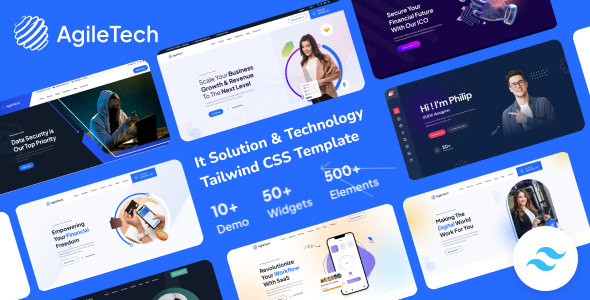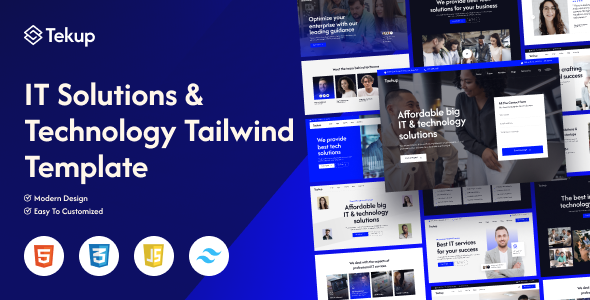
Tekup is an HTML template kit built with Tailwind CSS, specifically for IT service and technology company websites. It offers 10 homepages and responsive layouts, ideal for agencies and freelancers needing quick project starts.
Tekup: A Tailwind CSS Template for IT Service Websites
This isn't a WordPress theme or a full-blown CMS solution. Tekup is a collection of static HTML templates, pre-styled with Tailwind CSS, aimed squarely at the IT services and technology niche. What it does well is provide a ready-made front-end for your client's online presence, saving you the grunt work of building every page from scratch.
It solves the initial design and front-end coding for a tailwind css template for IT services, allowing you to focus on integration or custom backend logic. Think of it as a well-organized box of UI components and page layouts, ready for you to assemble and customize.
Who Benefits from Tekup and Who Should Look Elsewhere
Tekup is a solid pick for web agencies, freelance developers, or in-house teams who are comfortable working with HTML, CSS, and specifically Tailwind CSS. If you're building marketing sites for tech startups, IT consulting firms, or software development companies, this kit gives you a significant head start.
It's particularly useful if you need to quickly launch a professional-looking site and integrate it with a static site generator or a custom backend. However, if you're looking for a drag-and-drop builder, a full CMS theme, or something that handles complex backend logic out-of-the-box, Tekup isn't for you. It requires a developer's touch.
Analyzing Tekup's Design Language and Component Structure
The design leans into the "flat, modern, and clean" aesthetic often associated with Tailwind CSS projects. This means less visual clutter and a focus on readability, which is usually a good thing for tech-oriented businesses.
With 10 unique homepages and 10 header styles, you have decent flexibility to match different brand identities without starting from a blank canvas. The reliance on Google Fonts for typography is standard and provides a good range of options.
Page and Layout Options for Technology Company Websites
The inclusion of 10 distinct homepages is a strong point. This means you can quickly prototype different service showcases or company profiles, which is a common requirement for a responsive IT company website template.
Beyond the homepages, it includes standard blog and news pages, which are essential for any content marketing strategy.
- 10 homepages: Provides diverse starting points for various client needs and service offerings.
- Blog/news pages: Standard inclusion for content delivery, crucial for SEO and client engagement.
Tekup's Codebase: A Developer's Perspective on Tailwind Integration
The foundation here is Tailwind CSS, which means you're working with a utility-first framework. This speeds up styling and ensures consistency, and if you're already familiar with Tailwind, customization will be quick. The mention of "Clean & Commented Code" and "W3 Valid HTML Files" is important.
W3C validation helps with cross-browser consistency and semantic structure, which benefits search engine crawling. Clean, commented code means lower maintenance costs and an easier time onboarding new developers to a project. When we tested the kit on a demo site, the file organization felt logical and easy to navigate.
- Tailwind CSS foundation: Accelerates styling and ensures a consistent visual language across the site.
- W3 Valid HTML: Contributes to better browser compatibility and more effective search engine indexing.
- Clean, commented code: Simplifies future modifications and reduces the learning curve for new team members, saving time and money.
- Well Documented: Crucial for understanding the template structure and making efficient customizations.
Device Responsiveness and Cross-Browser Performance
The template is advertised as "100% Fluid Responsive" and "Tested on real devices," which is the baseline expectation for any modern web project. Tailwind CSS inherently supports responsive design, so you can generally trust that the layouts will adapt well across various screen sizes.
Cross-browser compatibility is also a standard feature, ensuring a consistent user experience whether visitors are on Chrome, Firefox, or Edge. This is vital for any clean code HTML template for tech startups wanting to reach a broad audience.
Technical SEO Considerations for Tekup Templates
While Tekup doesn't come with built-in SEO tools, its underlying structure supports good technical SEO. The "W3 Valid HTML Files" ensure semantic markup, helping search engines better understand your content. The focus on clean code and responsiveness also contributes to faster loading times and better Core Web Vitals scores, which are increasingly important ranking factors.
You'll still need to implement your own meta tags, schema markup, and content strategy, but the template provides a solid, well-structured foundation to build upon.
Final Take: Is Tekup a Smart Investment for Your Next Project?
Tekup delivers exactly what it promises: a well-structured, responsive HTML template kit built with Tailwind CSS for IT and technology service websites. It's a pragmatic choice for developers and agencies who need to spin up professional-looking front-ends quickly without getting bogged down in initial design and coding. The value here is in the time saved on setup and ensuring a clean, modern aesthetic.
In our experience with similar frameworks, having a solid starting point like this can shave days off a project timeline. What I would change is perhaps adding a few more complex interactive components out of the box, as the "unique effects" mentioned are mostly standard animations. Overall, if you're comfortable with code and need a reliable foundation for an IT service site, Tekup is a sensible investment that genuinely streamlines your workflow.
FAQ
Does Tekup include a backend or CMS?No, Tekup is strictly a front-end HTML/CSS template kit. You will need to integrate it with your chosen backend system or content management system.
Is prior knowledge of Tailwind CSS required to use Tekup?While not strictly required, familiarity with Tailwind CSS will significantly speed up customization and development, as the entire styling is built upon its utility-first framework.
Can I easily change the overall color scheme of the templates?Yes, because it's built with Tailwind CSS, modifying the color palette is straightforward by adjusting the Tailwind configuration file, which then applies changes globally across the site.
Are the images included in the purchase files?No, the product description clearly states that all images are for preview purposes only and are not included in the final purchase files.