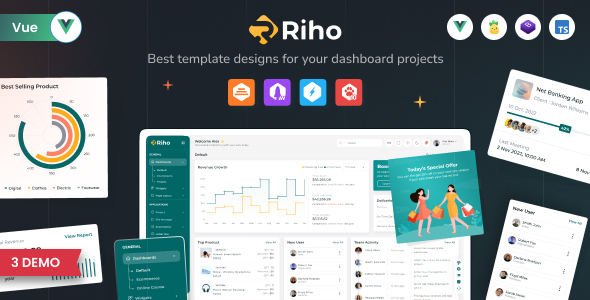
Riho Vue JS Admin Template: A Vue 3 admin dashboard starter kit for developers building custom web applications. Get a solid foundation with reusable components and Bootstrap 5 styling.
Riho Vue JS Admin Template: A Bootstrap 5 Vue 3 Admin Dashboard Kit
Riho is a Vue 3 admin dashboard template built on Bootstrap 5. Essentially, it’s a pre-built set of UI components and layouts designed to speed up the development of custom admin panels, backends for web applications, or CMS/CRM systems. It uses Vue 3 with TypeScript and the Composition API, meaning it’s built with modern Vue practices.
Who Should Use Riho Vue JS Admin Template and Who Should Skip It
This template is for developers who need to quickly scaffold a custom admin interface without starting from scratch. If you're building an application that requires a functional backend dashboard and you're comfortable with Vue and Bootstrap, Riho can save you a significant amount of time on front-end setup. It’s ideal for agencies needing fast turnarounds or for solo developers looking to get a project off the ground efficiently.
However, if you're looking for a no-code solution or a theme for a specific type of public-facing website like an e-commerce store or a marketing site, this isn't it. Riho is purely for the administrative side of applications. It’s also not for those who want a completely unique design system from the ground up; while customizable, it’s a component library first and foremost.
Solving the Admin Panel Development Headache
The main problem Riho solves is the repetitive and often tedious task of building common admin interface elements. Think about setting up navigation, data tables, form layouts, and basic charting. Instead of coding all of that from scratch, Riho provides these components ready to go. This means you can focus on the unique logic of your application rather than reinventing the wheel for the UI.
When we tested the kit on a demo site, the integration of Bootstrap 5 meant that styling was consistent and familiar, which is a big plus. The inclusion of charts via ApexCharts and Google Maps also means you don't have to hunt down and integrate separate libraries for common dashboard visualizations. This is a smart investment for projects where the admin panel is a core feature.
Code Quality and Developer Experience
Riho is built with Vue 3 and TypeScript, which is a good sign for maintainability and scalability. The description mentions clean and well-commented code, which is crucial for any template that developers will be working with long-term. The absence of jQuery is also a positive, aligning with modern JavaScript development practices.
In our experience with similar frameworks, having a clear code structure makes it easier to find what you need when customizing. The use of the Composition API in Vue 3 also generally leads to more organized and reusable logic compared to older patterns. This translates to fewer headaches when you need to extend functionality or fix bugs down the line, potentially lowering maintenance costs for your clients.
Responsiveness and Compatibility
The template is described as fully responsive, which is a standard expectation for any modern web development project. This means the admin interface should adapt well to different screen sizes, from desktops to tablets. While this is a baseline requirement, it's good to see it explicitly stated and is essential for any internal tools that might be accessed on various devices.
The foundation on Bootstrap 5 also gives us confidence in its cross-browser compatibility. Bootstrap is a well-established framework, and its grid system and components are generally well-tested across different browsers. This reduces the risk of encountering obscure rendering issues that can plague custom-built interfaces.
SEO Readiness for Admin Interfaces
For an admin dashboard template, "SEO readiness" typically refers to the semantic structure of the HTML and the organization of assets. Riho's use of Bootstrap 5 implies a standard HTML structure that is generally accessible and understandable by search engines, even though the primary audience isn't public searchers. The focus on Vue 3 and TypeScript without jQuery also suggests a cleaner asset loading process.
While not directly for public SEO, a clean semantic structure within the admin panel can make it easier for internal tools to be indexed if needed, and it adheres to general web standards. The way assets are managed can also impact the loading speed of the admin interface itself, which is important for user experience for those managing the application.
Final Thoughts on Riho Vue JS Admin Template
Riho Vue JS Admin Template offers a solid starting point for building custom admin dashboards. It leverages modern Vue 3 practices and the widely adopted Bootstrap 5 framework, which should make integration into existing projects straightforward for developers familiar with these technologies. If you're tired of spending days setting up basic UI elements for your web application's backend, this template is a practical choice that can significantly accelerate your development timeline.
FAQ
Is Riho suitable for beginners in Vue development?While Riho uses modern Vue 3 practices, it's best suited for developers who have a foundational understanding of Vue and Bootstrap. It's a starter kit, not a step-by-step tutorial.
Can I use Riho for a public-facing e-commerce website?No, Riho is specifically designed as an admin dashboard template for the backend of applications, not for customer-facing websites.
What kind of support is available for Riho?The product description mentions detailed documentation, and support is typically available through the platform where the template was purchased.
How does Riho handle theming and customization?As a Bootstrap 5 based template, customization is primarily done by overriding Bootstrap variables and CSS, and by modifying the Vue components provided.