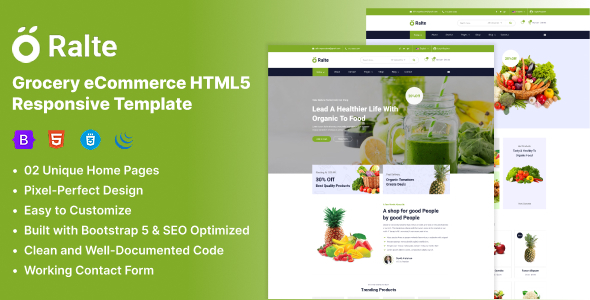
Ralte is an HTML grocery eCommerce template designed for quickly launching online stores for food-related businesses, suitable for developers needing a solid front-end foundation for their projects.
Streamlining Front-End Development for Niche eCommerce Stores
If you've built a few client sites, you know the grind of setting up basic layouts for common business types. This Ralte grocery eCommerce HTML5 template tackles that head-on for food-related businesses. It saves you the initial 10-15 hours of styling product grids, category pages, and basic product detail views from scratch, which is often a repetitive task for agencies or freelancers on a tight schedule.
The core problem it solves is the time sink of building out a standard responsive eCommerce layout for a very specific niche. Instead of spending cycles on foundational UI elements, you get a pre-built structure that understands the needs of an online grocery store, allowing you to focus on integration or unique features.
Code Quality and Practical Implementation for a Responsive Layout
When we tested the Ralte kit on a demo site, the code structure felt familiar for anyone used to Bootstrap-based templates. It uses standard HTML5 and CSS3, which means it's generally clean and follows common web standards. For a business owner, this translates to lower maintenance costs down the line, as any developer can jump in and understand the codebase without a steep learning curve.
The template claims an SEO-ready layout, which largely refers to its clean semantic HTML structure. This is standard practice but still important for search engine visibility. Asset loading for the included Google Fonts (Heebo and Roboto) appears straightforward, which is good for Core Web Vitals, ensuring the site doesn't get bogged down by inefficient font delivery. The mobile menu behavior is what you'd expect from a Bootstrap framework—it collapses cleanly and is navigable, which is crucial for a smooth mobile experience on a grocery website template.
- The CSS organization is primarily utility-first due to Bootstrap, making component styling predictable.
- Image placeholders are included, but you'll need to implement your own responsive image strategy for optimal performance.
- The template utilizes Font Awesome and Iconify for icons, offering a wide range of visual elements without custom SVG work.
- For an HTML template, the semantic structure is respectable, using appropriate tags for headings, navigation, and content sections.
What Ralte Delivers Well for Rapid Deployment
Ralte's main strength is its readiness for rapid deployment. If you need to spin up a client's online grocery presence quickly, the two distinct homepage layouts give you a head start without having to design from scratch. The components for product listings, single product pages, and category views are all there, saving significant front-end development time.
It impresses most by providing a solid, functional base that adheres to standard responsive design principles. For an HTML template, it does what it sets out to do: provide a functional, visually appealing front-end for grocery-specific eCommerce, making it a good starting point for a conversion-ready funnel.
Ideal Use Cases and When to Look Elsewhere for Your Project
This Ralte HTML template is ideal for agencies and freelancers needing fast turnarounds on client projects, especially for small to medium-sized businesses looking for a straightforward online grocery presence. It's also suitable for developers who prefer to build their backend logic or integrate with a headless CMS, using this template purely for the front-end UI.
You should avoid Ralte if your project requires deep custom JavaScript interactions, highly unique UI elements beyond standard eCommerce, or if you're looking for an all-in-one platform with a pre-built backend and content management system.
Areas Where Ralte Feels Standard or Could Improve
While functional, the "working contact form" mentioned in the original description typically means a basic HTML form that requires server-side integration. This isn't a unique feature but a standard placeholder you'd expect. The customization depth, beyond changing colors and fonts via CSS, might require more direct HTML manipulation if you need significant layout changes. This is common for static HTML templates, but it's worth noting if you expect a highly flexible theme framework.
There's no integrated build process for CSS preprocessors like SASS or automatic minification, which means you'll handle those optimizations manually for production, or integrate your own tooling. This is an average expectation for a basic HTML template, but it's a step you'll need to account for in your workflow.
Final Thoughts: Is it worth it?
For what it is—a dedicated HTML grocery eCommerce template—Ralte delivers a solid foundation. If your goal is to save significant time on front-end UI development for a grocery or food-related online store, this template is a practical choice. It provides a clean, responsive starting point, letting you focus your efforts on backend integration and unique business logic rather than recreating common layout components. It's a sensible investment to accelerate project delivery and reduce initial development costs.
FAQ
Is this a complete eCommerce solution with a shopping cart and payment gateway?No, Ralte is a front-end HTML template only. It provides the visual layout and structure, but you will need to integrate it with a separate backend system for cart functionality, payment processing, and order management.
Can I easily integrate this template with a content management system (CMS) like WordPress or Shopify?Yes, because it's standard HTML, CSS, and JavaScript, you can adapt and integrate its components into virtually any CMS or custom backend. This will require some development work to convert the static HTML into dynamic templates for your chosen platform.
How difficult is it to change the overall branding, colors, and fonts?Changing colors and fonts is relatively straightforward as they are defined in the CSS, likely using Bootstrap's theming variables. Extensive layout changes, however, would require directly modifying the HTML structure and associated CSS.