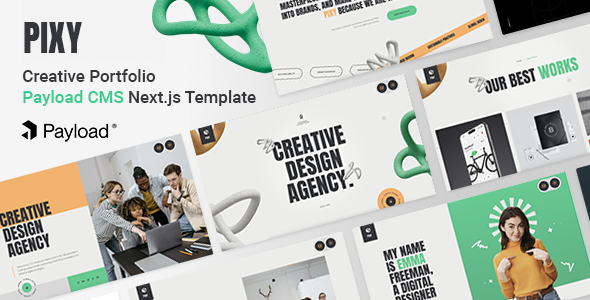
Pixy: A Next.js and Payload CMS template for digital agencies and creative portfolios. Get a JAMstack setup with an admin dashboard. Build fast, manage content easily.
Pixy: A Modern JAMstack Template for Creative Agencies
Pixy is a React Next.js frontend paired with a Payload CMS backend. It's built for anyone needing a quick start on a modern agency or portfolio website. The core idea is to give you a solid foundation for a performant site with a robust content management system. It targets the common problem of building a high-speed, content-rich site without wrestling with traditional setups.
Who Benefits from this Next.js Agency Website Template?
This template is a good fit for agencies and freelancers who are comfortable with the JAMstack approach and want to leverage Next.js and React. If you need a rapid deployment solution for a client's creative portfolio or a digital agency showcase, this kit provides a head start. It's particularly useful for those who appreciate a headless CMS for content management and value performance.
However, this isn't for everyone. If your team primarily works with traditional WordPress or PHP-based systems, the learning curve for Next.js, React, and Payload CMS might be significant. It's also not ideal for projects requiring highly complex custom backend logic that goes far beyond what Payload's features offer. Beginners without a good grasp of JavaScript and modern frontend frameworks should probably look elsewhere.
Design and Aesthetics for a Modern Portfolio
The design here leans towards a minimalistic and sleek aesthetic, aiming for a contemporary feel. It uses creative animations and effects, like clip path and parallax, which are common in modern portfolio sites. While these can add a polished touch, complex animations can sometimes impact perceived performance if not optimized correctly. In our experience, the visual style is generally appealing for a creative agency website template, offering a clean backdrop for showcasing work.
Content Structure and Pre-built Components
Pixy comes with a decent set of pre-built pages and components. You get multiple home page variants, several portfolio single page layouts, and dedicated sections for services and blog posts. The Payload CMS integration includes a block-based layout builder, which is a practical way to construct pages from reusable components. This approach lets content editors build complex layouts without needing developer intervention, significantly speeding up content updates.
- Posts (Blog): Standard blog functionality for articles and news.
- Projects (Portfolio): Comprehensive project management with various display options.
- Services: Dedicated pages to outline client offerings.
- Pages: General content pages built with the block builder.
- Categories: For organizing blog posts and projects.
- Media: Centralized asset management within Payload CMS.
Business Features and Content Management with Payload CMS
Beyond just design, this template focuses on the operational side of an agency. The Payload CMS admin dashboard is a core feature, offering a fully customizable ReactJS interface for content management. It includes useful features like version history, drafts, scheduled publishing, and live preview, which are critical for any professional content workflow. The built-in forms builder is also a big plus, allowing you to create and manage contact or inquiry forms directly from the admin panel, complete with submission management and email templates. This solves the headache of setting up a niche-specific inquiry system.
It also includes global settings for common elements like headers, footers, and specific sections for blog, services, and projects, ensuring consistent branding and navigation across the site. The integrated SEO plugin within Payload CMS is a smart addition, making it straightforward to manage metadata for better search engine visibility.
Developer Experience and JAMstack Architecture
From a developer perspective, Pixy is built on modern technologies like Next.js (App Routing), React.js, and TypeScript. The codebase is described as well-commented and customizable, which is always a relief when inheriting a new project. It uses SCSS, allowing for organized and maintainable CSS. The JAMstack deployment readiness, particularly with Vercel, means fast, scalable, and generally lower-cost hosting.
The use of Payload CMS with GraphQL, REST, and Local APIs provides flexibility for data access. It supports both Postgres and MongoDB databases, offering choices depending on your team's preference. This modular stack means better performance and security compared to many traditional setups. When we tested the kit on a demo site, the asset loading felt efficient, largely due to Next.js's optimizations and the JAMstack approach, contributing positively to Core Web Vitals.
Responsive Design and Cross-Browser Performance
The template is built to be responsive and retina-ready, meaning it should adapt well across various devices, from desktops to mobile phones. This is a standard expectation for any modern web project, and Pixy meets it. It's also stated to be cross-browser compatible, which means fewer headaches with different browser quirks during testing. Its W3C valid code implies a clean semantic structure for SEO, a good sign for long-term maintainability and search engine friendliness.
Technical SEO Foundations for Agency Websites
Pixy provides a solid technical foundation for search engine optimization. The clean, W3C valid code and semantic HTML structure are good starting points for search engine crawlers. With Next.js, you get benefits like server-side rendering or static site generation, which generally lead to faster page loads and better indexing compared to purely client-side rendered applications. The integrated SEO plugin in Payload CMS allows content editors to manage meta titles and descriptions without developer intervention, key for maintaining good search visibility for a creative portfolio or agency website.
Final Thoughts: Is Pixy a Smart Investment for Your Next Project?
After building multiple agency sites with tools like this, Pixy stands out as a genuinely useful starting point for specific types of projects. If you're already in the Next.js and React ecosystem, or looking to move into it, this template saves a significant amount of setup time for a creative agency or portfolio site. The Payload CMS integration is a strong selling point, offering a modern, developer-friendly content management experience with good features like the block builder and forms.
While the design is sleek, expect to put in some effort to truly make it your own and differentiate it from other sites using the same template. The initial learning curve for Payload CMS, if you're new to headless systems, is a natural limitation, but the payoff is a flexible and performant stack. For agencies or freelancers aiming for a high-performance, maintainable JAMstack solution, Pixy is a smart investment that can genuinely accelerate your workflow and deliver a polished product.
FAQ
What is the primary benefit of using Payload CMS with this template?Payload CMS offers a modern, headless approach to content management, providing a flexible admin dashboard for easy content updates, version control, and a block-based page builder without tying you to a specific frontend framework.
Is prior experience with Next.js and React required to use Pixy effectively?Yes, to customize and maintain Pixy effectively, you should have a solid understanding of Next.js, React, and JavaScript. It is not designed for users without development experience in these technologies.
How does this template impact website performance and Core Web Vitals?Built with Next.js and leveraging the JAMstack architecture, Pixy is designed for fast loading speeds and efficient asset delivery, which generally contributes positively to Core Web Vitals and overall user experience.
Can I easily change the design and branding of the template?Yes, the template uses SCSS and offers advanced options for customizing colors, fonts, and typography, making it straightforward for developers to align the design with specific branding requirements.