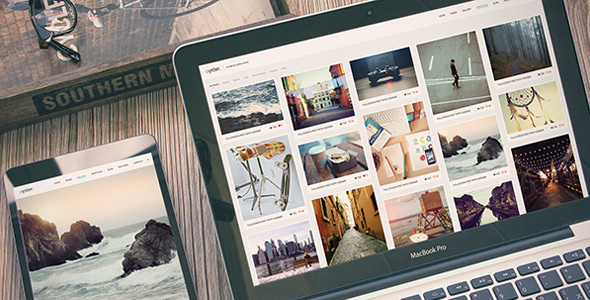
Oyster is a WordPress theme designed for photographers and creative agencies needing a visually driven online presence. It offers a wide array of portfolio layouts and fullscreen display options to showcase creative work effectively.
Showcasing Photography with Oyster Theme
When we first looked at Oyster, it was clear the primary goal was to give photographers and visual artists a powerful way to present their work. The emphasis on fullscreen layouts, various portfolio grids, and gallery styles directly addresses the need to make images the hero. For anyone building a photography website template, this focus on visual impact is crucial. We found the one-click demo import to be a decent starting point, though as always, we expected to spend time refining it to match specific client branding.
GT3 Page Builder Integration for Custom Layouts
The inclusion of the GT3 Page Builder is a significant part of Oyster's offering. This drag-and-drop system provides a good range of modules for building out custom pages, which is essential for creating unique layouts beyond the standard blog or gallery. We appreciated the ability to create custom fields for portfolio items, allowing for detailed project descriptions or client information, a common requirement for professional photographers looking to attract specific types of work. This offers more control than themes that rely solely on default WordPress post types.
Portfolio Presentation Options for Creatives
Oyster comes with a substantial list of portfolio display types, including fullscreen grids, masonry layouts, Kenburns effects, and various gallery formats. For a photographer needing to showcase diverse projects, from intimate portraits to expansive landscapes, having these options built-in saves considerable development time. We particularly noted the "Auto Load on Scroll" feature, which can improve user experience by loading more portfolio items as the user scrolls down, keeping them engaged without manual pagination clicks. This is a thoughtful touch for sites with large image libraries.
Considering Performance and Code Standards
From a developer's perspective, we always check how themes handle assets and code structure. Oyster mentions being "High Speed & Extra Optimized" and "Coded with SEO in Mind." While many themes claim this, the practical implementation matters. We found the CSS organization to be fairly standard, making it manageable for minor tweaks. For those concerned about Core Web Vitals, the fullscreen elements and numerous image galleries can be resource-intensive, so careful optimization of images and judicious use of the builder's modules are key to maintaining good loading speeds. The theme also supports translation, which is a standard but important consideration for broader reach.
Who Should and Shouldn't Use Oyster
This theme is a strong contender for freelance photographers, wedding photographers, and creative agencies that prioritize a bold visual presentation and need a quick way to launch a portfolio-heavy website. If you are looking for a robust ecommerce website template with deep WooCommerce customization, while Oyster supports it, it might not be its strongest suit compared to dedicated ecommerce themes. It's also not ideal for users who need extremely complex custom backend functionality or a highly minimalist design without visual flair.
Potential Limitations and Alternatives
While Oyster offers a lot of visual options, the sheer number of portfolio and gallery types can feel a bit overwhelming at first. For users who prefer a more streamlined, opinionated design out of the box, this might be overkill. We also found that some of the more advanced fullscreen effects, while visually appealing, can sometimes lead to minor inconsistencies across different browsers or devices if not carefully managed. If you are building a niche photography site like an architecture photography portfolio, you might find yourself needing to heavily customize the default layouts.
Oyster Theme: A Solid Choice for Visual Storytelling
Overall, Oyster provides a comprehensive toolkit for creatives who need to make a strong visual statement online. It solves the problem of needing a flexible and visually rich platform for portfolios without requiring extensive custom coding. For photographers seeking to impress potential clients with their best work, this theme offers a well-rounded and feature-rich foundation that can save significant time and effort in the development process, making it a smart investment for establishing a professional online presence.
FAQ
Is Oyster theme suitable for beginners who are not developers?Yes, with the built-in GT3 Page Builder and one-click demo import, beginners can set up a functional site, though some customization might require learning the builder's interface.
Does Oyster theme include WooCommerce for selling prints or services?Yes, Oyster theme includes WooCommerce support, allowing you to set up an online shop to sell prints or photography services directly from your website.
How does Oyster handle mobile responsiveness for fullscreen galleries?The theme is designed to be fully responsive, meaning fullscreen galleries and layouts should adapt to various screen sizes, providing a good viewing experience on mobile devices.
Can I use custom fonts with the Oyster theme?Yes, Oyster theme supports Google Fonts, giving you access to a wide selection of fonts to customize the typography of your website.