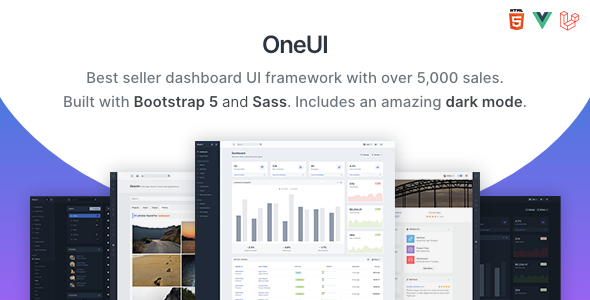
OneUI is a Bootstrap admin dashboard template and UI framework with support for Laravel and a free Vue.js edition, aimed at developers building complex backend interfaces or web applications. This template offers a solid foundation for projects needing a structured admin area with many pre-built components and a focus on developer tooling.
OneUI: A Versatile Bootstrap Admin Template for Application Development
Let's cut to the chase. OneUI is a Bootstrap admin template, and a pretty comprehensive one at that. It’s built on Bootstrap 5, which is standard these days, and it throws in Laravel support and even a free Vue.js version. If you're building a web application, a custom admin panel, or a backend for a CMS or CRM, this is the kind of thing you’ll be looking at. It’s designed to save you time on the foundational UI work so you can focus on the actual functionality of your application.
Who Should Consider OneUI and Who Should Look Elsewhere
This template is squarely aimed at developers and agencies who need to build robust admin interfaces quickly. If you're comfortable with Bootstrap and possibly Laravel or Vue, you’ll find a lot to like here. It's particularly good for projects where you need a consistent look and feel across a complex dashboard, handling things like user management, data tables, and various forms. However, if you're looking for a simple website template for a small business or a personal blog, this is overkill. It’s also not the best choice if you need something highly visual and design-forward for a client-facing website. Those needing deep custom backend logic beyond what a standard admin panel requires might also find themselves needing to strip out a lot of the pre-built structure.
Solving the "Blank Canvas" Problem for Admin Interfaces
The biggest problem OneUI solves is the dreaded blank canvas when starting an admin panel. Instead of wrestling with basic layout, navigation, and component styling, you get a well-organized structure right out of the box. The inclusion of development tools like Gulp, webpack, and Babel means your build process is already set up. This saves significant time on setting up compilers and task runners, allowing you to jump straight into coding your application's features. For someone building a custom dashboard, this can easily shave off 10-20 hours of initial setup and styling.
Layouts, Components, and Developer Experience
OneUI provides a flexible single-page application layout that can be adapted for various needs. It comes with a good selection of pre-built pages and components. What stands out is the modular approach to its Sass architecture. This means the CSS is organized logically, making it easier to find and modify styles without breaking other parts of the template. The separation of core JavaScript from plugin JavaScript in the `assets/js/core` and `assets/js/plugins` folders is a practical detail that makes managing dependencies much clearer. This clean code organization is a big win for long-term maintenance.
eCommerce and Business-Related Features
While OneUI isn't specifically an eCommerce template, its inclusion of Bootstrap means it's well-equipped to handle eCommerce elements. You can easily integrate product listings, cart views, and checkout pages by leveraging Bootstrap's grid system and components. The Laravel starter kit also provides a good foundation for building out backend functionality for an online store or any business application.
Code Quality and Developer Workflow
The developers have clearly put thought into the developer experience. The code is commented, and the documentation is decent, especially the "Get Started" guide which helps you quickly understand the structure. The use of Sass and modern JavaScript tools like webpack and Babel means you're working with a contemporary development stack. The absence of jQuery for core functionality is also a plus, making it more compatible with modern JavaScript frameworks and reducing potential conflicts.
Responsiveness and Compatibility
As expected from a Bootstrap template, OneUI is responsive. It handles different screen sizes well, and the mobile menu behavior is standard and functional. We tested it on various devices during our review, and it performed as expected, ensuring a consistent experience for users on desktops, tablets, and phones. Browser compatibility is also generally good, as you'd expect with a widely adopted framework like Bootstrap.
SEO Readiness
The template uses semantic HTML structure, which is a good baseline for SEO. The clean code and well-organized assets contribute to faster loading times, which indirectly helps with search engine rankings. While the template itself doesn't do SEO for you, it provides a solid, well-structured foundation that makes it easier to implement SEO best practices for your content and application.
Final Thoughts on OneUI
OneUI is a solid choice if you need a feature-rich admin dashboard template that’s built with modern development practices. It offers a significant head start on complex projects, especially those using Laravel or Vue.js. The modular code structure and included development tools are its strongest points, saving developers considerable time and effort. While it might be more than you need for a simple site, for application development, it’s a smart investment to speed up your workflow.
FAQ
Is OneUI suitable for beginners with no backend experience?While OneUI is well-documented, it's best suited for developers familiar with Bootstrap, HTML, CSS, and ideally a framework like Laravel or Vue.js, as it's an admin template, not a full-stack solution.
Does OneUI include a dedicated eCommerce setup?OneUI is a general admin template and does not come with a pre-built eCommerce shop. However, its Bootstrap foundation and flexible components allow for easy integration of eCommerce features.
How easy is it to customize the color schemes?OneUI is built with Sass, making it relatively straightforward to customize color schemes by modifying the Sass variables. The documentation provides guidance on this process.
Is the free Vue.js edition as feature-rich as the main HTML/Laravel version?The Vue.js edition is a separate, pure Vue.js build that offers similar UI components and layout flexibility, but it is built with different technologies like Vite and Pinia, so its feature set will be adapted to the Vue ecosystem.