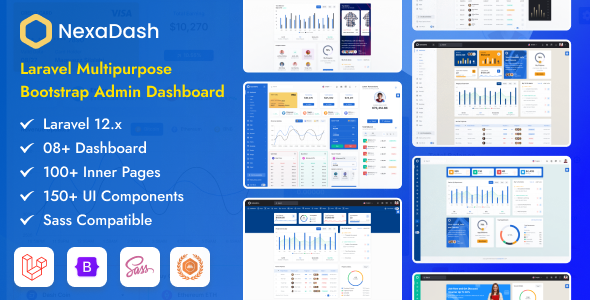
NexaDash is a Laravel admin dashboard template for building backend interfaces. It offers numerous UI components and layouts, ideal for agencies and developers needing to quickly set up administrative panels for web applications.
What NexaDash Offers Developers
This product is essentially a pre-built user interface kit specifically for Laravel applications. It takes the heavy lifting out of designing and coding common administrative screens, letting you focus on the backend logic. You get a collection of Blade files, JavaScript, jQuery, CSS, and Sass files, all structured to work within a Laravel environment.
After building multiple agency sites with tools like this, the biggest win is avoiding the repetitive grunt work. Instead of spending days styling data tables, charts, or complex forms from scratch, NexaDash provides a foundation. This speeds up backend interface creation significantly, translating directly to lower development costs for clients.
Who Needs This Dashboard Template (and Who Doesn't)
NexaDash is for Laravel developers, agencies, and product teams who need to launch a functional admin panel quickly. If you're building a SaaS product, a custom CRM, or any web application requiring an extensive administrative backend, this template provides a solid head start. It's particularly useful for those who appreciate a wide array of pre-built components and are comfortable working within a Bootstrap and jQuery ecosystem.
However, this isn't for everyone. If you're building a purely static website, a frontend-only application with a different JavaScript framework, or if your project demands an extremely lean, custom UI with zero external dependencies, NexaDash might be overkill. It’s also not ideal for those unfamiliar with Laravel's templating system or basic frontend development concepts.
Building Backend Interfaces with NexaDash
The core value here is the comprehensive set of UI elements. You'll find pages for charts, tables, forms, calendars, and various notification styles. For instance, the inclusion of Datatables, Apexcharts, and Fullcalendar means you can implement complex data displays, interactive charts, and scheduling features with minimal setup. This solves the workflow problem of integrating disparate UI libraries, as they are already wired up and styled.
The template includes specific "AI KIT Pages" and "CMS Pages," which appear to be pre-configured layouts for common AI-related dashboards or content management interfaces. This means less time spent arranging elements for niche-specific views, making it a smart investment for projects in these areas.
Design and Customization Flexibility
NexaDash offers a good degree of visual customization. You get multiple color options, along with light and dark modes, which are standard but always appreciated for user comfort. The various header and sidebar configurations allow for different navigation experiences, from compact to full-height, adapting to content needs.
The inclusion of Sass files is a practical benefit for developers. It means you can easily adjust global styles, colors, and component specifics without digging through compiled CSS. This structured approach to styling ensures a consistent look and feel across your application and makes deeper brand customization much more manageable.
Under the Hood: Code and Developer Experience
This template is built on Bootstrap, which provides a familiar and robust grid system and component library. The code is described as clean and well-commented, which is crucial for maintainability, especially when multiple developers are involved. Good comments reduce the learning curve and future maintenance costs.
The use of a wide range of third-party JavaScript libraries (jQuery, Chart.js, Apexcharts, CKEditor, etc.) means a lot of functionality is available out of the box. While this is a time-saver, it also means a larger initial asset load. In our experience with similar frameworks, this can impact initial page load times, which, while less critical for an admin panel than a public-facing site, still affects perceived responsiveness. Semantic accessibility for forms and tables appears to be standard, which is good for general compliance.
Final Verdict: Is NexaDash a Smart Buy?
NexaDash is a solid choice for any developer or agency looking to quickly deploy a feature-rich admin panel for a Laravel application. It significantly cuts down on the initial development time for common UI elements, allowing you to focus on the unique business logic of your project. The comprehensive set of components and customization options, especially with the Sass architecture, make it a flexible base.
While the extensive list of JavaScript dependencies means you'll need to be mindful of asset optimization for the leanest possible build, the trade-off for getting so much functionality pre-integrated is often worth it. If you need to deliver a functional, good-looking Laravel admin panel development project on a tight schedule, this template will save you considerable time and effort.
FAQ
How difficult is it to customize NexaDash beyond basic color changes?Customizing NexaDash beyond basic color options is manageable if you're comfortable with Sass and Bootstrap. The included Sass files allow for systematic changes to global styles and component appearances.
Will using NexaDash impact my application's performance significantly?NexaDash includes many JavaScript libraries, which can increase initial load times. For an admin panel, this is often acceptable, but for optimal performance, you might need to selectively load scripts or optimize your build process.
Is NexaDash suitable for complex data management and reporting?Yes, with its integrated Datatables, various charting libraries like Chart.js and Apexcharts, and form components, NexaDash provides a strong foundation for complex data management and reporting interfaces.
Can I easily integrate NexaDash with my existing Laravel backend logic?Yes, since NexaDash provides Blade files, it's designed to integrate directly with your Laravel backend. You'll primarily be connecting the frontend UI components to your controllers and models.