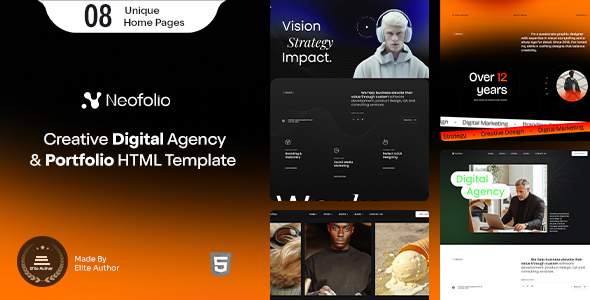
Neofolio is a static HTML template for digital agencies and freelancers needing a professional portfolio showcase. It offers a solid base for web design or software business websites.
Neofolio Digital Agency Template Overview
This Neofolio template is a straightforward static HTML kit aimed at digital agencies, design studios, and individual freelancers. It's built with standard web technologies like HTML5, CSS3, and jQuery, sitting on top of the Bootstrap framework. Essentially, it provides pre-built pages and components you can use to quickly assemble a professional-looking website to showcase your work.
In our experience with similar frameworks, a static template like this solves the immediate problem of getting a visually appealing online presence without the overhead of a content management system. It's a foundation, not a full solution, which is key to understanding its value.
Who Benefits from This Portfolio Website Design Template?
Neofolio is genuinely useful for agencies or freelancers who need to launch a new site or refresh an existing one quickly, especially if their primary goal is to showcase a portfolio of work. If you are comfortable with basic HTML, CSS, and JavaScript, you can get a site up fast. It's a good fit for those who prioritize a fast initial setup and prefer to manage content directly through code or a simple static site generator.
However, this template is not for everyone. If you need deep custom backend logic, a dynamic blog, or robust e-commerce features out-of-the-box, you'll find it lacking. It's also not ideal for those who aren't comfortable editing code, as there's no visual page builder or CMS to simplify content updates.
Design and Visual Approach for Agencies
The template leans into a "modern and clean" design aesthetic, which is pretty standard for the digital agency niche. It uses Google Fonts like Poppins and Inter, which are popular and generally load efficiently, contributing to good Core Web Vitals. Iconography comes from Font Awesome and Linea Icons, offering a good range without needing to source custom assets.
While the design is not groundbreaking, it’s competent and professional. This means you won't spend hours trying to make it look acceptable, which saves valuable project time. The minimal and clean approach ensures your portfolio content remains the focus, rather than overly complex UI elements.
Included Layouts and Components
What you get here is a collection of HTML content, meaning various pre-designed page layouts and UI components. This is the core value proposition: sections for services, about us, contact, and crucially, multiple portfolio layouts. For a freelancer portfolio showcase, having these pre-built sections means you're not starting from a blank slate.
The benefit here is speed. You can grab a portfolio grid, drop in your project images and descriptions, and move on. This saves significant development time compared to hand-coding every element from scratch. The structure is based on Bootstrap, so if you or your team are familiar with that framework, extending or modifying layouts is straightforward.
Showcasing Work with Neofolio
Since this is a portfolio template, the focus is on presenting your projects effectively. The included layouts should allow for various ways to display case studies or project galleries. However, because it's static HTML, any updates to your portfolio will require direct code edits. There's no built-in blog system, so if you plan to publish regular articles or news, you'd need to integrate a third-party solution or build that functionality yourself.
This direct approach to content management can be efficient for a fixed number of projects, but it becomes cumbersome for frequently updated content. For a business owner, this means content updates require a developer, which can add to long-term maintenance costs.
Basic Business Features
The main business-oriented feature is a "Working Contact Form PHP." This is a standard inclusion in many HTML templates. It means there's a basic server-side script to handle form submissions, sending emails directly. While functional, it's a basic setup and usually requires you to configure server-side email settings. It's not a full CRM integration or a sophisticated lead capture system.
For a small agency or freelancer, this is enough to start gathering inquiries. However, remember it's a simple script and lacks spam protection or advanced validation out-of-the-box, which are considerations for a conversion-ready funnel.
Code Quality and Developer Workflow Efficiency
The template is based on Sass, which is a big plus for developers. This means the CSS is organized with variables and mixins, making global style changes (like primary colors or font sizes) much easier and more consistent across the site. All files are well commented, and the documentation is included, which significantly lowers the learning curve when you first dive in.
Using established libraries like jQuery, Bootstrap, GSAP, and Swiper provides a familiar development environment. While these libraries can add to the total page weight, they also mean less custom JavaScript to write and maintain. The "Valid HTML5" claim suggests a clean semantic structure, which is good for accessibility and search engine indexing, making it easier for search engines to understand your content.
Responsiveness and Compatibility
The template claims "100% Responsive" and "Retina Ready," with testing across "all major browsers and devices." This is expected for any modern web template. In practical terms, this means your site should look good and function correctly whether viewed on a large desktop monitor, a tablet, or a smartphone. This consistency is crucial for maintaining a professional image and providing a good user experience, which directly impacts client perception of your agency.
Good responsiveness ensures that potential clients can easily browse your portfolio regardless of their device, preventing frustration and potentially increasing engagement with your services.
SEO Readiness for Agency Websites
Being "SEO optimized" and having "Valid HTML5" means the template provides a solid technical foundation for search engines. Semantic HTML helps search engines understand the structure and content of your pages, which is a baseline for good rankings. However, a static HTML template inherently limits advanced SEO strategies that rely on dynamic content generation, schema markup automation, or complex content hubs.
You'll still need to handle content strategy, keyword research, and manual schema implementation. This template offers a clean slate, free from the common bloat found in some WordPress themes, which can positively impact page load times—a factor for search engine ranking.
Final Verdict on Neofolio
Neofolio is a solid, no-frills static HTML template for digital agencies and freelancers who need a professional online portfolio quickly. It's not groundbreaking, but it doesn't promise to be. What it does, it does well: provides a clean, well-structured foundation using familiar technologies like Bootstrap and Sass.
If your goal is to save time on initial setup and styling, and you're comfortable working with code, this template is a smart investment. It delivers a visually competent base that allows you to focus on filling it with your best work, making it a pragmatic choice for getting a new agency website design off the ground without overcomplicating things.
FAQ
Is Neofolio suitable for dynamic content like a blog?No, Neofolio is a static HTML template, meaning it does not have built-in functionality for dynamic content like a blog or news section. You would need to manually update HTML files for new posts or integrate a third-party blogging solution.
Does this template include a content management system (CMS)?Neofolio does not include a content management system. It provides raw HTML, CSS, and JavaScript files, so all content updates and site modifications are done by directly editing the code.
What level of technical skill is needed to customize Neofolio?You should be comfortable with HTML, CSS (especially Sass), and basic JavaScript to effectively customize Neofolio beyond simple text and image changes. Familiarity with the Bootstrap framework is also beneficial.
Can I easily change the overall color scheme of the template?Yes, because the template uses Sass, changing the overall color scheme is relatively straightforward. You can modify the main Sass variables for colors, and those changes will propagate throughout the entire stylesheet.