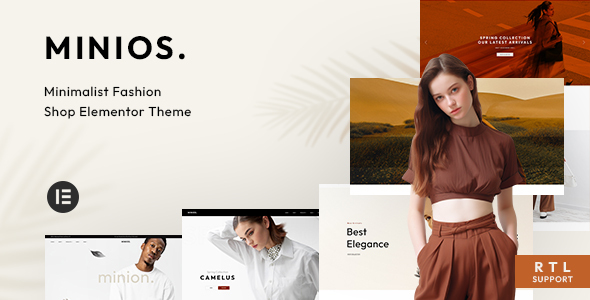
Minios is a WooCommerce theme designed for fashion stores, offering multiple layouts and features to quickly set up an online shop. It's best suited for freelancers and small agencies needing to launch visually appealing fashion sites without extensive custom coding.
Minios: A Fashion Store WooCommerce Theme for Quick Launches
Alright, let's talk about Minios. This is a WordPress theme specifically built for online fashion stores, using WooCommerce. It comes with a bunch of pre-designed homepage layouts, which is the main selling point here. The idea is you pick a look you like, import the demo content, and then swap out the placeholder images and text for your own.
If you're a freelancer or work for a small agency and need to get a fashion-related e-commerce site up and running fast, this is where Minios shines. It handles a lot of the visual styling and basic WooCommerce setup for you, saving you time on the initial design phase. It's built with Elementor, which means you can do visual edits without diving deep into code.
Who Should Consider Minios and Who Should Look Elsewhere
This theme is a good fit for anyone who needs a polished fashion store look quickly. Think small boutique owners, independent designers, or even marketing teams launching a new product line. If you're comfortable with WordPress and page builders like Elementor, you'll find your way around.
However, if you're building a highly custom e-commerce platform with unique backend logic, complex integrations, or require a completely bespoke design that deviates significantly from typical fashion store layouts, this might not be the best choice. It's designed for speed and pre-built aesthetics, not for deep custom development beyond what Elementor and WooCommerce offer. Trying to force it into a highly custom role could end up being more work than building from scratch.
Solving the "Pretty Website Fast" Problem
The core problem Minios solves is the time investment required to make an online store look good, especially in the fashion niche where visual appeal is paramount. Setting up product grids, category pages, and filtering options with WooCommerce can be tedious. Minios provides these elements out-of-the-box with a focus on fashion aesthetics, meaning you spend less time on repetitive styling and more time on product photography and marketing copy.
For instance, setting up product variations like colors and sizes with swatches is often a headache. Minios includes these features, which can save you hours of development time compared to building them from scratch or integrating multiple plugins. The live Ajax search is another practical benefit, allowing customers to find products quickly without page reloads, which is crucial for keeping shoppers engaged on a fashion site.
Layouts and Component Variety for Fashion Stores
Minios offers a good number of homepage layouts, which is typical for themes aiming for broad appeal within a niche. You get different arrangements for showcasing featured products, new arrivals, and collections. The theme also includes various header and footer options, allowing for some customization without needing to build them from the ground up.
It's worth noting that while there are many options, they all tend to fall within a certain visual style. If you're looking for something radically different from the standard fashion e-commerce look, you might find yourself fighting the theme's inherent design. The inclusion of numerous shortcodes for Elementor is a plus, offering more granular control over page content.
eCommerce Functionality and Multi-Vendor Support
As a WooCommerce theme, Minios integrates well with the platform's core features. It supports common e-commerce needs like wishlists, product comparison, and quick view options. The theme also highlights compatibility with popular multi-vendor plugins like Dokan and WCFM. This means if you plan to build a marketplace where multiple sellers can list their products, Minios is set up to handle that integration, which is a significant time saver for that specific business model.
The theme's approach to multi-vendor compatibility means it won't break when those plugins are installed, but it doesn't necessarily add custom UI elements for them. You'll manage vendor-specific features through the respective plugin's interface, which is standard practice.
Code Quality and Developer Considerations
From a developer's perspective, Minios seems to follow common WordPress theme development practices. It's built on Bootstrap, a widely recognized framework, which is good for consistency. The theme mentions HTML5 and CSS3, which are standard web technologies.
The "SEO Optimized" claim is standard for most themes, and while Minios likely provides a clean semantic structure for basic SEO, actual ranking performance depends heavily on content, site speed optimization, and off-page factors. Its asset loading appears to be typical for WordPress themes, meaning you might need to optimize images and potentially use caching plugins to ensure good Core Web Vitals scores.
Responsiveness and Browser Compatibility
The theme is stated to be fully responsive and tested on multiple devices. This is essential for any modern e-commerce site, as a significant portion of traffic comes from mobile. The "Friendly menu on mobile" suggests attention to the mobile navigation experience, which can often be an afterthought in theme development. Cross-browser compatibility is also mentioned, indicating it should work across major browsers without significant display issues.
SEO Readiness for Fashion E-commerce
Minios claims to be SEO optimized, which typically means it uses semantic HTML and follows basic WordPress SEO best practices. This provides a solid foundation for your fashion website's search engine visibility. Features like clean code structure and proper heading hierarchy contribute to this.
However, "SEO Optimized" is a broad term. For serious SEO, you'll still need to use a dedicated SEO plugin like Yoast SEO or Rank Math for meta descriptions, schema markup, and sitemaps. The theme provides the structural elements, but the content and ongoing optimization are up to you.
Is Minios a Smart Investment for Your Fashion Store?
If your primary goal is to launch a visually appealing fashion store on WooCommerce quickly and efficiently, Minios is a sensible choice. It bundles many common e-commerce features and design elements specific to the fashion industry, saving you considerable time and effort on initial setup. While it might not be the absolute deepest or most customizable theme on the market, its strength lies in providing a solid, attractive foundation that can be adapted with Elementor. For agencies and freelancers looking to speed up client projects, this theme can be a valuable tool in their arsenal.
FAQ
What kind of custom fields does Minios support for product variations?
Minios supports color, size, and image swatches for product variations, allowing customers to visually select options.
How does the live Ajax search function improve the shopping experience?
The live Ajax search provides instant product suggestions as the user types, reducing the need for full page reloads and speeding up product discovery.
Can I build a multi-vendor marketplace with Minios without conflicts?
Yes, Minios is designed to be compatible with popular multi-vendor plugins, ensuring they can be installed and used without theme conflicts.