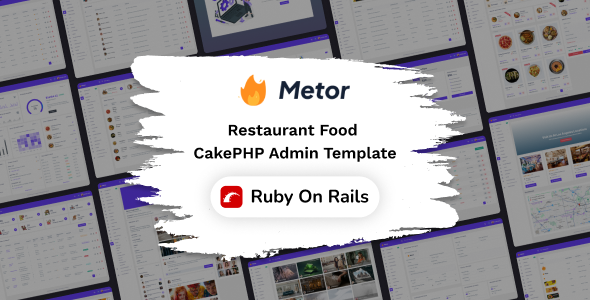
Metor is a Ruby on Rails admin UI kit for restaurant web apps, offering pre-built components and layouts to speed up development for agencies and freelancers building niche applications. This kit provides a solid foundation for creating custom restaurant management systems with a focus on Bootstrap and Ruby on Rails.
Metor: A Ruby on Rails Admin UI Kit for Restaurant Apps
Metor is essentially a pre-packaged set of user interface elements and page templates built with Ruby on Rails and Bootstrap. If you're developing a web application specifically for restaurants or the food industry, this kit aims to give you a head start. Think of it as a collection of building blocks for your admin dashboard, saving you the time you'd normally spend on basic styling and component setup.
The core idea here is to avoid reinventing the wheel for common admin tasks. Instead of coding every input field, button style, and navigation item from scratch, Metor provides these ready to go. This is particularly useful when you need to get a functional prototype or a minimum viable product out the door quickly for a client in the food service sector. The inclusion of Bootstrap means it adheres to widely accepted front-end patterns, which is a good thing for maintainability.
Who Needs Metor and Who Should Look Elsewhere
This UI kit is best suited for developers or agencies who are already working with Ruby on Rails and need to build a custom admin panel for a restaurant, cafe, or food delivery service. If your client has specific needs around managing orders, inventory, or table bookings, and you want to leverage a pre-built structure, Metor could be a smart investment. It’s for those who understand that a template like this provides a base, and they'll still need to integrate their custom logic and specific business workflows.
However, if you're looking for a general-purpose admin panel that can be easily adapted to any industry, or if your project heavily relies on a JavaScript framework like React or Vue, Metor might not be the best fit. It's also not for beginners who are still learning the fundamentals of Ruby on Rails or Bootstrap. Those needing a deeply custom backend with complex data relationships or unique user authentication flows will find this kit provides the front-end structure but not the backend solution.
Solving the Restaurant App Admin Development Headache
The main problem Metor solves is the time sink involved in creating a visually consistent and functional admin interface for a niche application. Building out a dashboard with various charts, forms, tables, and navigation from scratch can easily consume dozens of hours. For a restaurant website template that needs to handle things like order management or menu displays, having these components pre-built and styled can save significant development effort. The practical benefit is a faster project completion time, which translates to lower costs for clients or more projects completed for an agency.
The inclusion of pre-made pages like "Invoice" and "Log in" also helps streamline the process of setting up standard application sections. This avoids the common issue of spending too much time on generic pages when you should be focusing on the unique features of the restaurant application. In our experience with similar frameworks, having these foundational elements ready significantly reduces the initial setup friction.
Layouts, Pages, and Components Included
Metor comes with a substantial collection of pre-built pages and UI components. This includes essential administrative screens like dashboards, forms, tables, and various utility pages such as error screens and pricing layouts. The sheer number of UI components, over 400, means you're unlikely to run out of options for styling different elements within your application.
- Dashboard: A central hub for overview data.
- Form Elements: A wide variety of input fields and controls for data entry.
- Tables: Options for displaying data in structured formats.
- Charts Library: Tools for visualizing data trends.
- Error Pages: Standard 404 and 500 error displays.
While the number of pages and components is impressive, it's important to remember that these are starting points. You'll need to integrate them with your Ruby on Rails backend logic to make them truly functional for your specific restaurant application needs.
Code Quality and Developer Experience
The developers state that Metor uses clean, developer-friendly code and extensive SCSS variables for easy customization. This is crucial for long-term maintenance. When CSS is well-organized with variables, changing a primary color or font across the entire application becomes a simple task rather than a tedious search-and-replace operation. The use of Bootstrap also means the underlying structure is familiar to many developers, making it easier for new team members to get up to speed.
In our experience with similar frameworks, the clarity of code comments and the logical organization of SCSS files directly impact how quickly you can debug issues or add new features. While the description doesn't go into deep technical detail about the SASS architecture, the emphasis on customization with SCSS variables is a positive sign for maintainability.
Responsiveness and Browser Compatibility
Metor is designed to be fully responsive, meaning it should adapt well to different screen sizes, from desktops to mobile devices. This is a standard expectation for any modern web template, and it's essential for admin panels that might be accessed on tablets or phones. The kit also claims compatibility with all modern and supported browsers.
From a practical standpoint, how a mobile menu collapses or how a complex form handles smaller screens is often where templates show their weaknesses. While Metor claims responsiveness, the real test is in how gracefully it handles these transitions without breaking the layout or making elements difficult to interact with on touch devices. This is important for users who need to manage their restaurant operations on the go.
SEO Readiness
For an admin UI kit, SEO readiness is less about on-page optimization for public-facing content and more about the semantic structure of the HTML. A clean, semantic structure helps with accessibility and can indirectly benefit any public-facing pages built using the same styling principles. The use of Bootstrap generally results in well-structured HTML, which is a good foundation for accessibility standards. This means that if you were to build public-facing pages with similar components, they would have a better starting point for search engine visibility.
Final Thoughts on Metor
Metor presents itself as a practical tool for developers building Ruby on Rails applications in the restaurant niche. It offers a significant time-saving advantage by providing a pre-designed set of components and pages, allowing you to focus on the unique business logic of your project. If you're in the market for a foundation to build a custom restaurant management system and you're comfortable with Ruby on Rails and Bootstrap, this kit is worth considering to accelerate your development workflow.
FAQ
Is Metor suitable for building a public-facing restaurant website?
Metor is primarily an admin UI kit, designed for backend dashboards. While you could potentially adapt some styling for public pages, it's not its intended use and would require significant modification.
How easy is it to integrate custom Ruby on Rails logic with Metor?
The kit provides the front-end structure. You will need to write your own Ruby on Rails code to connect these UI elements to your database and application functionality.
What if I need a feature not included in the 400+ UI components?
Since it's built on Bootstrap and SCSS, you can extend it by adding your own custom CSS or JavaScript components, or by modifying the existing ones.
.png)