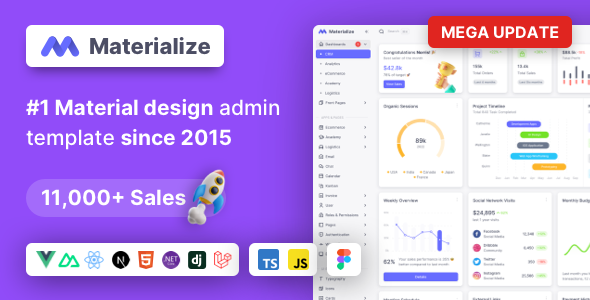
Materialize is a multi-framework admin template built with Material Design principles, suitable for developers needing a pre-built interface for web applications. It offers various tech stacks including HTML, Vue.js, and Next.js.
Materialize: A Multi-Framework Admin Template for Diverse Web Applications
Materialize presents itself as a comprehensive admin template, aiming to accelerate the development of web applications by providing a pre-styled interface based on Google's Material Design. After building multiple agency sites with tools like this, I can say it’s a common approach to speed up initial setup for dashboards and backends.
The core idea here is to give you a solid foundation for building complex applications without starting from scratch on every UI element. This can save significant time on styling and basic layout structure, especially for projects like SaaS platforms or e-commerce backends where a consistent interface is key.
The template comes in several flavors, including HTML with Bootstrap, Vue.js with Vuetify, and Next.js with MUI and TailwindCSS. This flexibility is a plus, allowing you to choose the stack that best fits your project. For those looking to build an ecommerce website template with a backend focus, or a robust analytics dashboard, this offers a starting point.
Who Should Consider Materialize and Who Should Look Elsewhere
This template is a good fit for developers or agencies who need to launch internal tools, dashboards, or application backends quickly. If your primary goal is to get a functional and visually consistent admin area up and running without spending weeks on custom UI design, Materialize can be a smart investment. It’s particularly useful if you're already familiar with one of the supported frameworks.
However, if you're building a public-facing website where unique branding and highly custom user experiences are paramount, this might not be the best choice. It's also not ideal for projects requiring deep backend logic that goes beyond standard CRUD operations or for those who prefer to build their entire UI from scratch with a minimal CSS framework.
Problem Solving for Rapid Application Development
The main problem Materialize solves is the time sink involved in creating standard administrative interfaces. Setting up navigation, forms, tables, and various widgets from scratch is repetitive. This template provides these components out of the box, allowing you to focus on the unique features of your application.
For instance, if you're building an inventory management system or a CRM, the pre-built data tables, form elements, and layout structures can save you easily 20-30 hours of development time on the frontend styling alone. The inclusion of pre-built applications like Email, Chat, and Kanban also means you don't have to reinvent the wheel for common functionalities.
Design and Visual Approach
Materialize adheres to Google's Material Design guidelines. This means you get a clean, card-based interface with clear typography and a consistent color palette. It’s a widely recognized design language, so users will likely find it intuitive.
While the Material Design aesthetic is common, Materialize does a decent job of implementing it across its components. It’s not groundbreakingly unique, but it’s a standard that works well for administrative interfaces. The visual organization is generally good, with clear spacing and hierarchy.
Layouts, Pages, and Components Included
The template comes with a variety of pre-built pages and components designed for administrative tasks. This includes several niche dashboards and applications that cover common use cases.
- Pre-built Applications: Email, Chat, Calendar, Kanban, eCommerce, Academy, Logistics, Invoice, User Management, Roles & Permissions, and Front-Pages.
- UI Elements: A wide array of form controls, buttons, typography options, and layout components are available.
The inclusion of these ready-to-use sections means you can assemble a functional application interface quite rapidly. For example, setting up an invoice generation system becomes much faster when you have pre-designed invoice templates and form fields ready to go.
eCommerce and Business-Related Features
While primarily an admin template, Materialize includes an eCommerce application. This suggests it's geared towards building the backend of an online store, rather than the customer-facing website. You'll find components that could be adapted for product listings, order management, and customer data within an administrative context.
This focus on backend functionality makes it suitable for businesses that need a custom control panel for their operations. If you’re looking to build an internal dashboard for sales tracking or managing customer interactions, this template provides a solid starting point.
Code Quality and Developer Experience
From a developer's perspective, the code organization is generally standard for this type of template. The HTML version uses Bootstrap, which is familiar to many. The Vue.js and Next.js versions leverage their respective frameworks and component libraries.
In our experience with similar frameworks, the asset loading feels average. While it supports various frameworks, the practical benefit is a cleaner developer experience if you’re already proficient in one of the supported stacks. The documentation is mentioned as being helpful, which is crucial for any template of this scope to avoid getting stuck on implementation details.
- Framework Support: Available in HTML (Bootstrap), Vue.js (Vuetify), and Next.js (MUI & TailwindCSS).
- Documentation: Claimed to be well-documented, aiding in quicker adoption.
One area that could be improved, as is common with many multi-framework templates, is ensuring perfect parity and the absolute latest best practices across all versions simultaneously. Always check the demo for the specific version you intend to purchase.
Responsiveness and Compatibility
Materialize is designed to be responsive and compatible with major web browsers. This means the interface should adapt well to different screen sizes, from desktops to tablets and mobile devices. For a web application, this is non-negotiable, ensuring a consistent experience for users regardless of their device.
The template supports Microsoft Edge, Chrome, Firefox, Safari, and Opera. This broad compatibility is standard for most professional web templates and ensures your application can be accessed by a wide audience without browser-specific issues.
SEO Readiness
As an admin template, the direct impact on public-facing SEO is minimal. However, the underlying structure aims for semantic correctness. For the HTML version using Bootstrap, the structure is generally clean, which is a good foundation for accessibility and basic search engine understanding if any part of the admin interface were to be indexed.
The focus here is on building functional interfaces, and while not a primary concern for admin panels, a clean HTML structure contributes to better maintainability and can indirectly help if parts of your admin are ever exposed or need to be crawled.
A Practical Foundation for Application Building
Materialize offers a practical way to cut down development time for web application backends. Its strength lies in providing a pre-built, Material Design-compliant interface across multiple popular frameworks. If you need to build an internal dashboard, a project management tool, or an e-commerce backend quickly, this template provides a solid, time-saving foundation.
While it's not for those seeking entirely unique frontend designs for public sites, its value as an administrative tool is clear. By leveraging its pre-built components and applications, you can significantly reduce the initial development effort and focus on the core functionality of your project.
FAQ
Is this template suitable for building a public-facing website?Generally, no. Materialize is designed as an admin template for backends and internal tools, not for customer-facing websites that require unique branding and user experiences.
How easy is it to customize the look and feel?Customization is straightforward if you are familiar with the underlying framework (Bootstrap, Vuetify, or MUI). You can change colors, typography, and component styles using the provided variables and classes.
Are there significant differences between the HTML, Vue.js, and Next.js versions?Yes, there are differences due to the distinct nature of the frameworks and their component libraries. It's important to check the specific demos for the version you are interested in.
Does this template handle GDPR compliance?The template itself provides the structure. Ensuring GDPR compliance is your responsibility and involves implementing features like cookie consent, data privacy policies, and secure data handling within your application.