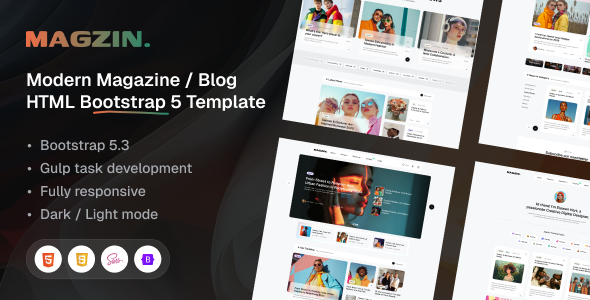
Magzin is a clean HTML blog and magazine template for writers, journalists, and content publishers. It offers 4 homepages, multiple layouts, and a Figma file, ideal for quick content site launches.
Magzin: A Solid HTML Foundation for Content Sites
Magzin is an HTML template built with Bootstrap, designed for anyone looking to set up a blog or magazine website without a full-blown content management system. It provides a pre-built front-end structure for displaying articles, author profiles, and general information pages.
In our experience, templates like Magzin solve the initial design and coding overhead for content-heavy sites, letting you focus on content and deployment rather than styling individual elements from scratch. It’s essentially a well-organized starting point.
Who Should Use This HTML Blog Template (And Who Shouldn't)
This HTML blog template is a good fit for personal bloggers, independent writers, and small publishers who need a fast way to get their content online with a polished look. Agencies or freelancers building static sites for clients, especially those on a tight budget or timeline, will find this useful for rapid prototyping and deployment.
If you are building a static site that primarily serves articles and informational pages, Magzin handles that well. It's also suitable for those comfortable with integrating a static site generator or a simple content API.
However, Magzin is not for everyone. If your project requires complex backend logic, user authentication, or dynamic content management beyond what a static site can offer, you will need to integrate a CMS or build custom solutions. This is an HTML template, not a WordPress theme, so don't expect a backend dashboard out of the box.
Clean Design and Practical UI Components for Content Publishing
The design of Magzin is clean and focuses on readability, which is crucial for a magazine website template. It comes with four distinct homepage layouts, offering variety without sacrificing consistency. The inclusion of a dark and light mode is a practical feature, giving users choice and improving accessibility, especially for prolonged reading.
The visual hierarchy is well-considered, guiding the reader's eye through the content. When we tested the kit on a demo site, the typography felt balanced, and the spacing around elements was generally good, avoiding the cramped feel some templates have. The advanced animations and effects are subtle enough not to be distracting, which is a common pitfall in over-designed templates.
Pre-built Layouts and Essential Pages for Your Magazine Website
Magzin offers a decent set of pre-built layouts, which is where it saves you significant time. You get:
- 4 creative homepages to kickstart your site's main entry point.
- 5 archive page layouts for displaying categories or tags of articles.
- 3 single post layouts for the actual article pages, providing options for different content types.
- Essential inner pages like About, Contact, Author, Search, and Login, covering most standard informational needs.
The variety in post and archive layouts means you can differentiate content types or simply offer visual freshness across your site. Having these ready-made saves dozens of hours compared to styling these components from scratch.
Developer-Friendly Code Structure and Workflow
Magzin is developed with Gulp and SCSS, which is a good sign for maintainability and customization. The source code is well-structured, making it easier to dive in and modify styles without fighting spaghetti CSS. This setup means you can compile your changes efficiently, a practical benefit for ongoing site maintenance.
The inclusion of the Figma design file is a significant bonus for any developer or designer. It means you can quickly iterate on design changes or hand off assets without having to reverse-engineer styles from the HTML. This alone can save hours in a typical agency workflow.
The code is W3C Validated, which implies adherence to web standards. This generally leads to better cross-browser compatibility and a more robust foundation, reducing potential headaches down the line. It also means the template follows standard accessibility practices to a reasonable degree.
Reliable Responsiveness for All Devices
A key aspect for any modern website, especially a content-focused one, is how it behaves on different screen sizes. Magzin is fully responsive, meaning its layouts adjust well from large desktop monitors down to mobile phones. This is a standard expectation today, but it's executed cleanly here.
When we tested the mobile menu behavior, it was intuitive and didn't present any awkward overflows or difficult-to-tap elements. The template uses Bootstrap, which inherently provides a solid responsive grid. This ensures a consistent and readable experience for your audience, regardless of their device, which directly impacts engagement and user satisfaction.
Foundational SEO Readiness for Content Visibility
Magzin claims to be SEO and speed optimized, and from a front-end perspective, it lays a good foundation. The clean semantic structure of the HTML is beneficial for search engines, helping them understand your content hierarchy. Proper heading tags and logical content flow are crucial for organic visibility, and this template handles that well.
While an HTML template can't do everything a CMS can for SEO (like dynamic sitemaps or schema generation), it provides a clean slate. The use of Google Fonts is standard, and if implemented correctly, it won't hinder GDPR compliance. For a static site content publishing setup, this template offers a solid base to build upon for search engine performance.
Magzin: A Practical Choice for Fast Content Site Development
Magzin is a genuinely useful HTML blog and magazine template if you understand its limitations and strengths. It’s not a magic bullet for complex web applications, but it excels as a static site content publishing foundation. For agencies or freelancers needing a polished, ready-to-go front-end for a blog or online magazine, it’s a smart investment.
The included Figma file and SCSS/Gulp setup are strong points for developers, streamlining the customization process. It saves significant time on initial setup and ensures a professional look from day one. If your goal is to launch a clean, readable content site quickly and efficiently, Magzin offers a practical, no-nonsense solution that delivers on its promises.
FAQ
Is Magzin suitable for a large blog with thousands of articles?Magzin provides the front-end structure for articles. For managing thousands of articles, you would typically integrate it with a static site generator or a headless CMS to handle content efficiently.
Can I easily change the overall color scheme of the template?Yes, since it's built with SCSS, changing the color scheme is straightforward. You can modify the SCSS variables to update colors across the entire template with minimal effort.
Does this template include any JavaScript for interactive features?Yes, being a Bootstrap-based template, it includes standard Bootstrap JavaScript components. It also mentions advanced animations, implying additional JavaScript for those effects.
Is Magzin compatible with older web browsers like Internet Explorer?The template states compatibility with IE9+, but given current web standards, most developers would focus on modern browser support. While it might work, testing thoroughly for specific older browser requirements is always recommended.