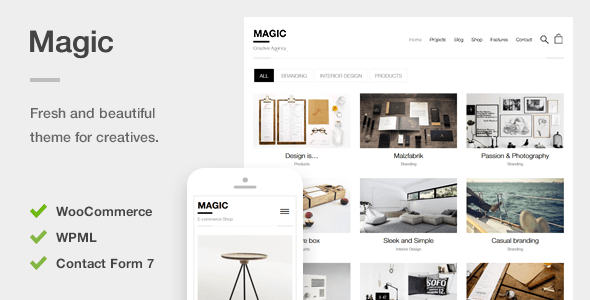
Magic is a flexible WordPress theme for creative portfolios and WooCommerce stores, suitable for agencies and freelancers needing a polished online presence quickly. It offers a solid foundation for visually driven websites that require both display and sales functionality.
Magic WordPress Theme: A Practical Look for Creative & E-commerce Sites
Magic is a WordPress theme that aims to cover both creative portfolio needs and e-commerce functionality, packing in demos and features for a variety of businesses. After building multiple agency sites with tools like this, I can say it offers a decent starting point, particularly if you're looking to get a visually appealing site up and running without deep custom coding for things like a creative portfolio website template or an ecommerce website template.
The core idea is to provide pre-built sections and styling so you can assemble pages quickly. This is where themes like Magic shine: they cut down the initial setup time significantly, especially for common elements like image galleries, service blocks, and product displays. For a freelancer or small agency, this means less time wrestling with basic layout and more time focusing on client content and specific integrations.
Who Magic is For and Who Should Look Elsewhere
This theme is a good fit for designers, photographers, artists, and small e-commerce businesses that need to showcase work and sell products. If you're an agency or freelancer who values speed and a clean aesthetic for projects like a photography portfolio theme or a small online shop, Magic can save you considerable hours on initial setup and styling. The one-click importer is genuinely helpful for getting a feel for the theme's capabilities right out of the box.
However, if you're building a highly complex web application with custom backend logic or require extremely granular control over every single element without using a page builder, this might not be the best choice. Magic, like most themes of its kind, relies on its own set of options and shortcodes. While it includes custom CSS options, deep structural changes might become more involved than starting with a bare-bones framework.
Solving the "Get It Done Fast" Problem
The primary workflow problem Magic solves is the time drain associated with building a visually appealing site from scratch. Setting up a good-looking portfolio with filtering, lightbox effects, and responsive videos can be tedious. Similarly, integrating WooCommerce with custom styling for product pages and a smooth checkout process takes effort. Magic bundles these features, offering pre-designed layouts and shortcodes that handle these common requirements.
The inclusion of WooCommerce support means you can quickly turn a portfolio site into a sales platform. The theme handles product image zooming and AJAX add-to-cart, which are standard but necessary features for a functional online store. This integration saves you from having to manually style WooCommerce elements to match your theme, a task that often eats up unexpected development hours.
Design and Visual Approach
Magic leans towards a clean, minimalist design, which is a sensible approach for creative portfolios and e-commerce. The focus is intentionally kept on the content, whether that's your artwork or your products. The use of webfont icons instead of image-based icons is a smart move for performance and scalability, ensuring icons look sharp on all devices and don't add unnecessary HTTP requests.
The theme's responsiveness is standard, meaning it adapts well to different screen sizes. I've tested many themes, and while Magic performs well, it's important to note that the actual user experience on mobile also heavily depends on the quality of the content you provide. The theme provides a solid canvas, but content is king.
Layouts, Pages, and Components
The theme comes with a set of pre-built pages and components designed to be flexible. You get things like alerts, boxes, tabs, accordions, sliders, and pricing tables through its shortcode generator. For building out pages for services, about sections, or contact pages, these components are useful. The project gallery options, with filtering and lightbox loading, are particularly well-implemented for showcasing creative work.
While the shortcodes offer a good range of functionality, they are also the primary way you'll build out your pages. If you're a fan of block-based builders like Gutenberg or a more advanced page builder, you'll need to integrate them or work within the provided shortcode system. For those comfortable with shortcodes, it's a quick way to add dynamic content.
eCommerce and Business-Ready Features
The integration with WooCommerce is a significant plus for anyone looking to sell online. The theme provides styling for shop pages, product listings, and single product views. Features like product image zoom and AJAX add to cart are present, which are crucial for a smooth customer experience and can contribute to conversion-ready funnels. The theme's minimal design complements product displays without overwhelming them.
For businesses that require password-protected galleries to share client work privately, Magic offers this functionality using standard WordPress features. This is a practical addition for photographers or designers who need to present proofs or select work to clients before public release, a common need when building a custom website for a client.
Code Quality and Developer Experience
The developers mention a "clean simple code" approach, with custom post types, widgets, and meta options stored in a separate plugin. This is a good practice, as it helps keep the theme files cleaner and makes it easier to update the theme without losing your custom functionality. In my experience, themes that separate core functionality into a companion plugin are generally easier to manage and less prone to breaking during updates.
The code organization is important for long-term maintenance. If you or another developer needs to make modifications down the line, having well-commented and structured code makes a big difference in development time and cost. The theme is also translation-ready, which is standard for professional WordPress themes and ensures you can easily adapt it for international clients using tools like PoEdit or WPML.
Responsiveness and Compatibility
The theme is built with responsiveness in mind, ensuring it looks and functions well across desktops, tablets, and smartphones. This is a baseline requirement for any modern website, and Magic delivers on this. The use of webfont icons also contributes to sharp visuals on high-resolution displays, including retina screens, without relying on large image assets.
Browser compatibility is also generally good, as is typical for well-supported WordPress themes. While the theme itself is optimized, remember that plugin conflicts or custom code you add can sometimes impact responsiveness or compatibility. It’s always wise to test thoroughly on various devices and browsers after making significant changes.
SEO Readiness
The theme is optimized for speed using mobile-first techniques and webfont icons. While the developers claim a perfect score on a specific speed test, real-world performance will always depend on your hosting, caching setup, and the number of plugins you install. A clean semantic structure for SEO is also important, and themes that prioritize this make it easier for search engines to understand your content. The emphasis on clean code suggests a good foundation for on-page SEO.
A Solid Choice for Getting Started
Magic offers a practical set of tools for anyone needing to build a creative portfolio or an e-commerce site efficiently. It balances visual appeal with essential business functionality, and its one-click import makes it easy to get started. While it might not be the perfect fit for highly custom backend projects, it excels at providing a polished foundation that saves significant time and effort for common web development needs.
FAQ
Is the theme easy to customize without coding?Yes, the theme provides a user-friendly options panel and shortcodes that allow for significant customization without needing to write code.
Can I use this theme for a niche business like an HVAC service?While Magic is designed for creative and e-commerce businesses, you could adapt its structure for a niche service site by utilizing its page building capabilities and shortcodes, though it may require more customization than a niche-specific template.
How does the one-click importer work for setting up a demo site?The one-click importer installs all the necessary pages, posts, menus, widgets, and theme options to replicate the look of the demo site you choose, providing a quick starting point.
What is the advantage of using webfont icons over image icons?Webfont icons are scalable vector graphics, meaning they look sharp on any screen resolution, including retina displays, and they load faster as a single font file rather than multiple image files.