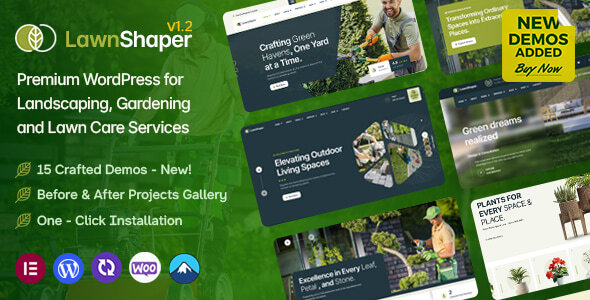
Lawnshaper is a WordPress theme for gardening and landscaping businesses, offering pre-built demos and Elementor integration for easy site creation. It's best suited for agencies and freelancers needing to launch niche websites quickly.
Lawnshaper: A WordPress Theme for Landscaping and Gardening Businesses
This is a WordPress theme built specifically for the gardening and landscaping niche. It comes with a bunch of pre-designed demos, meaning you get a head start on building a website for a lawn care company, garden designer, or any outdoor service business. If you've ever had to build a site for this kind of client, you know how specific the visuals and features need to be. This theme aims to provide that out of the box.
Who Needs Lawnshaper and Who Should Look Elsewhere
If you're an agency or a freelancer who frequently works with clients in the gardening, landscaping, or outdoor services sector, this theme is worth a look. It's designed to save you time on the initial setup and styling, which is a big deal when you're juggling multiple projects. The single-click demo import feature is genuinely useful for getting a basic structure in place fast. This theme is not for developers who need absolute control over every line of code or for those building highly complex custom applications on WordPress.
Solving the "Niche Website Dilemma" for Landscaping Services
The main problem Lawnshaper solves is the time sink involved in creating a visually appropriate and functionally sound website for a very specific industry. Building a landscaping website from scratch or with a generic theme often means spending hours tweaking colors, fonts, and layouts to fit the gardening aesthetic. This theme provides pre-designed elements and layouts that already speak the language of the industry. Features like dedicated sections for before-and-after projects and service filtering help showcase client work effectively, which is crucial for lead generation in this field. It also integrates with the Amelia booking system, streamlining the process for clients to schedule consultations or services, a common need for these types of businesses.
Layouts, Pages, and Components for Garden Businesses
Lawnshaper offers a decent selection of pre-built pages and components. You get multiple demo options, each with a set of inner pages. The theme also includes builders for headers, footers, and mega menus, all managed through Elementor. This means you're not stuck with rigid designs; you can customize these crucial site areas to match your branding. The inclusion of specific elements for portfolios and services is a practical advantage, allowing you to easily display your work and list your offerings.
eCommerce Features for Selling Garden Supplies
For businesses that also sell products, like garden tools, plants, or landscaping materials, Lawnshaper includes WooCommerce integration. It supports common eCommerce features such as wishlists, product comparison, and quick view. The "Ajax Add to Cart" functionality means customers can add items to their cart without a full page reload, which feels smoother and can improve the user experience. While these are standard for WooCommerce themes, their inclusion here means you don't have to hunt down separate plugins for basic online store functionality.
Code Quality and Developer Experience
From a developer's perspective, the code seems to follow standard WordPress theme development practices. It relies heavily on Elementor, which is a common approach these days. The theme includes a child theme, which is essential for making modifications without losing them during theme updates. The presence of auto-update options for the theme and its add-on plugin is a convenience, though I always recommend testing updates on a staging site first. The structure appears organized, which helps when you need to dive in and make custom adjustments. It supports semantic accessibility standards, which is good for SEO and user experience.
Responsiveness and Compatibility
The theme is built to be responsive, meaning it should adapt well to different screen sizes, from desktops to mobile phones. This is critical for ensuring a good user experience and for search engine rankings. The developers mention compatibility with recent WordPress and WooCommerce versions, which is important for avoiding conflicts and security issues. Testing on various devices is always recommended, but the foundation for good responsiveness is there.
SEO Readiness
Lawnshaper is built with SEO in mind, adhering to clean semantic structure for better search engine crawling. Features like optimized image loading and clean code contribute to better performance, which indirectly helps with SEO. The inclusion of schema markup for services and products can also give you an edge in search results. It's ready to integrate with SEO plugins if you need more advanced features.
A Practical Choice for Landscaping Web Projects
If you're in the business of building websites for the gardening and landscaping niche, Lawnshaper is a solid option that can save you significant development time. It provides a good foundation with relevant features and integrations, allowing you to focus on client-specific content and customization rather than reinventing the wheel. While it's not a revolutionary piece of software, it effectively addresses a common need in the market for specialized industry themes.
FAQ
Is Lawnshaper suitable for beginners who don't code?Yes, with its Elementor integration and one-click demo import, it's designed for users who prefer a visual, no-code approach to website building.
Does Lawnshaper handle multiple languages?The theme is listed as WPML Ready and Polylang Ready, meaning it can be translated using popular multilingual plugins.
Can I use Lawnshaper for a general business website, not just gardening?While it's heavily tailored for the gardening niche, the flexibility of Elementor and the theme's customization options might allow for adaptation to other service-based businesses if you're willing to put in the extra effort.
How often is the theme updated?Based on the changelog, updates are released periodically, often focusing on compatibility with new WordPress and WooCommerce versions, as well as plugin updates.