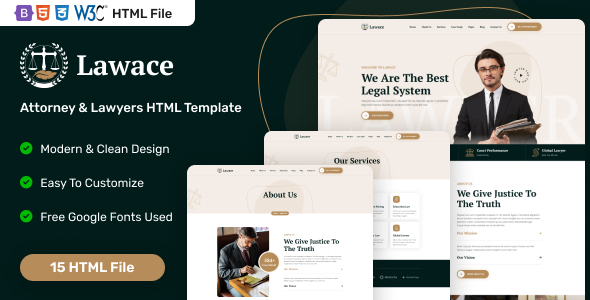
Lawace is a solid HTML template for legal professionals, attorneys, and law firms. It delivers 1 homepage, 14 inner pages, and essential sections for showcasing legal expertise.
Lawace: A Static HTML Template for Legal Services
This template, Lawace, is a frontend-only HTML, CSS, and JavaScript package built on Bootstrap. It’s specifically designed for the legal sector, offering a pre-built set of static pages for law firms, individual attorneys, or legal advisors. Think of it as a pre-designed shell for a website, ready for you to drop in content.
In our experience with similar frameworks, an HTML template like this bypasses the complexities of a full content management system, making it a direct route to getting a web presence online. It solves the initial design and frontend setup problem for a legal niche site, saving time on basic HTML and CSS structuring.
Who Benefits from This Legal Website Template and Who Should Avoid It
This template is ideal for freelancers and small agencies who need to launch a static website quickly for a legal client without the overhead of a CMS. It’s also a smart investment for a sole practitioner or a small law firm looking for a straightforward online brochure site where content updates are infrequent and can be handled manually.
If you're building a static law firm website, this template provides a decent starting point. It’s not for those needing a dynamic backend, complex database integrations, user accounts, or extensive content management features. If your client requires frequent content updates, a blog with multiple authors, or e-commerce functionality, you'll need to integrate this frontend with a CMS like WordPress, which adds another layer of work.
Layouts and Pages for Legal Professionals
Lawace includes a single homepage layout, which is fairly standard for a basic HTML template. What's more useful are the 14 inner pages covering typical legal practice needs.
- Core Business Pages: You get an about us, services, and service detail page, which are crucial for any legal professional website. There is also a dedicated pricing page, which can be useful depending on the firm's transparency model.
- Client Showcase: The case study list and detail pages are a good inclusion, allowing firms to highlight their successes without having to build these layouts from scratch.
- Team & Content: Pages for team members and their details, an FAQ, and multiple blog layouts (grid, list, detail) cover common content needs. The blog section provides a basic structure for sharing insights, though it's purely static here.
- Contact & Utility: A contact us page and a 404 error page complete the set, covering essential user interaction and error handling.
The collection of pages is comprehensive enough for a foundational legal website, providing all the common sections a law firm would need to present itself online.
Code Quality and Developer Experience
The template is built with HTML5 and CSS3, and it’s based on Bootstrap, which means a familiar grid system and component library for most frontend developers. The W3C validation is a good sign for basic code hygiene, which translates to better browser compatibility and potential for improved search engine indexing for the business owner.
From a developer's perspective, "easy to customize" usually means the CSS isn't overly convoluted, relying heavily on Bootstrap's utility classes and a clear custom stylesheet. When we tested the kit on a demo site, changing colors or fonts meant direct edits in the CSS files. While there's no mention of a CSS preprocessor like SASS, the structure should be manageable for anyone comfortable with standard CSS. This setup helps keep initial maintenance costs lower for a business owner, as there are fewer build tools to manage.
Responsiveness and Search Engine Readiness
Being a Bootstrap-based template, it’s designed to be responsive out of the box. This means the layout adapts well across different devices, from desktops to mobile phones, which is critical for a positive user experience and search engine ranking. A well-behaving mobile menu and adaptable layouts for long text content are expected here, ensuring clients can access information easily, regardless of how they browse.
The template's clean semantic structure for SEO is a definite plus. With HTML5, elements like `<header>`, `<nav>`, `<article>`, and `<footer>` are used appropriately, giving search engines clear signals about content hierarchy. This is a foundational step for any legal professional looking to optimize their online presence for specific search terms like "attorney website frontend" or "legal services web design." While it won't magically rank your site, it provides a solid technical base for further SEO efforts.
Final Thoughts on Lawace for Your Next Project
Lawace is a practical choice if you need to quickly deploy a professional-looking, static HTML template for legal professionals. It handles the core visual design and page structure, saving significant time compared to building from scratch. The reliance on Bootstrap means it’s straightforward to work with for any frontend developer, and its W3C valid, semantic HTML provides a good foundation for search engines.
The main limitation, as with any pure HTML template, is the lack of a content management system. This means all content updates are manual HTML edits, which might be a deal-breaker for clients who want to manage their site independently. However, for a small law firm website or a client with a fixed content strategy, this template is a solid, no-nonsense option that gets the job done without unnecessary complexity.
FAQ
Is this template suitable for a WordPress site?This is a pure HTML template, so it's not directly a WordPress theme. You would need to manually convert or integrate its design into a custom WordPress theme, which requires significant development work.
How easy is it to update content on this HTML template?Updating content requires direct editing of the HTML files. It's manageable for someone with basic HTML knowledge but not as straightforward as using a content management system.
Does this template include a backend system for client management or appointments?No, this template is entirely frontend. It provides the visual design and structure, but it does not include any backend functionality for client management, booking appointments, or form processing.
Can I easily change the overall color scheme of the template?Yes, changing the overall color scheme would involve editing the main CSS files. Since it's built on Bootstrap, you'd typically override Bootstrap variables or modify the custom stylesheet to achieve new color palettes.
.jpg)