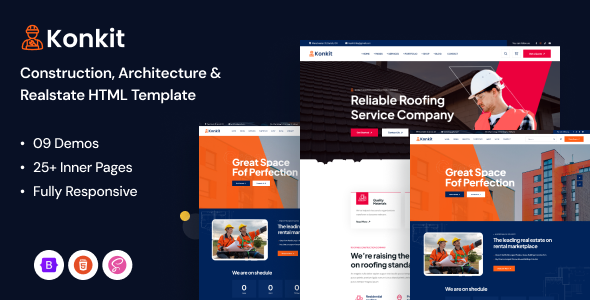
Konkit is an HTML construction template designed for agencies or freelancers needing a quick setup for building, renovation, or related service websites.
Solving the Initial Setup for Construction Website Projects
This template addresses a common pain point for small agencies or independent developers: the initial build-out for clients in the construction sector. When you need to get a new contractor website online fast, starting from scratch with basic pages like services, projects, and contact forms can eat up significant time. Konkit provides a structured starting point, potentially saving dozens of hours on layout and basic styling, which translates directly to lower project costs for clients or faster project delivery.
Technical Standards and Core Features for a Solid Foundation
Under the hood, Konkit uses Bootstrap, which means a familiar grid system for anyone accustomed to that framework. The SASS architecture for the CSS is a definite plus, allowing for easier theme customization and maintainability compared to monolithic CSS files. This organized approach means less time spent debugging style conflicts and makes future updates simpler, which is a practical benefit for long-term site maintenance and lower costs for the business owner.
The code claims W3C validation, which is a good baseline for semantic structure. This helps with search engine optimization (SEO) by providing clear page hierarchy and also contributes to better accessibility for users relying on assistive technologies, ensuring a broader audience can use the site.
- The SASS structure is fairly standard, making it easy to locate and modify variables for colors and fonts. This saves time when implementing client branding.
- Mobile responsiveness is handled by Bootstrap, so the layouts adapt well to various screen sizes. The mobile navigation is a typical off-canvas menu, functional and expected.
- Pages like project portfolios and service listings are laid out logically, which is crucial for a construction business to showcase their work effectively. This helps potential clients quickly find relevant information.
- Asset loading, especially for images and scripts, feels reasonably optimized for an HTML template of this type. It doesn't appear to be excessively bloated, which helps with Core Web Vitals and overall page speed, a key factor for user experience and SEO.
- The inclusion of common UI elements like accordions, tabs, and modals means less time building these from scratch. These components are essential for displaying detailed information without overwhelming the user.
- The overall code cleanliness is average for a ThemeForest HTML template. It is well-commented in places, which helps when a new developer takes over the project, reducing future maintenance costs.
Where Konkit Excels in Rapid Deployment
Konkit's main strength is its collection of pre-built pages and components specifically tailored for the construction and related industries. Having multiple homepage layouts and dedicated pages for services, projects, teams, and testimonials means you can quickly assemble a full site without designing every single section from scratch. For agencies with a backlog of small business construction website projects, this offers significant time savings and a consistent starting point.
Who Benefits from this Construction Website Template
This template is ideal for freelance developers or small agencies who regularly build websites for contractors, builders, renovation companies, or other service-based businesses in the construction niche. It's for projects where the client needs a professional online presence quickly, without requiring highly custom design elements or complex backend integrations. Those needing deep custom backend logic or a truly unique, bespoke design that breaks from conventional layouts should probably avoid this template and consider a custom build.
Areas Where Konkit is Just Standard
While functional, the visual design of Konkit is generally what you'd expect from a market-average HTML template in this category. It's clean and modern, but it doesn't offer a groundbreaking aesthetic or truly innovative UI patterns. The reliance on specific third-party JavaScript libraries like Swiper and Magnific Popup is standard practice, but it means you're tied to those particular implementations if you don't want to refactor. The included form styling is basic and will likely need some custom work to match specific branding or advanced validation requirements.
Final Thoughts: Is it worth it?
If your workflow involves frequently delivering standard brochure sites for construction-related clients, Konkit provides a solid, time-saving foundation. The organized SASS and Bootstrap framework make it a practical choice for rapid deployment. It's a sensible investment to streamline your development process and deliver projects faster, directly impacting your project profitability and client satisfaction.
FAQ
Does this template include a content management system?
No, Konkit is a static HTML template. You would need to integrate it with a CMS like WordPress, Webflow, or a static site generator if dynamic content management is required.
How easy is it to change the primary brand colors?
Since the template uses SASS, changing primary brand colors is relatively straightforward. You can typically adjust a few variables in the SASS files, recompile, and the changes will apply globally.
Are the project portfolio pages easy to extend for many projects?
The project portfolio layouts provide a good starting point. You can duplicate existing project item HTML blocks to add more projects, but managing a very large number of projects would be more efficient with a CMS integration.
What about image optimization for performance?
The template provides the structure for images, but you are responsible for optimizing the actual image files (compression, proper sizing, modern formats like WebP) before deploying them to ensure good site performance.