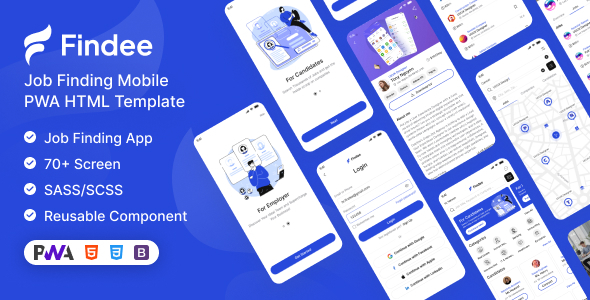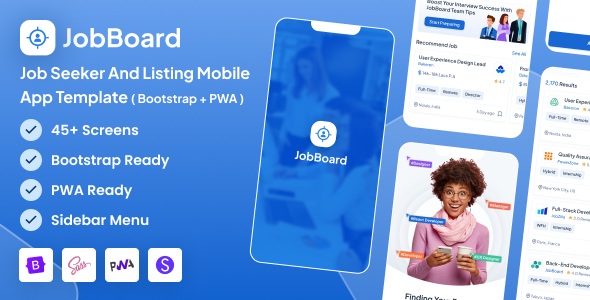
JobBoard is a Bootstrap PWA template for building mobile-first job board and job seeker applications. It offers 60+ screens, light/dark modes, and reusable components.
JobBoard Template for Mobile Job Applications
This template is a front-end UI kit built with Bootstrap, specifically aimed at building job board mobile apps and job seeker platforms. It’s essentially a pre-built set of HTML, CSS, and JavaScript files that give you a head start on the visual and interactive parts of a job listing application.
It includes a Progressive Web Application (PWA) setup, which means you can give users an app-like experience directly from their browser, including offline access and home screen installation. This can significantly reduce the barrier to entry compared to developing a native app from scratch, making it a smart investment for agencies or freelancers on a budget.
Target Audience for This Job Board Template
JobBoard is really for agencies and freelancers who need to spin up a mobile-focused job board or job seeker portal quickly. If your client needs a solid front-end for their recruitment platform without starting from zero, this template provides a strong foundation. It’s also useful for startups looking to test an idea with a functional, good-looking interface without a huge initial investment.
However, it’s not for everyone. If you need a deeply customized, unique UI that deviates significantly from Bootstrap's aesthetic, you'll be fighting the framework. Also, this is purely a front-end template; it doesn't come with any backend logic for user authentication, job posting, or application management. You'll need to integrate that yourself.
Design Choices and Dark Mode for Job Seekers
The design leans into a clean, modern Bootstrap aesthetic. It’s functional and familiar, which helps with user adoption as most people are already accustomed to Bootstrap-based interfaces. The inclusion of both light and dark modes is a practical feature, especially for a job board where users might spend extended periods browsing. This offers user choice and can reduce eye strain, which is a small but important detail for user retention.
It comes with multiple header and bottom navigation styles, which provides some flexibility without needing to dive deep into custom CSS right away. This helps in tailoring the overall feel for different brand requirements.
Navigating the 60+ Screens and Reusable UI
With over 60 screens, you get a lot of common pages pre-built, from login and registration to user profiles, job listings, and application forms. This is a massive time-saver for anyone building job board mobile apps. Instead of designing each page from scratch, you can pick and choose what you need.
The strength here lies in its reusable components. Things like accordions, input fields, cards, and buttons are all styled consistently. This means when you’re assembling new pages or modifying existing ones, you’re working with a cohesive design system, which leads to a more polished product and less development effort to maintain visual consistency.
SCSS, NPM, and Maintainable Codebase
From a developer's perspective, the use of Bootstrap is standard and means most front-end developers can jump in without a steep learning curve. The SCSS files are a big plus; it means the CSS is organized and easier to manage than a single, monolithic CSS file. This makes customizing colors, fonts, and spacing much more efficient, which translates to lower long-term maintenance costs.
The mention of Node Package Manager for dependency management is good practice. It suggests a more modern workflow than just dropping in CDN links everywhere. The code is generally clean and well-commented, which helps when you need to understand how a specific component works or where to make changes. This level of organization is better than many market-average templates we’ve seen, where code can be a jumbled mess.
PWA and Cross-Browser Performance
Being PWA-ready means this template is built with a mobile-first mindset. It’s designed to perform well on various devices, offering a consistent experience whether users are on a phone, tablet, or desktop. This focus on responsive design ensures your job listing platform looks good and functions correctly across the board, which is crucial for reaching a wide audience.
The cross-browser compatibility is also standard, ensuring it works reliably across Chrome, Firefox, Safari, and Edge. This is expected these days, but it’s good to confirm it's been tested. The underlying HTML and CSS are built using current web standards, which aids in overall performance and future compatibility.
Semantic Structure for Job Listing Visibility
The template claims to be SEO optimized, and while a front-end template can only do so much, a clean semantic HTML structure is a good starting point. This helps search engines understand the content on your job board pages better, potentially leading to improved visibility for specific job listings or company profiles. Valid HTML, as stated, also contributes to better crawlability.
Properly structured content, especially for things like job titles, descriptions, and company information, is key for a job listing template to rank well. This template provides the framework to implement that effectively.
Is JobBoard the Right Choice for Your Project?
After building multiple agency sites with tools like this, JobBoard stands out as a solid choice for anyone needing a quick-start mobile-first job board or job seeker front-end. It saves significant development time on UI implementation, especially with its extensive screen library and reusable components. The PWA capability is a real differentiator for delivering an app-like experience without the complexities of native development.
The main trade-off is that you're largely working within the Bootstrap ecosystem, so if you need something truly visually distinct, you'll put in more effort overriding styles. However, for getting a functional, conversion-ready job listing template up and running fast, this template delivers on its promise. It’s a practical investment for accelerating your project timeline and reducing initial development costs.
FAQ
Does JobBoard include a backend for job management?No, JobBoard is a front-end HTML template only. You will need to integrate your own backend system for job posting, user accounts, and application management.
Can I customize the design beyond the provided light and dark modes?Yes, the template uses SCSS, which makes it easier to customize colors, fonts, and other styles. However, extensive visual changes will require a good understanding of Bootstrap and SCSS.
Is this template suitable for a multi-vendor job portal?The front-end screens can support a multi-vendor layout, but you'll need to develop the backend logic for vendor registration, job submission, and payment processing yourself.
How does the PWA feature benefit my users?The PWA functionality allows users to install your job board as an app on their home screen, access it offline, and receive push notifications, providing a more engaging and native-like experience.