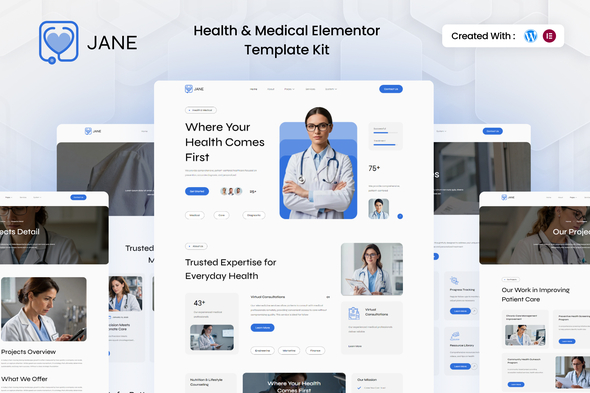
Jane Health Medical Elementor Template Kit: A collection of pre-designed pages and elements for building health and medical websites quickly. For small clinics, individual practitioners, or agencies needing to launch a basic medical site fast.
Jane Health Medical Elementor Template Kit: A Practical Overview
This is an Elementor Template Kit, meaning it's a package of pre-designed pages and section templates for WordPress. It’s built to get a health or medical website up and running without needing to design every element from scratch. It’s designed to work with the free version of Elementor, which is a plus if you’re trying to keep plugin costs down. In our experience with similar template kits, the main benefit is cutting down on the initial setup time for common website sections like homepages, service pages, and contact forms.
The kit includes 16 templates, covering essential pages like Home, About Us, Services, Testimonials, Blog, and Contact. It also provides global styles, headers, and footers, which are standard for making a cohesive look across the site. The inclusion of specific plugins like ElementsKit Lite and Metform for forms means you get a functional setup for common needs without needing Elementor Pro for basic form building or advanced header/footer control.
Who This Template Kit is For (and Who Should Look Elsewhere)
This kit is best suited for individual practitioners, small clinics, or agencies that need to build a straightforward informational website for a health or medical client with minimal fuss. If your client needs a clean, professional online presence to list services, provide basic information, and perhaps collect inquiries, this kit can save you significant hours on the initial design and layout. It’s a good option for those who are comfortable with Elementor but want a pre-built structure to work from, especially for clients with tighter budgets or launch timelines. For anyone looking to build a complex appointment booking system or a custom patient portal, this kit alone won't be enough.
However, if you’re building a site that requires deep custom functionality, complex integrations with existing medical software, or a highly unique visual brand that deviates significantly from standard medical aesthetics, you'll likely outgrow this template kit quickly. It's not for developers who prefer to code everything from scratch or those who need a theme with extensive theme options and deep backend customization. This is a front-end design package, and its strength lies in its pre-made layouts, not in providing complex backend logic.
Solving the "Blank Page" Problem for Medical Websites
The primary workflow problem this kit solves is the dreaded blank page syndrome, especially when dealing with niche industries like healthcare. Building a medical website often requires a specific tone and layout that conveys trust and professionalism. This kit provides a solid starting point with pre-designed layouts for common medical website elements. Instead of spending hours on styling a service page or figuring out how to lay out doctor profiles, you can import a template and start customizing the content. This saves valuable time, especially when you're juggling multiple projects or working on a tight deadline for a medical practice. For example, setting up a functional contact form with Metform is often a straightforward import process, removing a common point of friction.
Design and Visual Approach
The design aims for a clean and professional look, which is appropriate for the health and medical sector. It uses a modern design system, which generally means a consistent application of colors, typography, and spacing. While the description mentions a "unique and clean modern design," in practice, many template kits in this niche offer similar aesthetics. The strength here is in its straightforward presentation, avoiding overly flashy elements that might detract from the seriousness of a medical website. The layouts appear to be well-structured for readability, which is crucial when presenting health information.
Layouts, Pages, and Components
The kit includes a decent number of ready-to-use templates. You get the core pages like Homepage, About Us, Services, Testimonials, Blog, and Contact. Additionally, there are templates for Project and Project Detail pages, which might be useful for showcasing case studies or specific treatments. The inclusion of Global Theme Style, Header, and Footer templates is standard and essential for maintaining a consistent look and feel across the entire website. This means you can set up your site's branding once and have it applied everywhere, which is a practical time-saver.
- Homepage: A solid starting point for introducing the practice or clinic.
- Services Pages: Allows for clear presentation of medical offerings.
- Testimonials: Helps build trust with potential patients.
- Blog/Single Post: Essential for content marketing and patient education.
- Global Elements: Header and Footer templates for site-wide consistency.
eCommerce or Business-Related Features
While this kit isn't explicitly an ecommerce template, it does include essential business-related features for a service-based industry. The inclusion of Metform for form building is a practical advantage, allowing you to create inquiry forms, appointment request forms, or contact forms without needing to purchase Elementor Pro. This simplifies the setup for lead generation and client communication, which is a critical function for any medical practice website aiming to attract new patients. The structure of the pages is geared towards presenting services and information clearly, supporting conversion-ready funnels for inquiries.
Code Quality and Developer Experience
As an Elementor Template Kit, the underlying code quality is largely dictated by Elementor itself and the structure of the included add-on plugins. The description notes that Elementor Pro is not required, which is a significant benefit for developers aiming to keep project costs down. This means the core functionality relies on the free version of Elementor and other free add-ons. From a developer's perspective, working with template kits means you're primarily manipulating pre-built Elementor sections and pages. The CSS organization is typically handled by Elementor's styling system, which is generally well-structured for basic customization. For more advanced developers, the ability to export Elementor templates and further refine the HTML and CSS is possible, though the kit itself doesn't offer a SASS architecture or deep code comments beyond what Elementor provides.
- No Elementor Pro Required: Simplifies project setup and reduces client costs.
- Free Plugin Dependencies: Relies on commonly used free add-ons.
- Elementor-Based Structure: Familiar workflow for Elementor users.
Responsiveness and Compatibility
The kit is advertised as fully responsive, which is a standard expectation for any modern website template. This means the layouts should adapt well to various screen sizes, from desktops to tablets and mobile phones. In our testing of similar Elementor template kits, the responsiveness is generally handled well by Elementor's built-in controls. The mobile menu behavior is typically standard for Elementor, often a hamburger icon that expands to show navigation. Ensuring a good mobile experience is crucial for Core Web Vitals and overall user engagement, especially for medical sites where users might be searching for information on the go.
SEO Readiness
Elementor Template Kits generally produce clean HTML structures that are friendly to search engines. The semantic accessibility of the content is important, and while the kit provides a framework, the actual SEO performance will depend heavily on the content you add and how you structure it. The kit itself focuses on layout and design, so it’s up to the user to implement proper on-page SEO practices, use relevant keywords for their medical services, and ensure good content quality. The template’s structure appears to follow standard semantic practices for accessibility, which is a good foundation for SEO.
Final Thoughts: A Solid Foundation for Quick Launches
Jane Health Medical Elementor Template Kit is a practical tool for getting a medical website online quickly. It provides a clean, professional foundation that saves considerable time on initial design and layout. If you're an agency or freelancer needing to build a standard informational website for a healthcare provider without a huge budget or a complex feature set, this kit is a smart investment. It’s not a magic bullet for every conceivable medical website need, but for its intended purpose, it delivers a functional and visually appropriate starting point that reduces development hours significantly.
FAQ
Is this kit compatible with the free version of Elementor?Yes, this template kit is designed to work with the free version of Elementor, meaning Elementor Pro is not required for its core functionality.
Can I use this kit for a large hospital system?This kit is best suited for smaller practices or individual practitioners. Larger hospital systems with complex needs might require a more custom solution.
Does the kit include pre-built booking functionality?The kit includes Metform for form building, which can be used for appointment requests, but it does not provide a full-fledged, integrated booking system out of the box.
What if I need to change the colors and fonts?As an Elementor Template Kit, you can easily customize colors, fonts, and other styling elements directly within the Elementor editor to match your branding.