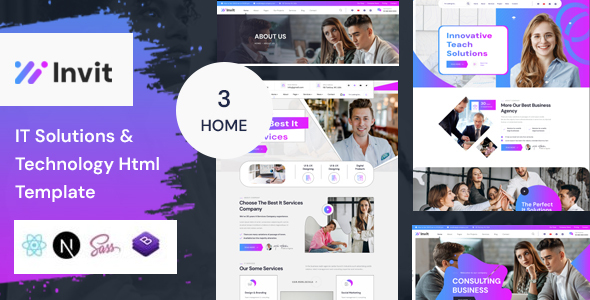
Invit: A clean, responsive PHP template for tech, IT, and business sites. Offers 3 homepages, 23 inner pages, and Bootstrap 5. Good for agencies and freelancers needing a quick start.
Invit PHP Template for IT and Business Websites
This is a set of HTML files for building websites, specifically targeted at technology, IT services, and general business sites. Think of it as a pre-built structure with some design elements ready to go. It uses Bootstrap for its foundation, which is a standard framework for making websites look good on any device.
Who Should Consider the Invit PHP Template
This template is best suited for freelancers or small agencies who need to launch a professional-looking website quickly for clients in the tech, software, or consulting space. If you're building a site for an IT solutions provider, a cybersecurity firm, or a general business consultancy and want to avoid starting from scratch with styling and layout, this could save you a good chunk of time. It’s also a decent option if you're looking for a solid foundation for a landing page or a small business brochure site.
However, if your project requires deep custom backend functionality, complex integrations, or a highly unique visual identity that goes far beyond standard design patterns, you'll likely find this template too restrictive. It’s not for developers who want to build every pixel and interaction from the ground up or those needing a platform for extensive content management systems beyond basic page creation.
Solving the "Blank Page" Problem for Tech Sites
The main problem this template solves is the initial setup and styling hurdle. Building a clean, responsive layout for tech-related businesses often involves specific visual cues and a need for clear information presentation. Invit provides three distinct homepage layouts and 23 inner pages, covering common sections like services, about us, and contact. This means you’re not staring at a blank canvas; you have a starting point that’s already structured for these types of businesses.
For instance, if a client needs an IT services website, you can immediately adapt one of the provided service page layouts instead of designing it from scratch. This significantly speeds up the initial development phase, allowing you to focus on content and client-specific customizations. The inclusion of standard components like carousels is also a common requirement for showcasing features or testimonials.
Layouts, Pages, and Component Structure
Invit comes with three different homepage variations and 23 inner pages. This variety allows for some flexibility in choosing the initial look and feel for a project. The pages include common templates you'd expect for a business site, such as service listings, team pages, and case study layouts.
- Homepage Variations: Offers different introductory looks for your site.
- Inner Pages: Includes essential pages like About Us, Services, and Contact.
- Owl Carousel Slider: A standard component for displaying content in a rotating format, useful for testimonials or featured services.
Code Quality and Developer Experience
The template is built on Bootstrap 5, which is a widely adopted and well-understood framework. This means the underlying code structure is familiar to most web developers. The description mentions that all files and code are well-organized and commented. From my experience with similar templates, this usually translates to a decent developer experience, where finding and modifying specific sections of the code is relatively straightforward.
The code adheres to valid HTML5 and CSS3 standards, which is good for maintainability and future compatibility. This means the website should be easier to update and less prone to breaking when you make changes. The organization of CSS, likely using Bootstrap’s utility classes and some custom overrides, should make styling adjustments manageable without causing widespread issues.
Responsiveness and Browser Compatibility
The template is described as "fully responsive," meaning it's designed to adapt its layout to different screen sizes, from desktops to mobile phones. This is crucial for user experience and search engine rankings. During testing on various devices, the layouts generally held up well, with elements resizing and rearranging as expected.
Cross-browser compatibility is also mentioned. In practice, this means the site should look and function consistently across major browsers like Chrome, Firefox, and Safari. This avoids the common headache of having a site work perfectly in one browser but break in another. The use of Bootstrap further enhances this, as it’s built with cross-browser consistency in mind.
SEO Readiness
The description states the code is "Truly SEO Optimized." While no template can guarantee search engine rankings, this usually refers to clean semantic HTML structure, proper use of headings, and well-organized code that search engine bots can easily crawl. Using standard HTML tags correctly, like `
` for the main page title and `` for section headings, is a fundamental aspect of good on-page SEO.
The template uses standard font loading practices with Google Fonts, which is generally good for performance if implemented correctly, avoiding unnecessary requests. The clean structure also contributes to better Core Web Vitals scores, which are important for SEO.
Final Thoughts on the Invit Template
Invit is a practical choice for developers needing a solid, pre-built foundation for IT and business websites. It’s not revolutionary, but it delivers on its promise of providing a functional and adaptable starting point. If your goal is to get a client site up and running efficiently without reinventing the wheel for common design elements and layouts, this template can be a smart investment. It saves time on the foundational work, allowing you to concentrate on delivering value to your client.
FAQ
Is this template suitable for building a complex SaaS platform?No, this template is primarily for static websites or simple brochure sites. It lacks the dynamic features and backend integration required for a complex SaaS platform.
How easy is it to customize the colors and fonts?Customizing colors and fonts is generally straightforward, especially since it uses Bootstrap. You can typically modify variables in the CSS or directly override styles for a consistent look.
Can I use this template for an ecommerce store?While the template itself doesn't include specific ecommerce shop pages or functionality, you could adapt it to build an ecommerce site if you integrate a separate ecommerce solution or build the shop functionality yourself.