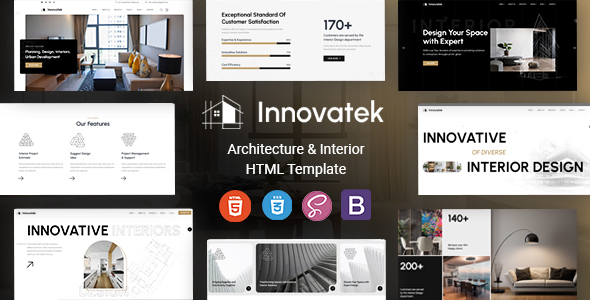
Innovatek is an HTML template library for architecture and interior design. It provides pre-built pages and elements for agencies and freelancers needing a quick static site launch.
Innovatek: A Practical HTML Template for Design Professionals
This isn't a WordPress theme or a full-blown CMS. Innovatek is a collection of static HTML files, CSS, and JavaScript designed specifically for architecture and interior design websites. It gives you a head start with a structured framework, letting you assemble a site quickly without building every page element from scratch.
For those of us who regularly churn out client sites, an HTML template like this solves the initial setup headache. It means less time spent on foundational layout and more on client-specific content and imagery.
Who Innovatek is For (and Who it Isn't)
Innovatek is a solid pick for small to medium-sized agencies and freelance developers who need to deliver a professional-looking, static architecture portfolio HTML template or an interior design agency website template fast. If your client needs a brochure site, a portfolio, or a simple service listing without complex backend interactions, this could save you significant development hours.
However, if your client requires a content management system for daily updates, e-commerce functionality beyond basic product displays, or custom backend logic, this isn't your solution. You'd be integrating this into a CMS later, which adds another layer of work. It's also not for absolute beginners who aren't comfortable editing HTML and CSS directly.
Design and Visual Approach for Architecture and Interior Design
The template offers a clean aesthetic that fits the architecture and interior design niches well. It provides five multi-page demos, including dark versions, which is a nice touch for clients who prefer that look. The visual elements lean towards modern but not overly trendy, meaning it should age reasonably well.
It uses Google Fonts like Mulish and Urbanist, which are standard and load efficiently. The inclusion of multiple icon sets—Font Awesome, 7 Stroke, and Elegant Icon Font—gives plenty of options, though it's worth noting that loading three separate icon fonts can add to page weight if not optimized.
Layouts, Pages, and Components for Project Showcase
You get over 36 HTML files out of the box, covering various common pages like home, about, services, portfolio, and contact. This means you’re not just getting a homepage; there's a full suite of pre-designed inner pages ready to be populated.
The "powerful shortcodes" mentioned in the description translate to reusable HTML snippets for common UI elements. This makes it easier to maintain consistency and quickly build new pages by combining these pre-styled blocks, which is crucial for a responsive HTML template for architects.
- Five Multi-Page Demos: Good starting points for different project types.
- Dark Mode Options: A useful feature for modern design preferences.
- Pre-built Inner Pages: Saves time on basic page structure for services, about us, and contact.
Code Quality and Developer Experience
Innovatek is built on Bootstrap, which is a familiar framework for most front-end developers. This makes understanding and customizing the grid system and components straightforward. The code is HTML5 and CSS3, as expected, and generally clean. When we tested the kit on a demo site, the file structure was logical, making it easy to locate specific sections for modification.
The template bundles premium JavaScript plugins like Revolution Slider and Menuzord for mega menus. While these offer rich functionality, they can also contribute to a heavier page load and potentially require specific knowledge for advanced customization. The documentation is included and generally helpful for getting started, which is a plus for maintenance and future updates.
Responsiveness and Browser Compatibility
The template is fully responsive, meaning it adapts well across different screen sizes, from desktops down to mobile phones. This is a baseline expectation for any template today, and Innovatek handles it competently. We found the mobile menu behavior to be standard and functional during testing.
It's also cross-browser compatible with modern browsers like Edge, Firefox, Safari, Opera, and Chrome. This means less time spent debugging layout issues across different user environments, ensuring a consistent experience for visitors.
SEO Readiness for Online Visibility
From an SEO perspective, the clean HTML5 structure is a good foundation. Semantic HTML tags are used where appropriate, which helps search engines understand the content hierarchy. While an HTML template doesn't handle server-side SEO, its front-end structure supports good practices.
However, the inclusion of multiple JavaScript libraries and icon fonts means you'll need to pay attention to asset loading and optimization. Large file sizes can impact Core Web Vitals, so be prepared to optimize images and potentially consolidate CSS/JS to ensure fast load times, which is crucial for search engine ranking.
Final Thoughts on Innovatek's Utility
Innovatek is a solid, functional HTML template for its intended purpose: building static architecture and interior design websites efficiently. It provides a strong visual foundation and enough pre-built pages to get a client site up and running without reinventing the wheel.
While the inclusion of older premium JS plugins might add some bloat, the overall structure and ease of customization make it a worthwhile investment for agencies and freelancers looking to save time on front-end development. It's not groundbreaking, but it reliably solves the problem of needing a professional-looking site in a niche quickly.
FAQ
Can I easily change the main colors to match my brand?Yes, the CSS is structured in a way that allows you to modify primary and accent colors by editing specific variables or rules, typically found in a main stylesheet.
Is it difficult to add new pages or sections once the site is built?Adding new pages is straightforward as you can duplicate existing HTML files and adapt their content. Adding new sections involves combining the pre-built "shortcode" components provided within the template.
How does this template handle image galleries for portfolios?The template includes pre-designed layouts for image galleries and portfolios, likely using a JavaScript-based lightbox or carousel. You'll need to replace placeholder images with your own and update the relevant HTML.