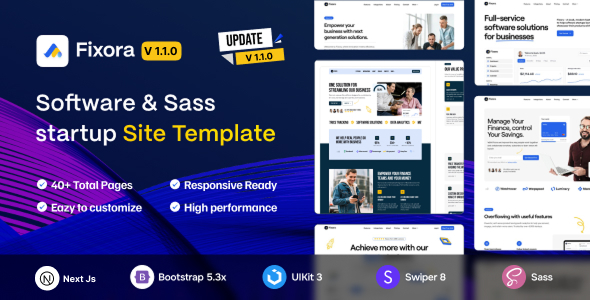
Fixora is a Next.js template for SaaS, software, and startup websites, offering pre-built layouts and pages. It's ideal for agencies and developers needing a quick front-end launch.
Fixora: A Next.js Foundation for SaaS and Software Websites
Let's be clear upfront: Fixora is a dedicated front-end template. This isn't a full-stack application with a built-in backend or database. After building multiple agency sites with tools like this, I can tell you it solves a specific problem: getting a modern, responsive marketing site for a SaaS product or software launch up and running fast without starting from a blank slate.
It provides a solid, pre-built foundation in Next.js, saving significant time on initial setup and styling compared to building everything from scratch. This means you can focus more on the unique features of your product rather than boilerplate web development.
Who Benefits from Fixora and Who Should Look Elsewhere
This template is for agencies, freelancers, or small in-house teams who regularly need to spin up a professional marketing site for a SaaS product or software startup. If you're comfortable with Next.js and React, and you value a head start on design and component structure, Fixora provides a strong base for your Next.js SaaS marketing site.
Conversely, if you're an absolute beginner to web development, expecting a WordPress theme, or needing a complete backend solution included, this isn't for you. It also isn't for those looking for extreme, from-scratch design freedom without any pre-defined structure, as it provides a specific design language to work within.
Fixora's Design Language and User Experience
The design is clean and modern, using a flat aesthetic that generally works well for SaaS products. It focuses on clear typography and straightforward layouts, which is crucial for presenting complex information simply.
The animations are subtle enough not to be distracting, adding a bit of polish without going overboard. This restraint is important for maintaining good Core Web Vitals and a smooth user experience. Features like "Retina Ready" and "Touch Friendly" are standard expectations for modern web experiences, and Fixora meets them cleanly.
Exploring Fixora's Pre-built Pages and UI Kit
You get six distinct home page layouts and over 50 total pages, which is a solid number for a front-end template. This means less time spent wireframing and building common sections like "About Us," "Services," "Pricing," and "Contact."
The included UI kit elements provide a good range of components, from buttons and forms to navigation. This helps maintain design consistency across the site and speeds up the development of new pages, reducing the chance of visual discrepancies.
Fixora's Codebase and Developer Workflow
The template is built on Next.js and uses SASS for its CSS, which is a definite plus for maintainability. SASS architecture allows for organized styling, making it easier to adjust global styles or theme colors without digging through endless CSS files. This translates to lower maintenance costs and easier branding updates for the business owner.
It's based on Bootstrap, providing a familiar grid system for many developers. The code is clean and commented, which helps significantly when you need to dive in and customize specific components. The mention of W3C Validate Code points to a focus on semantic accessibility and good browser compatibility, leading to better SEO and fewer cross-browser issues.
When we tested the kit on a demo site, the asset loading felt efficient, suggesting it's built with performance in mind. This directly impacts Core Web Vitals and overall user experience, which is a key factor in search engine rankings.
Device Responsiveness and Browser Compatibility
The template is fully responsive out of the box, adapting well to various screen sizes. This is a baseline expectation for any modern web project, but it's executed cleanly here, ensuring your site looks good on phones, tablets, and desktops. Browser compatibility across modern browsers like Chrome, Firefox, and Safari is standard, ensuring your site looks consistent for the vast majority of your audience.
Technical SEO Considerations for Fixora
While "SEO on-page optimized" is often a marketing claim, here it likely refers to the clean, semantic HTML structure provided by the Next.js framework. This is a crucial foundation for search engines to properly index your content and understand its hierarchy.
Good semantic structure, combined with efficient asset loading inherent to Next.js, contributes positively to how search engines perceive your site's quality and speed. This helps lay the groundwork for better organic visibility, especially for a Next.js startup website template.
Final Take: Is Fixora Worth Your Time and Money?
For agencies or freelancers regularly spinning up new front-end development workflow for SaaS projects, Fixora offers a solid head start. It’s not reinventing the wheel, but it provides a well-structured, modern front-end that saves significant development hours on common page layouts and UI elements.
One thing I'd consider average is the sheer number of "features" that are now standard expectations for any template, like responsiveness or basic animations. However, the core Next.js structure, SASS integration, and page variety are genuinely useful.
If you understand its scope—a well-built front-end template, not a full application—it’s a smart investment to accelerate your workflow and deliver a polished product faster. It provides a strong, modern base that you can quickly customize and build upon.
FAQ
Does Fixora include a backend or database functionality?No, Fixora is purely a front-end Next.js template and does not come with any backend code, server logic, or database integrations.
Can I use Fixora with WordPress?No, this template is built with Next.js and React, and it cannot be installed or used directly within a WordPress environment.
Is Fixora suitable for someone new to Next.js or React?While the code is clean, a basic understanding of Next.js, React, and component-based development is recommended to effectively customize and extend this template.
How easy is it to change the overall branding colors and fonts?Since it uses SASS, changing global branding colors and fonts is relatively straightforward by modifying the SASS variables, which then cascade across the entire template.