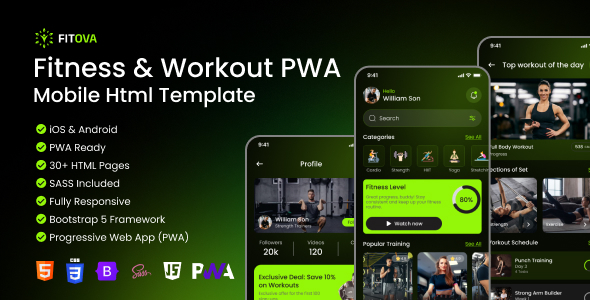
Fitova is a PWA mobile HTML template for fitness and workout tracking apps, built with Tailwind CSS and Vanilla JS. It's designed for developers needing a solid, app-like foundation for health and fitness platforms.
Fitova: A PWA Mobile HTML Template for Fitness Tracking Apps
This Fitova template offers a pre-built structure for mobile fitness and workout tracking applications. It's essentially a collection of HTML, CSS, and JavaScript files that mimic a native app experience, designed to run directly in a mobile browser. The core technology here is Tailwind CSS for styling and Vanilla JavaScript for interactivity, meaning no heavy frameworks like React or Vue are involved.
For anyone looking to build a fitness app or a workout tracker, this template can significantly cut down the initial setup time for the front-end. It provides a complete set of pages and user flows out of the box, from onboarding and login to detailed workout tracking and food scanning.
Who Should Use Fitova and Who Should Avoid It
This template is a good fit for developers or agencies building mobile-first fitness applications where a fast launch is crucial. If you're developing a workout tracker, a calorie counter, or a general health platform and need a robust, app-like interface without building it all from scratch, Fitova offers a strong starting point. It's particularly useful if you're comfortable working with Tailwind CSS and plain JavaScript, and you're aiming for a PWA experience.
However, Fitova is not for those who need a highly customizable backend or complex server-side logic. It's purely a front-end template. If your project requires a custom content management system, intricate user role management, or integration with a specific backend framework that doesn't play well with simple HTML/JS, you'll likely find yourself fighting against the template's structure.
Solving the Mobile App Front-End Development Headache
The main problem Fitova solves is the time sink involved in building a polished mobile app interface from scratch. Creating smooth transitions, handling mobile navigation, implementing PWA features like offline capability and installability, and designing a visually appealing dark-green theme all take considerable effort. Fitova bundles all of this into a ready-to-use package.
For instance, setting up the food scanner with camera access and animated overlays, or integrating Chart.js for dynamic statistics, are tasks that can easily consume days. By providing these components pre-built and functional, Fitova allows developers to focus on the unique features of their application rather than reinventing common UI patterns. This is especially valuable when you need to launch a minimum viable product quickly, for example, to test a new fitness app idea.
Design and Visual Approach
Fitova adopts a mobile-first approach, with a specific design width of 430px, which is common for modern smartphones. The visual style leans towards a dark-green color scheme, which is quite distinct in the fitness app space. While the default color is set, customization is straightforward via the Tailwind CSS configuration, allowing you to easily swap out the primary brand color.
The use of SVG icons and WebP images is a good touch for ensuring crisp visuals on high-density displays (Retina ready) and optimizing load times. The template also accounts for mobile-specific UI elements like iPhone's safe area (notch and home indicator), which is handled through CSS environment variables. This attention to detail in mobile UI is something you don't always see in templates.
Layouts, Pages, and Components
Fitova comes with an impressive 35+ pages, covering a wide range of functionalities needed for a fitness app. This includes everything from the initial splash and onboarding screens to detailed workout pages, a food scanner with results, user profiles, settings, and even payment-related screens. The structure is well-organized into logical folders for CSS, JavaScript, pages, and assets.
- Navigation: The bottom navigation bar is dynamic, with active icons and context-aware state detection based on the current page's filename.
- Interactions: Micro-interactions are present, like toast notifications for feedback (e.g., "Workout saved!") instead of jarring browser alerts.
- Data Handling: All dynamic data like goals, metrics, and food logs are managed using localStorage, making it easy to connect to a real API later.
eCommerce or Business-Related Features
While Fitova isn't a full-blown eCommerce solution, it includes pages and flows relevant to a subscription-based fitness service. This includes screens for subscription plans, payment methods, adding credit cards, and payment confirmation. These are designed to integrate into a broader business model where users might pay for premium features or content.
The template's structure for handling payments and subscriptions is quite standard for a mobile app, making it a solid foundation if your fitness application has a monetization strategy involving recurring fees or premium access. It's a good starting point for building conversion-ready funnels.
Code Quality and Developer Experience
The use of Vanilla JavaScript and a clear IIFE (Immediately Invoked Function Expression) pattern for each page's script is a positive. This means JavaScript code is self-contained, preventing global namespace pollution and making it easier to manage and debug individual page functionalities. The script loading order is clearly defined, which is crucial for preventing runtime errors.
Tailwind CSS is utility-first, which can be a bit of a learning curve for those unfamiliar, but it offers immense flexibility and control over styling. The template includes the Tailwind configuration file, allowing for deeper customization if needed. The folder structure is logical and easy to navigate, which is a big plus for any developer inheriting or working with the code. The documentation also provides clear instructions on rebuilding Tailwind CSS if you modify the configuration.
- Data Storage: localStorage keys are clearly listed, simplifying the process of mapping them to your backend database.
- PWA Setup: The manifest.json and service-worker.js files are provided, making PWA implementation relatively straightforward, though PWA features require HTTPS in production.
Responsiveness and Compatibility
Fitova is explicitly designed for mobile devices, with its layout optimized for a 430px width. While this means it's not intended for desktop or tablet use out of the box, the mobile-first approach ensures a great experience on smartphones. Browser compatibility is stated as tested on Chrome, Safari (iOS), Firefox, and Edge, which covers the major mobile browsers.
SEO Readiness
The template emphasizes W3C semantic HTML with proper ARIA roles, labels, and landmarks. This is a good foundation for search engine optimization, as it helps search engines understand the structure and content of your pages. For a PWA, SEO can be a bit more nuanced, but having clean, semantic HTML is always a positive step. The focus on mobile-first design also aligns with Google's mobile-first indexing practices.
Final Thoughts on Fitova
Fitova is a well-structured and feature-rich HTML template for anyone looking to build a mobile fitness or workout tracking application. It genuinely saves a significant amount of time on the front-end development, providing a polished, app-like experience with PWA capabilities. The use of Tailwind CSS and Vanilla JS makes it accessible to a broad range of developers, and the clear organization and documentation are commendable.
While it's not a solution for complex backend requirements, for its intended purpose as a front-end foundation, it's a smart investment for agencies and developers aiming for rapid deployment of mobile fitness platforms. If you need a pre-built mobile UI for a health app, this template is definitely worth considering.
FAQ
What is a PWA and why is it important for a fitness app?A PWA (Progressive Web App) allows users to install your web application on their device and use it offline, similar to a native app, without needing to go through an app store. This is beneficial for fitness apps as users can track workouts or access health data even with limited internet connectivity.
Can I use Fitova for a desktop website?Fitova is designed and optimized specifically for mobile devices. While you could technically adapt it for desktop, it would require significant layout adjustments and is not its intended use case.
How easy is it to integrate Fitova with a backend API?The template uses localStorage for data storage, which is a common pattern. Integrating with a backend API would involve replacing the localStorage calls with your API requests (e.g., using Fetch API or Axios) to send and retrieve data.
What if I need features not included in Fitova?Since Fitova is built with standard HTML, CSS, and JavaScript, you can extend its functionality by adding your own custom code. The clear JavaScript architecture and Tailwind CSS classes make it relatively straightforward to build upon.