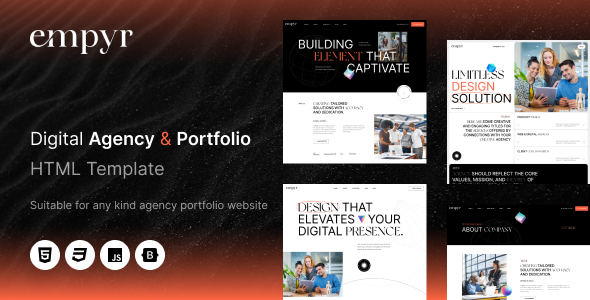
Empyr is a clean HTML template for digital agencies and portfolios, offering 6+ homepages and 22+ total pages built on Bootstrap. It's a solid starting point for agencies and freelancers needing quick project launches.
Empyr: A Foundation for Digital Agency Websites
When you're looking for a quick start on a new client project, especially for a digital agency or a freelancer's portfolio, an HTML template like Empyr can be a real time-saver. This isn't a WordPress theme or a full CMS, but a static HTML kit that provides the frontend structure and styling. It’s built on Bootstrap, which means a familiar framework for most frontend developers, making it relatively straightforward to navigate.
The main problem it solves is getting past the blank canvas stage. Instead of building common layouts from scratch, you get pre-designed sections for services, team, contact, and, importantly, a solid portfolio display. This can shave off significant initial development hours, letting you focus on content and any backend integration needed.
Who Empyr Serves and Who Should Look Elsewhere
Empyr is primarily for digital agencies, web developers, and freelancers who need to launch a professional-looking website quickly without investing heavily in custom design from the ground up. If you're an agency needing fast turnarounds for smaller clients or a freelancer wanting a strong online presence to showcase your work, this digital agency HTML template provides a robust starting point.
However, this is not for everyone. If your project requires deep custom backend logic, complex interactive applications, or a unique design system that deviates heavily from Bootstrap's conventions, you'll find yourself fighting the template more than using it. It's also not ideal for non-technical users who expect a drag-and-drop CMS experience out of the box, as it requires comfort with HTML, CSS, and JavaScript to modify.
Layouts, Pages, and Components for Agency Portfolios
The template comes with over 22 total pages, including more than 6 unique homepage variations. This variety is useful for quickly picking a starting point that aligns with a client's brand or specific service offerings. You get the standard pages like 'About Us', 'Services', 'Contact', and a 'Portfolio' section, which is critical for any creative business.
From a practical standpoint, having these core pages pre-built saves a lot of time. When we tested the kit on a demo site, customizing the content on these pages was straightforward, leveraging the existing semantic structure. The portfolio layouts are clean, focusing on presenting work clearly, which is essential for conversion-ready funnels in the creative industry.
Code Quality and Developer Experience
Empyr is built on the Bootstrap framework, which means a familiar and well-documented foundation for most developers. The description mentions "clean and commented code" and "W3C Validated HTML5 / CSS3," which are good indicators of a maintainable codebase. In our experience with similar frameworks, this generally translates to lower maintenance costs and fewer browser compatibility headaches down the line for a business owner.
The inclusion of HTML, CSS, and JS files means you have direct access to everything. For a developer, this is crucial for making deeper customizations. While the vendor claims "24/7 Professional Support," our experience with templates at this price point suggests that actual support quality can vary, so be prepared to handle most common modifications yourself.
Responsiveness and Technical SEO Readiness
The template is described as "100% Responsive Layout" and "Touch-Friendly," which are standard expectations for any modern web project. Being built on Bootstrap means it inherently handles different screen sizes well, providing a consistent user experience across desktops, tablets, and smartphones. This is a practical benefit for any business owner, ensuring their site reaches a wider audience effectively.
For SEO readiness, the template includes "SEO on-page optimized" features and "W3C Validated Code." This implies a clean semantic structure for search engines, which helps with indexing and understanding content. While no template guarantees top rankings, a well-structured HTML foundation is a solid start for improving visibility and potential Core Web Vitals scores, contributing to better organic traffic over time.
Final Thoughts on Empyr for Agency Projects
Empyr offers a solid, no-frills foundation for anyone needing a digital agency HTML template or a portfolio website template for freelancers. It delivers on its promise of providing a quick, structured start, leveraging the widely adopted Bootstrap framework. While it's not a magical solution for complex web applications, it genuinely solves the workflow problem of getting a professional-looking static site up and running efficiently.
For agencies and freelancers who regularly build client sites, having a reliable responsive agency website starter kit like this in your toolkit can save countless hours on initial setup and basic styling. It allows you to focus your efforts on content, client-specific features, and marketing, making it a smart investment for its sheer time-saving potential.
FAQ
Can I easily change the colors and fonts?Yes, since it's built on Bootstrap, you can typically override colors and fonts by modifying the CSS variables or custom stylesheets. This process requires basic CSS knowledge.
Is it easy to integrate Empyr with a Content Management System (CMS)?Empyr is a static HTML template, so it doesn't come with CMS integration out of the box. You would need to manually convert the HTML pages into a CMS theme (like WordPress, Craft CMS, or another platform) which requires development work.
How does Empyr perform on mobile devices?Being built on Bootstrap, Empyr is inherently responsive and designed to adapt well to various screen sizes. This ensures a consistent and functional experience across desktops, tablets, and mobile phones.
What's the process for customizing the layouts beyond basic content changes?Customizing layouts involves editing the HTML structure and CSS. If you need to rearrange sections or add new complex components, you'll be working directly with the code, which is standard for an HTML template.