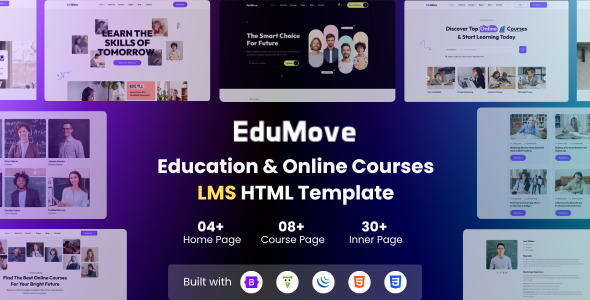
EduMove is an HTML template for online education platforms. It's best for individuals or agencies building educational websites who need a solid starting point for courses, instructors, and general school sites.
EduMove: An HTML Template for Building Online Education Websites
This is an HTML template specifically designed for learning management systems and e-learning platforms. Think schools, training centers, or online course providers. It provides a pre-built structure for displaying courses, instructor profiles, and general educational content. If you're starting an online education venture and need a foundational design that handles these specific needs, this template can save you time on the initial setup.
The template is built on Bootstrap, which is a standard framework for responsive web development. This means the layouts are designed to adapt reasonably well to different screen sizes, from desktops to phones. It includes a good number of inner pages, 31 to be exact, which gives you plenty of options for things like course details, instructor bios, and various informational pages you'd typically find on an educational site.
Who Needs This Education Website Template and Who Should Look Elsewhere
This template is a good fit for freelancers or small agencies building websites for clients in the education sector who need a fast turnaround. If your client is a language school, a coding bootcamp, or a private tutor, the included course and instructor layouts will be directly applicable. It’s also suitable if you're building a personal portfolio site for an educator.
However, if you're planning a highly custom learning management system with complex backend logic, user progress tracking, or intricate quiz functionalities, this HTML template alone won't be enough. It’s a frontend design kit. You’ll still need to integrate it with a backend system or CMS to handle the dynamic aspects of a full LMS. It’s not for developers who want to build every pixel from scratch or those who need a WordPress or other CMS theme out of the box.
Design and Visual Approach for Educational Content
The design leans towards a clean and straightforward aesthetic, which is generally a good approach for educational content. It avoids overly flashy elements that could distract from the learning material. The use of Google Fonts is standard, and the template includes options for typography that should work well for displaying text-heavy course descriptions or academic information.
When we tested the kit on a demo site, the visual presentation felt appropriate for the niche. It's not groundbreakingly unique, but it's functional and presents educational information in an organized manner. The focus is on clarity and readability, which is crucial for an online learning environment.
Layouts, Pages, and Components for Education Sites
EduMove offers four distinct home page designs, giving you a few different starting points for your project. Beyond that, the 31 inner pages cover most common requirements for an educational website. This includes dedicated pages for courses, instructors, blog posts, and other essential sections.
- Multiple Home Pages: Provides a few different visual starting points for your site's main landing page.
- 31 Inner Pages: Offers pre-designed templates for common sections like course details, instructor profiles, and blog posts, saving significant design time.
- Reusable Layouts: The structure is designed to be flexible, allowing you to adapt existing sections for different purposes if needed.
eCommerce or Business-Related Features for Online Courses
While this template is primarily for educational content, it does include pages that can support selling courses. It's not a full eCommerce solution like WooCommerce, but it provides the necessary frontend structure for presenting course offerings and instructor details that can lead to a sale. If you're selling access to courses, the structure is there to display what you offer.
For actual transaction processing, you would need to integrate this with a payment gateway and a backend system. The template provides the visual presentation, not the backend sales engine. This is common for many HTML templates; they focus on the user-facing design.
Code Quality and Developer Experience
The template states it's built with clean, commented, and developer-friendly HTML5 and CSS3 code. This is important because it means when you or another developer needs to make changes, the code should be easier to navigate and modify. Well-commented code is a standard practice for maintainable projects.
The use of Bootstrap 5 is also a positive. It's a widely adopted framework, so most developers are familiar with its structure. This familiarity generally leads to a smoother customization process and fewer surprises when working with the template's files. The mention of W3C validation is also a good sign for code standards, which can contribute to better accessibility and fewer browser quirks.
Responsiveness and Compatibility
The template is built to be fully responsive, meaning it should adapt to various screen sizes. It's tested on real devices, which is a good indicator that the developers have put effort into ensuring it looks and functions correctly on phones, tablets, and desktops. Cross-browser compatibility is also listed, which is a standard requirement for web templates to ensure a consistent experience across different browsers like Chrome, Firefox, and Safari.
In our experience with similar frameworks, Bootstrap's responsive grid system is generally reliable. The key is how well the custom CSS is implemented on top of it. This template seems to follow standard practices for mobile-first design, which is good for user experience and performance on smaller devices.
SEO Readiness for Educational Websites
The template emphasizes clean HTML5 and valid code, which are foundational for good SEO. A clean semantic structure helps search engines understand the content on your pages more effectively. While the template itself doesn't guarantee high rankings, it provides a solid technical base for SEO efforts. This means that when you add your content, search engines have a better chance of indexing it correctly.
It's important to remember that SEO readiness in a template means the technical structure is sound. You'll still need to implement proper on-page SEO strategies, including relevant keywords and quality content, to achieve good search engine performance.
A Practical Foundation for Your E-Learning Project
EduMove offers a sensible starting point for anyone needing to build an online education website without starting from scratch. It provides a good set of pre-designed pages and layouts that cover the essential elements of an e-learning platform. While it's an HTML template and requires further development for full functionality, it significantly reduces the initial design and structural work, allowing you to focus on content and unique features. For agencies or individuals looking to launch educational sites efficiently, this template is a worthwhile consideration.
FAQ
Is this template suitable for building a full-fledged Learning Management System (LMS)?This is an HTML template, meaning it provides the frontend design. You will need to integrate it with a backend system or CMS to create a fully functional LMS with features like user accounts, course progress tracking, and payment processing.
How easy is it to customize the colors and fonts?The template is built on Bootstrap and uses standard CSS. Customizing colors and fonts should be straightforward for anyone familiar with CSS, especially since the template mentions clean and developer-friendly code.
Are images included with the template?No, the documentation states that images are not included in the downloadable package. You will need to source your own images for the website.
What level of technical skill is required to use this template?A basic understanding of HTML and CSS is required for customization. Familiarity with the Bootstrap framework will also be beneficial for making significant changes to the layout.