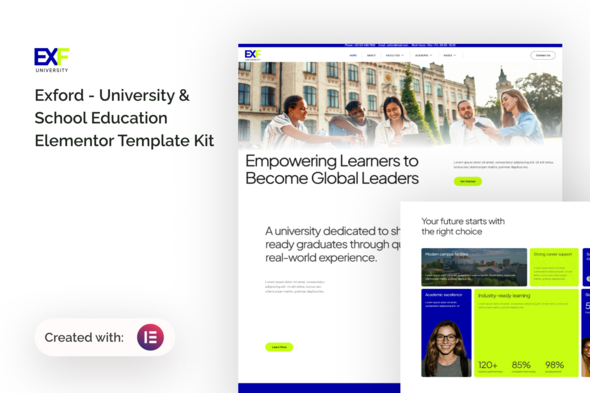
The Educate Elementor Template Kit offers a collection of pre-designed pages and global styles for building online learning platforms, primarily useful for agencies or freelancers needing to quickly launch education-focused WordPress sites.
What Problem Does This Educate Elementor Template Kit Solve for E-learning Sites?
This kit addresses the initial design and setup time for common e-learning website elements. Instead of building course listings, instructor profiles, and detail pages from scratch, you get a solid starting point. For anyone needing to quickly deploy an Elementor template kit for online schools, this shaves off significant hours in the design phase.
It's a smart investment if your goal is rapid deployment for clients in the education sector. It allows you to focus more on content and less on the initial layout grunt work, which directly translates to faster project turnaround and potentially lower costs for the client.
Evaluating the Technical Standards and Core Features of Educate
From a technical standpoint, the kit follows standard Elementor practices. It relies on Elementor Pro's templating features for dynamic content, which is expected for an Elementor-based product. The included MetForm integration for forms is a practical choice, as it's a common Elementor add-on.
The kit is built with the "Hello Elementor" theme in mind, which is a lightweight base, helping with overall site performance. In our experience with similar frameworks, this means less theme-related bloat, allowing Elementor and its add-ons to dictate the majority of the page structure and styling. This approach generally leads to better Core Web Vitals compared to heavier, multi-purpose themes.
- CSS Organization: The kit leverages Elementor's global styling, which is crucial for consistency. Changing primary colors or fonts means updating them in one place, simplifying maintenance and ensuring a cohesive brand look across the site for the business owner.
- Semantic Structure: The layouts generally use appropriate HTML tags for headings and content areas. This is good for search engine optimization and basic accessibility, making the site easier for search engines to understand and for assistive technologies to interpret.
- Dynamic Content Handling: The inclusion of templates for course lists and instructor profiles suggests it's designed to work with custom post types. This is essential for a functional e-learning site, allowing for easy content updates by a non-technical user without touching page layouts.
- Mobile Adaptation: The layouts adapt reasonably well to smaller screens. The mobile menu functions as expected, providing a standard collapsible navigation, which is a basic but critical user experience element for visitors on phones and tablets.
Strengths and Standout Features for Building Online Course Websites
What impresses most is the sheer number of pre-built pages focused on the e-learning niche. Having dedicated layouts for course detail, instructor profiles, and categories means less custom design work upfront. This makes it a strong contender for someone looking to build an e-learning website with Elementor quickly, especially if the project has a tight deadline.
The global styling approach for colors and fonts is a significant time-saver, a feature that many Elementor kits get right. It means you can establish a brand identity across all pages without tedious individual element adjustments. This is a practical benefit that directly reduces ongoing design update costs.
Who Should Use This Elementor Template Kit (And Who Should Not)
This Educate kit is for web developers, agencies, and freelancers who frequently build WordPress sites for educational institutions, online coaches, or course creators using Elementor. It’s particularly useful for projects where a quick launch is paramount and a visually appealing, functional site is needed without extensive custom coding.
It is not for those needing deep custom backend logic beyond what Elementor and standard WordPress plugins offer, nor for clients demanding a highly unique, bespoke design that deviates significantly from common e-learning layouts.
Where the Educate Template Kit Feels Standard
While functional, the design aesthetic of the Educate Elementor Template Kit feels quite standard for the e-learning niche. It's clean and legible, but it doesn't break new ground in terms of visual innovation. The overall look is professional but also somewhat generic, which can be a double-edged sword: easy to adapt but not particularly memorable without significant customization.
The reliance on ElementsKit Lite and MetForm means you're tied into specific third-party add-ons. While common, it adds to the plugin footprint, which can sometimes impact performance or introduce compatibility issues down the line, a trade-off inherent with many Elementor-based solutions.
Final Thoughts: Is it worth it?
For its intended purpose—providing a solid, functional base for an e-learning platform with Elementor—this kit delivers. It effectively solves the problem of starting from a blank slate, offering a practical way to save development time on initial page layouts and styling. If you're an agency or freelancer regularly tackling education-focused projects, investing in this kit is a logical step to streamline your workflow and deliver projects more efficiently.
FAQ
Does this kit support custom post types for courses and instructors?
Yes, the templates are designed to work with Elementor Pro's dynamic content features, allowing you to display information from custom post types for courses and instructors.
Will this Elementor course website template slow down my WordPress site?
The kit itself is a collection of Elementor templates, not a heavy theme. Performance largely depends on your hosting, other plugins, and how you optimize images and assets within Elementor.
Can I easily change the overall branding colors and fonts?
Yes, the kit utilizes Elementor's global styling features, allowing you to update primary colors and fonts from a central location to maintain consistent branding.
Is this kit compatible with other WordPress themes?
While it's optimized for the "Hello Elementor" theme, Elementor template kits generally work with most Elementor-compatible themes, though minor styling conflicts could occur with very opinionated themes.